Starlink Gen 3 Router Mount
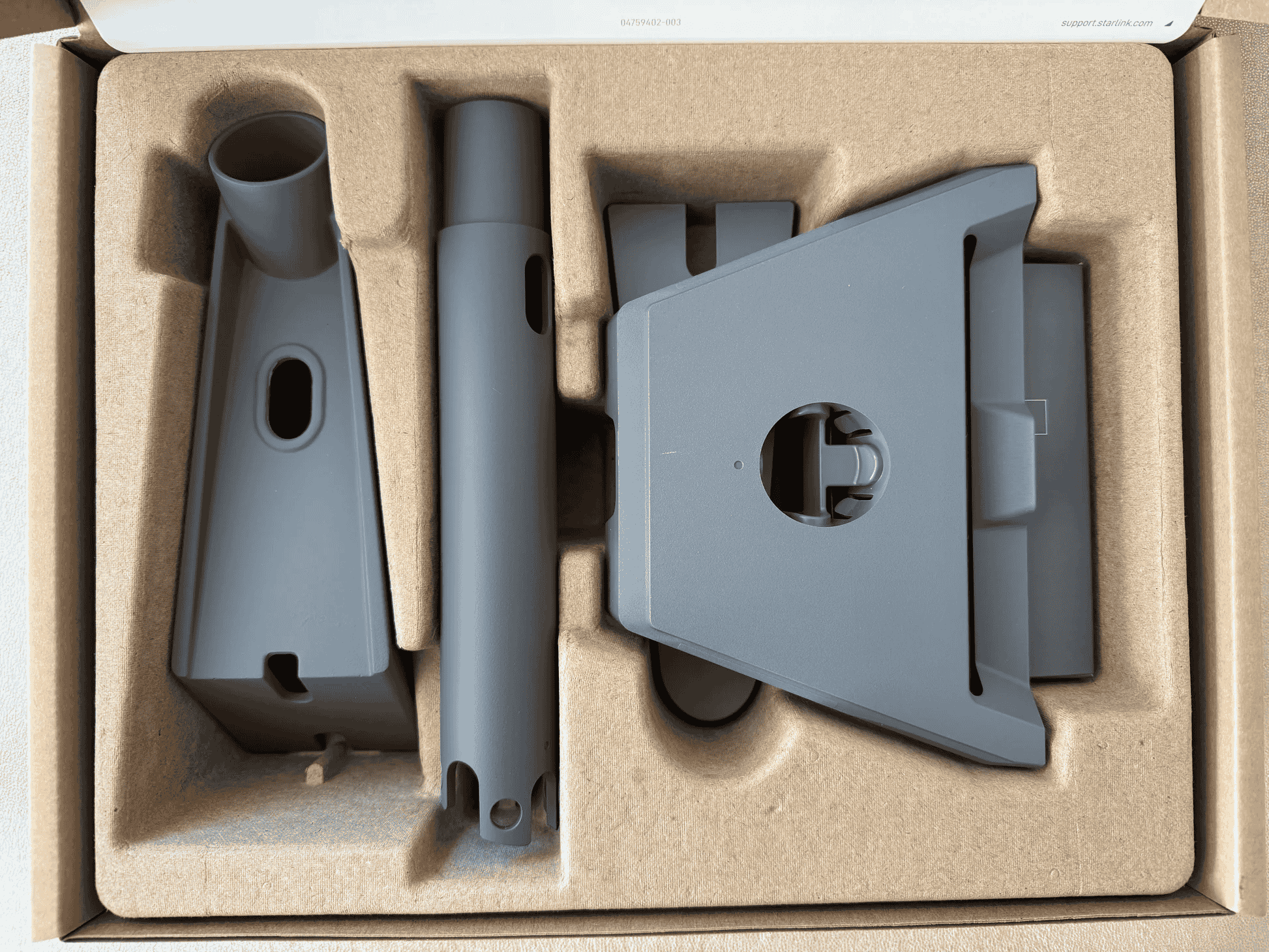
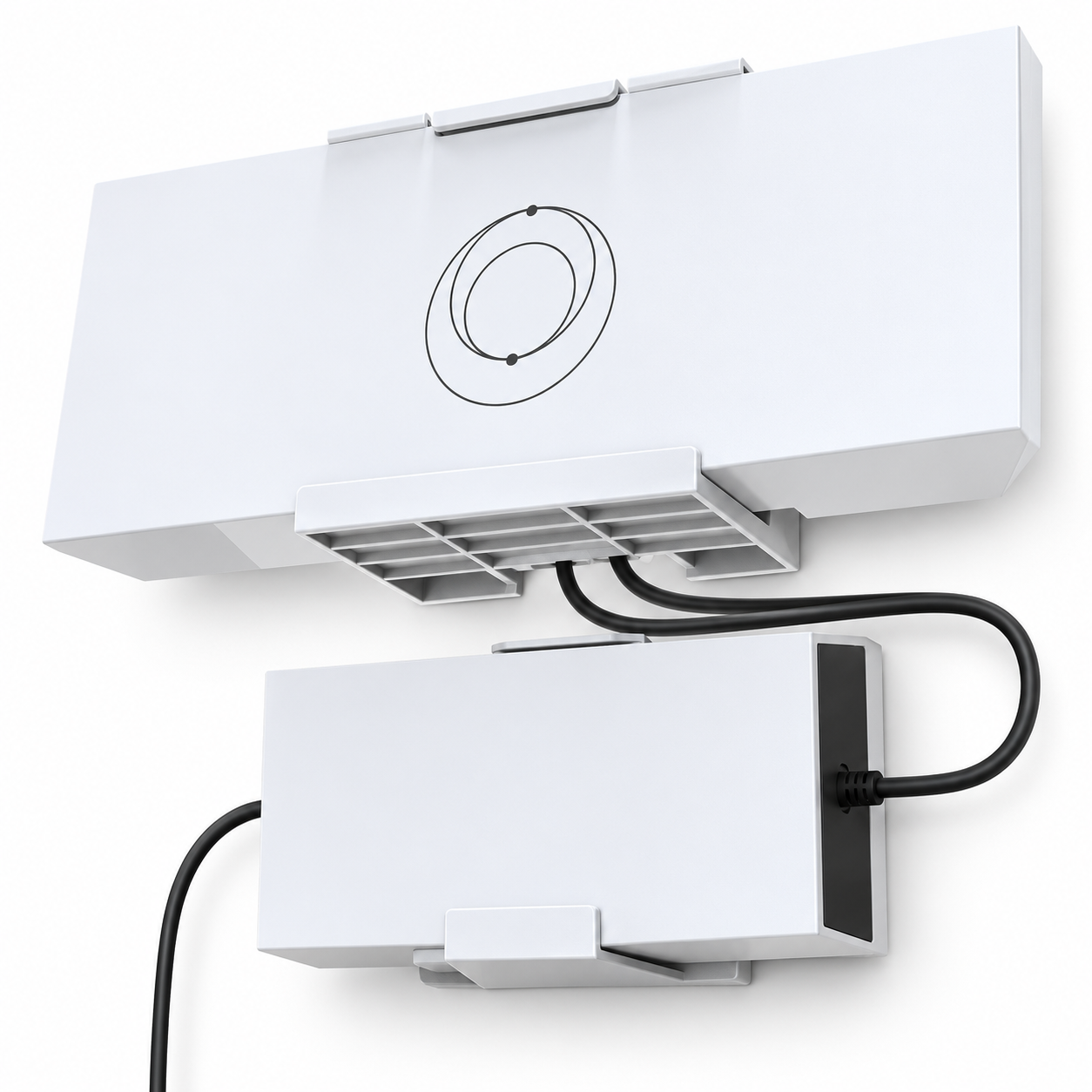
Starlink Gen 3 Router Mount The Starlink Gen 3 Router Mount is an official mounting accessory designed specifically for the Starlink Gen 3 Router. It allows the router to be mounted directly to a wall or another suitable surface instead...
Delivery: Nairobi same-day to 1 day; nationwide 1–5 business days.
Warranty: Manufacturer warranty where applicable.
Description
Starlink Gen 3 Router Mount
The Starlink Gen 3 Router Mount is an official mounting accessory designed specifically for the Starlink Gen 3 Router. It allows the router to be mounted directly to a wall or another suitable surface instead of occupying desk or shelf space.
Starlink positions the mount for home or office use where desk space is limited, as well as mobility applications where efficient use of available space is important. Once installed, the Gen 3 Router snaps into the mount, while the integrated cable-retention arrangement helps reduce the risk of connected cables being accidentally pulled out.
For customers looking to buy a Starlink Gen 3 Router Mount in Kenya, Tawa can be used to check current availability, package details and the latest selling price.
Key Features of Starlink Gen 3 Router Mount
-
Official mount designed for the Starlink Gen 3 Router
-
Mounts the router directly to a wall or suitable surface
-
Router snaps into the installed mounting bracket
-
Designed for home and office installations where desk space is limited
-
Also specified by Starlink for space-efficient mobility applications
-
Provides cable retention to help prevent accidental cable disconnection
-
Dedicated opening for routing Starlink and power cables
-
Includes mounting screws and drywall anchors
-
Compact purpose-built design
-
No electronic or powered components
-
Does not alter the technical performance of the Gen 3 Router
Designed Specifically for the Starlink Gen 3 Router
The most important compatibility detail is that this accessory is designed for the Gen 3 Router.
Starlink officially lists its compatibility simply as:
Compatibility: Gen 3 Router
This means buyers should confirm which Starlink router generation they own before ordering. The mount should not be treated as a universal router bracket, and compatibility with older or different Starlink router models should not be assumed.
Because the mount has been shaped around the Gen 3 Router, the router fits directly into the bracket and clicks into place after the mount and cabling have been installed.
Wall-Mounting Your Gen 3 Router
The main purpose of the Starlink Gen 3 Router Mount is to provide a dedicated wall-mounted installation position.
This is particularly useful where you do not want the router sitting loosely on:
-
A desk
-
A shelf
-
A cabinet
-
A worktop
-
Other furniture
Starlink specifically identifies homes and offices without sufficient desk space as intended use cases.
A fixed wall-mounted position can also help create a cleaner physical installation by giving the router and its cables a defined location.
The mount itself does not improve Starlink speed or increase Wi-Fi range. Its function is physical mounting, organization and cable retention.
Cable Routing and Retention
The Gen 3 Router Mount includes an opening through which the power cable and Starlink cable are routed before being connected to the router.
According to Starlink's installation instructions, the cables are passed through the mounting bracket, connected to the router, and the router is then pressed into the mount until it clicks into position.
Starlink also states that the mount provides cable retention, helping ensure that cables are not accidentally pulled out once the router has been mounted.
This is an important practical benefit in installations where loose cables could otherwise be disturbed.
Cable retention should not be confused with cable protection against damage. Installers should still avoid:
-
Sharp bends
-
Excessive pulling
-
Crushing cables
-
Pinching cables behind furniture
-
Unnecessary tension on connectors
Starlink Gen 3 Router Mount Dimensions
Starlink publishes the following dimensions for the Router Mount:
| Specification | Verified Measurement |
|---|---|
| Width | 298.6 mm / 11.76 in |
| Height | 132.5 mm / 5.2 in |
| Depth | 66 mm / 2.60 in |
These are the dimensions of the mounting accessory documented by Starlink.
The dimensions are useful when checking whether sufficient installation space is available around the intended mounting position.
Package Dimensions and Weight
Starlink also provides official packaging specifications for the Router Mount.
| Specification | Verified Value |
|---|---|
| Package dimensions | 250 × 165 × 85 mm |
| Package dimensions in inches | 9.8 × 6.5 × 3.3 in |
| Package weight | 0.34 kg / 0.75 lb |
These values refer to the packaged Router Mount accessory rather than the Gen 3 Router itself.
What Is Included?
According to Starlink's official accessory guide, the Gen 3 Router Mount package includes:
-
1 × Router Mount
-
2 × screws
-
2 × drywall anchors
The Gen 3 Router itself is not listed as part of the Router Mount package.
Customers should confirm the exact package contents before ordering, especially when buying through third-party resellers.
Check Tawa for current stock details and the exact package being offered in Kenya.
Recommended Installation Tools
Starlink lists the following recommended tools for installation:
-
Drill or impact driver
-
Marker
-
Level
-
#2 Phillips screwdriver
-
Appropriate drill bit
The correct drill-bit size depends on whether the supplied wall anchors are being used.
Installation Without Wall Anchors
Starlink specifies:
4 mm / 5/32-inch drill bit
Installation With Wall Anchors
Starlink specifies:
7 mm / 9/32-inch drill bit
These drill sizes are taken directly from Starlink's installation documentation.
The correct fixing method still depends on the mounting surface. The supplied drywall anchors should not automatically be assumed to be suitable for concrete, masonry, timber or every other wall material.
How the Starlink Gen 3 Router Mount Is Installed
Starlink's official installation procedure consists of four main stages.
1. Mark and Drill the Mounting Holes
Position the Router Mount against the selected surface and use it as a guide to mark the fixing points.
Drill the holes using the appropriate drill bit depending on whether wall anchors are being used.
2. Secure the Mount
Fasten the mounting bracket to the surface using the supplied screws.
If the installation uses the supplied drywall anchors, install them according to the Starlink instructions before securing the mount.
3. Route and Connect the Cables
Pass the power cable and Starlink cable through the opening in the Router Mount.
Connect the cables to the Gen 3 Router.
4. Snap the Router Into the Mount
Place the bottom edge of the Gen 3 Router into the mount.
Press the router into the mounting bracket until it clicks into position.
These steps follow Starlink's official Gen 3 Router Mount installation guidance.
Space-Saving Installation
Starlink specifically describes the Router Mount as ideal when desk space is unavailable.
Instead of placing the router on furniture, the accessory provides a dedicated mounting point for the Gen 3 Router.
This makes it particularly relevant for buyers who want:
-
A wall-mounted router installation
-
Less equipment sitting on desks or shelves
-
A fixed router position
-
Better physical cable organization
-
A purpose-built mounting solution rather than an improvised bracket
The exact installation position should still be selected carefully.
The mount does not itself guarantee better Wi-Fi performance because wireless performance depends on factors such as router placement, obstacles, building layout and interference.
Does the Starlink Gen 3 Router Mount Improve Internet Speed?
No manufacturer documentation indicates that the Router Mount increases Starlink internet speed.
The mount is a mechanical accessory, not an active networking device.
It does not provide:
-
Additional Wi-Fi radios
-
Signal amplification
-
Ethernet switching
-
Internet-speed enhancement
-
Additional router processing
-
Additional network ports
Its purpose is to securely mount the compatible router and manage the connected cables.
If a customer is experiencing Wi-Fi coverage problems, changing the mounting position may sometimes affect wireless conditions, but the Router Mount itself is not a Wi-Fi booster or extender.
Best Uses for Starlink Gen 3 Router Mount
The mount is best suited to installations where the user already has a compatible Starlink Gen 3 Router and wants a dedicated mounting arrangement.
Home Installations
Starlink officially identifies residential use as one of the applications for the accessory.
The mount can be useful where the router would otherwise occupy a desk, shelf or other surface.
Office Installations
Starlink also specifically identifies office environments.
The wall-mounted arrangement can help keep the router in a fixed position and reduce unnecessary use of workspace.
Space-Constrained Installations
The mount is especially useful where available desk or shelf space is limited.
Mobility Applications
Starlink's accessory documentation also states that the mount is suitable for mobility applications where space efficiency is paramount.
The correct mounting method should still be selected according to the actual surface and installation environment.
Who Should Buy the Starlink Gen 3 Router Mount?
The Starlink Gen 3 Router Mount is primarily intended for people who:
-
Already own a compatible Gen 3 Router
-
Want to mount their router to a wall
-
Need to free up desk or shelf space
-
Want a purpose-built Starlink mounting accessory
-
Want integrated cable retention
-
Prefer a fixed router installation
-
Need an installation suited to limited available space
It may not be necessary if you are satisfied with placing the router on an existing surface and do not require a mounted installation.
It is also not the correct product if you are looking for a Starlink dish mount, pipe adapter, roof mount or other antenna mounting accessory.
Professional Starlink and Network Installations
For a simple wall installation, the Router Mount itself is relatively straightforward to install when used on an appropriate surface.
Larger business installations may involve additional work such as network cabling, Ethernet distribution, access points, network switches and structured network design.
Businesses requiring a broader Starlink or network deployment can consult OrbitLink Solutions for professional installation and networking services.
The Router Mount itself can still be purchased separately through Tawa where available.
Starlink Gen 3 Router Mount Price in Kenya
The Starlink Gen 3 Router Mount price in Kenya is not a fixed manufacturer specification.
Local selling prices can change because of factors such as:
-
Stock availability
-
Exchange rates
-
Import and shipping costs
-
Supplier pricing
-
Package contents
-
Local availability
For this reason, a Kenya price should not be stated unless it has been confirmed from the seller's current listing.
Visit Tawa to check the latest Starlink Gen 3 Router Mount price in Kenya and current stock availability.
What to Check Before Buying
Before ordering, confirm the following.
Router Compatibility
Confirm that your router is the Starlink Gen 3 Router.
Compatibility with other router generations should not be assumed.
Installation Surface
Determine whether the mount will be installed on drywall or another material.
The supplied drywall anchors may not be appropriate for every wall type.
Available Space
Check that there is enough room for the approximately:
298.6 × 132.5 × 66 mm mount dimensions
as well as sufficient clearance for the router and connected cables.
Package Contents
Starlink's documented package includes:
-
Router Mount
-
Two screws
-
Two drywall anchors
Confirm the actual seller package before ordering.
Current Price
Because prices can change, confirm the current selling price directly from Tawa.
Buy Starlink Gen 3 Router Mount in Kenya
The Starlink Gen 3 Router Mount is a straightforward official accessory for customers who want to securely mount a compatible Gen 3 Router to a wall or suitable surface.
Its strongest practical benefits are its purpose-built Gen 3 Router compatibility, snap-in mounting system, integrated cable routing and cable retention. It is particularly useful where desk space is limited or where a fixed router position is preferred.
Before ordering, confirm that you have the Starlink Gen 3 Router, check that your mounting surface is suitable, and verify the exact package contents and current selling price.
To buy the Starlink Gen 3 Router Mount in Kenya, visit Tawa to check current pricing, availability and related Starlink accessories.