Starlink Ethernet Adapter
Starlink Ethernet Adapter The Starlink Ethernet Adapter is an official Starlink accessory designed to add a wired Ethernet connection to compatible Starlink systems using the Gen 2 Router. It is particularly relevant to the Starlink Standard Actuated setup because the...
Delivery: Nairobi same-day to 1 day; nationwide 1–5 business days.
Warranty: Manufacturer warranty where applicable.
Description
Starlink Ethernet Adapter
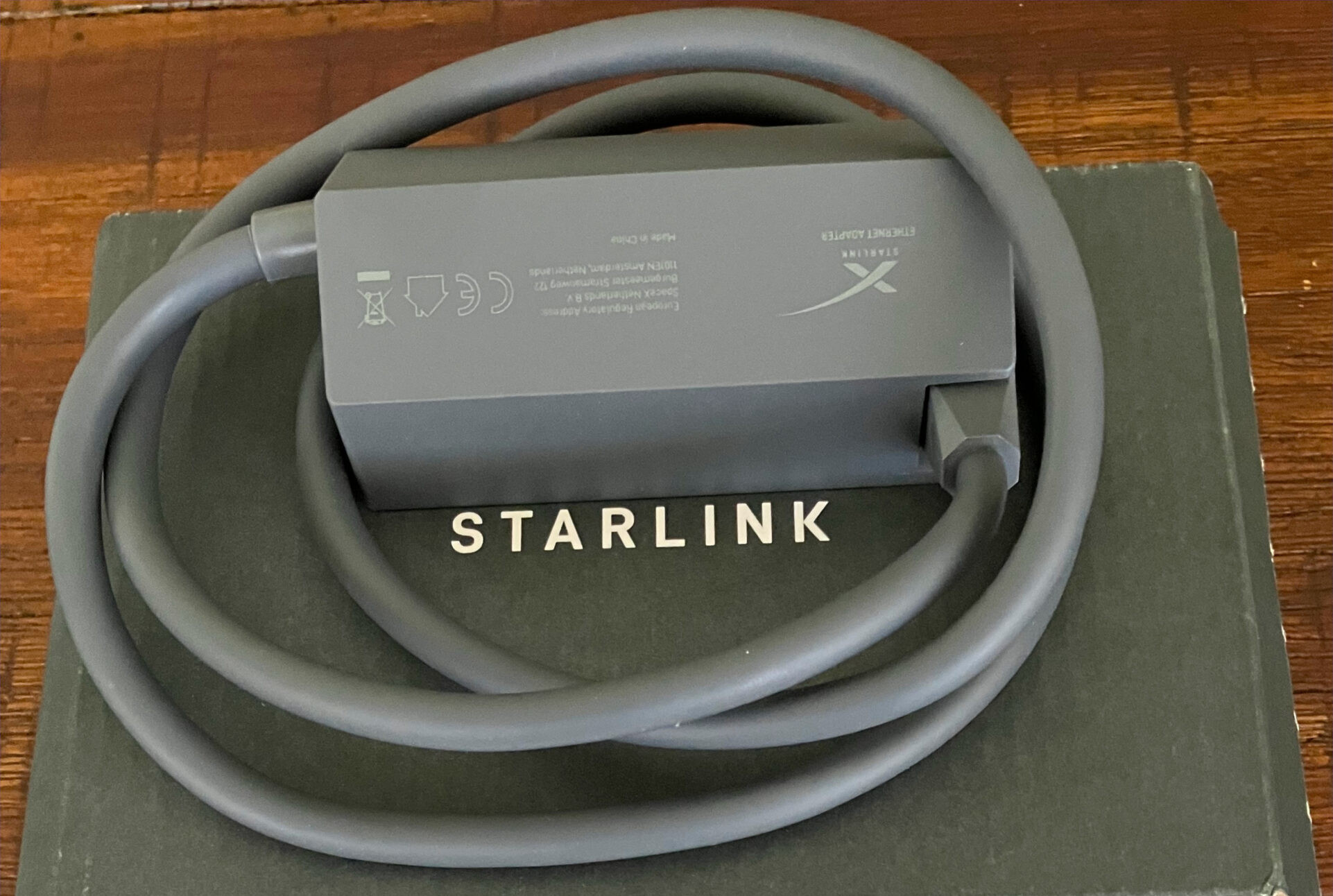
The Starlink Ethernet Adapter is an official Starlink accessory designed to add a wired Ethernet connection to compatible Starlink systems using the Gen 2 Router. It is particularly relevant to the Starlink Standard Actuated setup because the Gen 2 Router does not include a built-in Ethernet LAN port.
The adapter allows you to connect compatible wired networking equipment to your Starlink system, including a computer, Ethernet switch, access point or third-party router. Starlink officially specifies support for wired connections of up to 1 Gbps.
For homes, offices, businesses and professional installations that require Ethernet rather than Wi-Fi-only connectivity, the Starlink Ethernet Adapter provides a straightforward way to connect the Gen 2 Starlink network to conventional networking equipment.
Key Features of Starlink Ethernet Adapter
-
Official Starlink Ethernet accessory
-
Designed for compatible Starlink systems using the Gen 2 Router
-
Required for Ethernet connectivity on Standard Actuated Starlink
-
Supports wired connection speeds of up to 1 Gbps
-
Approximately 0.92 m / 3 ft long
-
Can be used to connect a network switch
-
Can be used when connecting a compatible third-party router
-
Suitable for computers and other Ethernet-enabled networking equipment
-
Compact design for installation near the Starlink router
-
No Wi-Fi capability of its own
-
Does not function as a router or Ethernet switch
Add Ethernet to a Starlink Gen 2 Router
The main purpose of the Starlink Ethernet Adapter is to provide Ethernet connectivity for the Gen 2 Router.
Starlink confirms that the Gen 2 Router supplied with the Standard Actuated system does not have built-in Ethernet ports. Users who need a wired connection therefore require the Ethernet Adapter.
Once installed, the adapter provides a connection point that can be used with standard networking equipment.
This is useful if your Starlink installation needs to connect to:
-
A desktop computer
-
A network switch
-
A third-party router
-
A wired access point
-
Business networking equipment
-
Other Ethernet-enabled devices
Up to 1 Gbps Wired Connection
Starlink officially specifies that the Ethernet Adapter supports wired connections of up to 1 Gbps.
This means the adapter can operate as part of a Gigabit Ethernet network when connected to compatible equipment.
The 1 Gbps rating is the Ethernet interface capability, not a promise that the Starlink internet service itself will deliver 1 Gbps internet speeds.
Actual Starlink internet performance depends on the service plan, network conditions, location, congestion and other operational factors.
Connect a Network Switch
The Starlink Ethernet Adapter can be used when you need to connect a network switch to a Standard Actuated Starlink system.
Starlink specifically states that Standard Actuated customers require the Ethernet Adapter to connect a network switch.
A typical installation can therefore be arranged as:
Starlink system → Gen 2 Router / Ethernet Adapter → Network Switch → Wired Devices
The switch can then provide additional Ethernet ports for equipment around the property.
This is useful for offices, schools, retail shops, homes, hospitality installations and other environments where several wired devices need network connectivity.
You can find Starlink accessories and compatible networking equipment from Tawa Kenya.
Connect a Third-Party Router
The Starlink Ethernet Adapter is also important for Gen 2 installations where a third-party router will be used.
Starlink's current support documentation states that the Standard Actuated system requires the Starlink Ethernet Adapter when connecting to a third-party router.
The Ethernet cable from the adapter can be connected to the WAN port of the third-party router.
Depending on the intended network setup, Starlink's Bypass Mode may also be used so that the third-party router manages the network.
This type of setup is useful when more advanced networking features are required, such as:
-
VLANs
-
Advanced firewall policies
-
Business Wi-Fi systems
-
Multiple access points
-
Guest networks
-
Bandwidth management
-
Captive portals
-
Centralized network management
For more complex Starlink and business networking installations, OrbitLink Solutions can assist with professional installation, structured networking, switches, routers and access-point deployment.
Starlink Ethernet Adapter Compatibility
Compatibility should be checked carefully before buying.
According to Starlink's current documentation, the Ethernet Adapter is relevant primarily to the Gen 2 Router / Standard Actuated system.
Starlink specifically identifies the Standard Actuated kit as requiring the Ethernet Adapter for Ethernet connectivity.
Compatible Use
The adapter is designed for Starlink installations using the:
-
Gen 2 Router
-
Standard Actuated Starlink system
Starlink documentation also references use of the adapter in Gen 2 networking arrangements involving Router 3.
Not Required for Every Starlink Kit
Do not assume that every Starlink system needs this adapter.
Several newer Starlink products provide Ethernet differently.
For example:
-
Router 3 has built-in Ethernet LAN ports.
-
Current Starlink Standard systems provide Ethernet through their associated hardware without requiring this Gen 2 Ethernet Adapter.
-
Performance Gen 2 uses a power supply with built-in Ethernet.
-
Starlink Mini uses a different Ethernet connectivity arrangement.
Therefore, confirm your exact Starlink hardware before ordering.
Starlink Ethernet Adapter Specifications
| Specification | Verified Detail |
|---|---|
| Product | Starlink Ethernet Adapter |
| Purpose | Adds wired Ethernet connectivity to compatible Starlink systems |
| Supported Ethernet Speed | Up to 1 Gbps |
| Compatibility | Standard / Gen 2 Router |
| Cable Length | 0.92 m / 3 ft |
| Package Dimensions | 16.5 × 11.4 × 3.6 cm |
| Package Weight | 0.15 kg |
These specifications are based on Starlink's official accessory documentation.
Gen 2 Router Has No Built-In Ethernet Port
This distinction is one of the most important things to understand before buying.
Starlink officially confirms that the Gen 2 Router does not include built-in Ethernet ports.
The Ethernet Adapter therefore provides the wired connection required for compatible Gen 2 installations.
This is different from the newer Router 3, which includes two built-in LAN Ethernet ports.
If your Starlink system already provides the Ethernet connectivity you require, purchasing this adapter may be unnecessary.
Starlink Ethernet Adapter vs Network Switch
The Starlink Ethernet Adapter is not a network switch.
It provides the Ethernet connection needed to connect compatible networking equipment to the Gen 2 Starlink system.
If you need several wired Ethernet ports, you can connect a separate Ethernet switch to the adapter.
For example:
Starlink Ethernet Adapter → 8-Port Switch → PCs, Access Points, TVs and Other Devices
The number of additional ports available will depend on the switch you purchase.
Starlink Ethernet Adapter vs Router
The Ethernet Adapter is also not a router.
It does not provide:
-
Wi-Fi
-
DHCP routing by itself
-
Firewall management
-
Wireless coverage
-
Mesh Wi-Fi by itself
-
Multiple Ethernet LAN ports
Its job is simply to provide the wired Ethernet interface required by compatible Starlink hardware.
Network routing continues to be handled by the Starlink router or another router used in your network configuration.
Useful for Business Starlink Installations
The Starlink Ethernet Adapter is especially useful when a Gen 2 Starlink connection must feed an existing wired business network.
Business installations commonly use equipment such as:
-
Managed network switches
-
Wireless access points
-
Desktop workstations
-
CCTV networking equipment
-
Third-party routers
-
Firewalls
-
Structured Ethernet cabling
Adding Ethernet allows compatible Starlink service to be integrated into this type of infrastructure rather than relying only on Wi-Fi from the Starlink router.
Best Uses for Starlink Ethernet Adapter
Connecting a Network Switch
Use the adapter to provide the Ethernet connection required to attach a compatible switch to Standard Actuated Starlink.
Connecting a Third-Party Router
The adapter provides the wired interface needed when using your own router with a Gen 2 Starlink system.
Connecting a Wired Computer
A computer can be connected through Ethernet where a wired network connection is preferred.
Expanding a Business Network
The adapter can form the connection between Starlink and an existing business LAN.
Connecting Additional Access Points
Where a network switch or compatible router is used, Starlink can feed wired access points installed elsewhere in a building.
Who Should Buy the Starlink Ethernet Adapter?
The Starlink Ethernet Adapter is best suited to customers who:
-
Own a compatible Gen 2 Starlink Router
-
Use a Standard Actuated Starlink system
-
Need a wired Ethernet connection
-
Want to connect a network switch
-
Want to connect a third-party router
-
Need to integrate Starlink with an existing wired network
-
Are setting up Starlink for an office or business
-
Require Ethernet connectivity for fixed network equipment
Customers with newer Starlink systems that already have suitable Ethernet connectivity may not need this adapter.
What to Check Before Buying
Before purchasing a Starlink Ethernet Adapter in Kenya, confirm exactly which Starlink system you own.
Check:
-
Your router generation
-
Whether you have a Standard Actuated kit
-
Whether your current Starlink hardware already provides Ethernet
-
Whether you need a network switch
-
Whether you intend to use a third-party router
-
The network layout you plan to build
The most important check is the router generation.
A product labelled simply as “Starlink Ethernet Adapter” should not automatically be assumed to work with every Starlink kit.
Starlink Ethernet Adapter Price in Kenya
The Starlink Ethernet Adapter price in Kenya can vary according to current stock availability, exchange rates, shipping costs and supplier availability.
A fixed price should therefore be confirmed at the time of purchase rather than assumed from an older listing.
Visit Tawa Kenya for the latest Starlink Ethernet Adapter price in Kenya, current stock status and related Starlink accessories.
Before ordering, confirm that your Starlink router is compatible with this particular adapter.
Buy Starlink Ethernet Adapter in Kenya
The Starlink Ethernet Adapter is a practical accessory for compatible Gen 2 Starlink installations that require wired Ethernet connectivity.
It supports wired connections of up to 1 Gbps and provides the connection needed to attach equipment such as a network switch, computer or third-party router to a compatible Starlink Gen 2 setup.
Its main use is with the Standard Actuated Starlink system and Gen 2 Router, where built-in Ethernet LAN ports are not available. Customers using newer Starlink hardware should check their equipment first because an Ethernet Adapter may not be required.
To buy Starlink Ethernet Adapter in Kenya, check the latest price and availability from Tawa Kenya. Confirm your Starlink generation before ordering to ensure you purchase the correct accessory for your installation.