Ubiquiti Unifi U7 Pro Max Wifi 7 Access Point
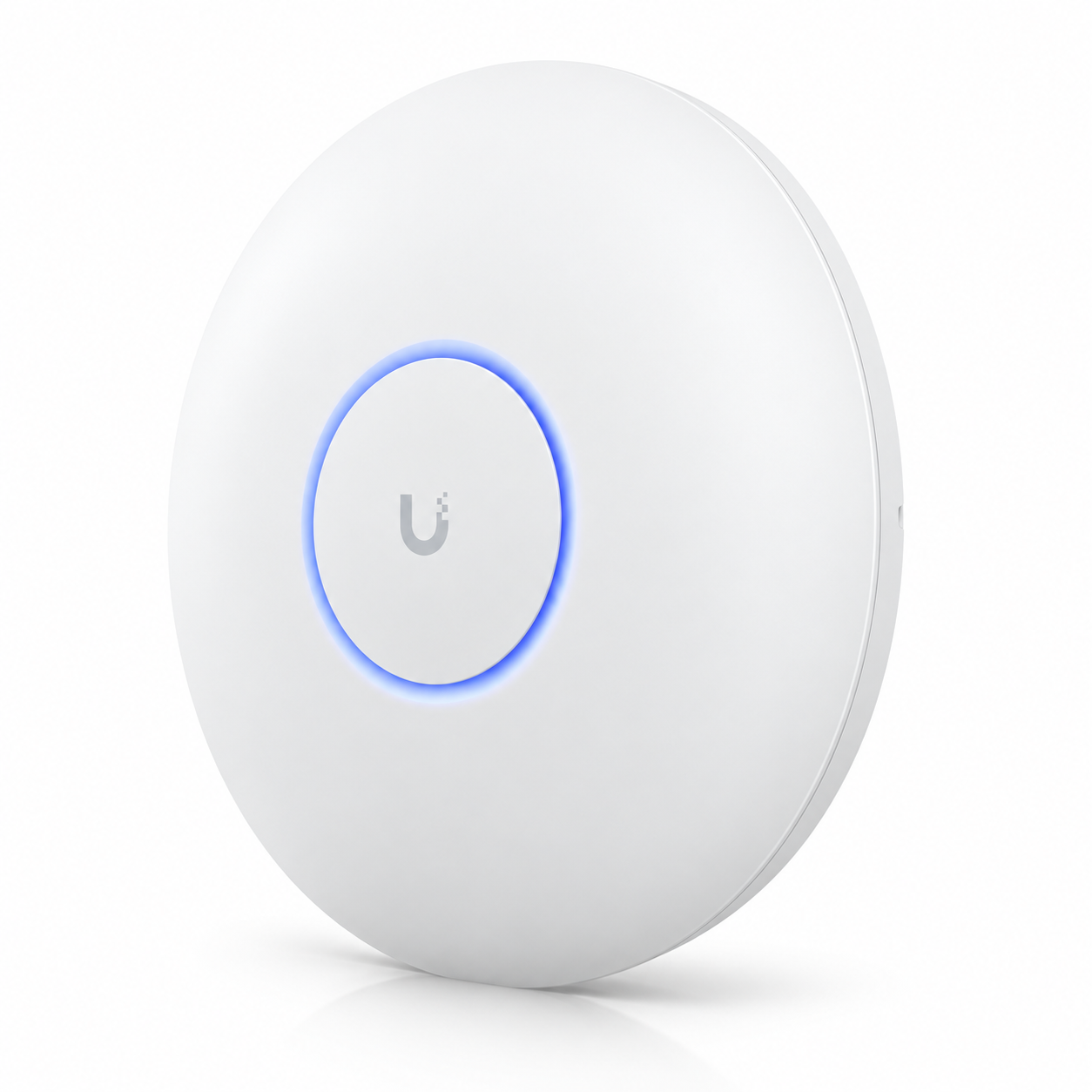
Ubiquiti UniFi U7 Pro Max WiFi 7 Access Point The Ubiquiti UniFi U7 Pro Max WiFi 7 Access Point is a high-performance indoor wireless access point designed for demanding business, institutional, hospitality and enterprise environments. It combines WiFi 7, tri-band...
Delivery: Nairobi same-day to 1 day; nationwide 1–5 business days.
Warranty: Manufacturer warranty where applicable.
Description
Ubiquiti UniFi U7 Pro Max WiFi 7 Access Point
The Ubiquiti UniFi U7 Pro Max WiFi 7 Access Point is a high-performance indoor wireless access point designed for demanding business, institutional, hospitality and enterprise environments. It combines WiFi 7, tri-band operation, eight spatial streams, a 2.5 Gigabit Ethernet uplink and a dedicated spectral scanning engine in a centrally managed UniFi platform.
It is particularly well suited to offices, hotels, schools, universities, hospitals, co-working spaces, commercial buildings and other environments where many wireless devices need reliable connectivity at the same time. Compared with simpler access points, the U7 Pro Max is built to provide more radio capacity, stronger 5 GHz performance and better visibility into wireless interference.
Ubiquiti currently rates the U7 Pro Max for a 160 m² coverage area and 500+ connected clients. These are manufacturer-rated figures rather than guaranteed real-world performance figures. Actual coverage, speed and simultaneous user experience depend on building materials, AP placement, interference, client capability, network design and available internet bandwidth. Customers looking to buy Ubiquiti UniFi U7 Pro Max WiFi 7 Access Point in Kenya can check current availability through Tawa.
Key Features of Ubiquiti UniFi U7 Pro Max WiFi 7 Access Point
-
WiFi 7 wireless access point
-
Tri-band 2.4 GHz, 5 GHz and 6 GHz operation
-
8 spatial streams
-
2 × 2 MU-MIMO on 2.4 GHz
-
4 × 4 MU-MIMO on 5 GHz
-
2 × 2 MU-MIMO on 6 GHz
-
Maximum PHY rate of up to 688 Mbps on 2.4 GHz
-
Maximum PHY rate of up to 8.6 Gbps on 5 GHz
-
Maximum PHY rate of up to 5.8 Gbps on 6 GHz
-
Up to 320 MHz channel width on 6 GHz
-
Up to 240 MHz channel width on 5 GHz with WiFi 7
-
Manufacturer-rated coverage area of 160 m²
-
Manufacturer-rated client capacity of 500+
-
Dedicated spectral scanning engine
-
Real-time spectral analysis
-
1 × 1/2.5 GbE RJ45 network interface
-
PoE+ power
-
Maximum power consumption of 25W
-
Ceiling or wall mounting
-
Pro Mount included
-
Wireless meshing
-
Band steering
-
Fast roaming support
-
Captive portal and guest network features
-
Private Pre-Shared Key support
-
Client isolation and WiFi speed limiting
-
Managed through UniFi Network
WiFi 7 Performance
The Ubiquiti UniFi U7 Pro Max supports WiFi 7, also known as IEEE 802.11be. WiFi 7 is designed to improve wireless efficiency, increase available throughput and make better use of wider channels when compatible client devices and suitable spectrum are available.
The U7 Pro Max operates across 2.4 GHz, 5 GHz and 6 GHz, allowing network administrators to distribute different client types across multiple wireless bands.
The 2.4 GHz band remains useful for compatibility and devices that do not require very high throughput. The 5 GHz band handles much of the day-to-day business WiFi traffic, while 6 GHz provides additional spectrum for compatible WiFi 6E and WiFi 7 devices.
It is important to distinguish radio specifications from real-world throughput. The manufacturer-listed speeds are maximum PHY data rates, not guaranteed internet speeds.
Eight Spatial Streams
The U7 Pro Max has eight spatial streams, distributed across its three radios.
The configuration is:
-
2 spatial streams on 2.4 GHz
-
4 spatial streams on 5 GHz
-
2 spatial streams on 6 GHz
The 4 × 4 configuration on 5 GHz is one of the important reasons to consider the U7 Pro Max for high-density installations.
Many current laptops, phones and business devices still spend much of their time on the 5 GHz band, so the additional radio resources can be useful in environments with many active clients.
Eight spatial streams do not mean that one individual client will automatically use all eight streams or receive the combined maximum throughput of all radios. Performance depends on the capabilities of the client device and the network environment.
2.4 GHz Wireless Performance
The 2.4 GHz radio uses a 2 × 2 MU-MIMO configuration.
Ubiquiti lists a maximum PHY data rate of up to 688 Mbps using supported WiFi 7 settings and up to 40 MHz channel width.
The 2.4 GHz band remains useful for older devices, IoT hardware and situations where compatibility or signal penetration matters more than maximum throughput.
In busy office environments, network administrators may choose to move capable laptops and smartphones onto 5 GHz or 6 GHz while leaving lower-bandwidth devices on 2.4 GHz.
5 GHz Wireless Performance
The 5 GHz radio uses a 4 × 4 MU-MIMO configuration.
Ubiquiti lists a maximum PHY data rate of up to 8.6 Gbps on 5 GHz under supported WiFi 7 conditions, using channel widths of up to 240 MHz.
This figure represents the radio's theoretical PHY capability rather than the speed one laptop or phone should be expected to receive.
Real-world throughput depends on factors including:
-
client radio capability
-
channel width
-
distance from the access point
-
RF interference
-
number of active users
-
uplink capacity
-
network switching
-
router performance
-
internet connection speed
The strong 5 GHz radio makes the U7 Pro Max particularly attractive for modern office, hospitality and institutional deployments.
6 GHz Wireless Performance
The U7 Pro Max also provides a 2 × 2 6 GHz radio.
Ubiquiti lists maximum PHY rates of up to 5.8 Gbps with a supported 320 MHz channel width.
The 6 GHz band provides additional spectrum that can reduce congestion for compatible devices. It is particularly relevant to newer WiFi 6E and WiFi 7 client hardware.
Not every laptop, phone or wireless device supports 6 GHz. Buyers should therefore check the client devices they intend to use if 6 GHz connectivity is one of the main reasons for purchasing the AP.
Use of 6 GHz is also subject to regulatory availability and device configuration within the country where the access point is deployed.
Dedicated Spectral Scanning Engine
One of the standout features of the U7 Pro Max is its dedicated spectral scanning engine.
Ubiquiti designed the AP to provide real-time spectral analysis so administrators can gain better visibility into RF conditions around the access point.
Wireless networks can be affected by congestion and interference from neighbouring access points and other radio devices. In a busy commercial environment, understanding those conditions is useful when planning channels and troubleshooting performance problems.
This makes the U7 Pro Max particularly relevant to installations such as:
-
hotels
-
campuses
-
office floors
-
conference centres
-
universities
-
hospitals
-
co-working spaces
-
large commercial buildings
Spectral analysis does not replace proper wireless design. Good access-point placement, sensible channel planning and appropriate transmit-power settings are still important.
Coverage Area
Ubiquiti currently lists a 160 m² coverage area for the U7 Pro Max.
This should be treated as a manufacturer reference figure rather than a guaranteed figure for every installation.
Wireless coverage can vary greatly depending on:
-
concrete walls
-
reinforced floors
-
metal structures
-
glass partitions
-
shelving
-
doors
-
furniture
-
ceiling height
-
surrounding wireless networks
-
client antenna quality
-
selected frequency band
For example, a U7 Pro Max installed in an open office may cover a larger usable area than one installed inside a building with several reinforced concrete rooms.
For larger buildings, several access points may provide a better result than trying to make one AP cover the whole site.
Professional WiFi planning, structured cabling, site surveys and enterprise network deployment can be handled through OrbitLink Solutions where a project requires more than simply purchasing the access point.
500+ Client Capacity
Ubiquiti currently lists the U7 Pro Max with a maximum client count of 500+.
This is an access-point capacity specification. It should not be interpreted as a guarantee that 500 users can simultaneously stream, download or run bandwidth-heavy applications at full speed.
Actual usable capacity depends on:
-
application types
-
available airtime
-
client capabilities
-
signal quality
-
internet bandwidth
-
channel planning
-
traffic patterns
-
network design
-
switch and gateway performance
A school with hundreds of lightly active mobile devices has very different requirements from a conference hall where hundreds of users are simultaneously uploading video.
For this reason, network design should be based on expected usage rather than the client-count figure alone.
2.5 Gigabit Ethernet Uplink
The U7 Pro Max includes one 1/2.5 GbE RJ45 port.
A 2.5 Gigabit Ethernet uplink is useful because modern high-capacity wireless access points can potentially generate more traffic than a traditional 1 GbE connection can carry under demanding conditions.
For best results in a high-performance deployment, connect the AP to a compatible 2.5 GbE network switch.
A 1 GbE connection can still be used because the port supports both 1 GbE and 2.5 GbE. However, the wired connection may become a limiting factor before the access point reaches its maximum wireless capability.
When building a new WiFi 7 network, buyers should consider the whole network path, including:
-
PoE+ switching
-
multi-gigabit switching
-
structured cabling
-
router capacity
-
firewall capacity
-
internet bandwidth
-
UniFi management
Compatible switches, Ethernet cabling and related networking hardware can be sourced from Tawa.
PoE+ Power
The Ubiquiti UniFi U7 Pro Max is powered using PoE+.
Ubiquiti lists:
-
supported voltage range: 44–57V DC
-
maximum power consumption: 25W
PoE allows the access point to receive both network data and electrical power through the Ethernet cable.
This is particularly useful for ceiling-mounted deployments because a separate AC socket is not required beside the AP.
Before installation, confirm that your PoE switch or injector provides compatible PoE+ output and sufficient available power.
Do not assume that every old PoE injector is compatible merely because it can power another Ubiquiti device. PoE standards and available wattage should be checked before connecting the U7 Pro Max.
UniFi Network Management
The U7 Pro Max is managed through UniFi Network.
Ubiquiti currently lists UniFi Network 8.2.93 or later as the application requirement for this model.
Centralized UniFi management allows network administrators to manage access points, SSIDs, radio settings, wireless clients, guest access and broader network behaviour through one interface.
Useful supported features include:
-
wireless meshing
-
band steering
-
802.11k Radio Resource Management
-
802.11r Fast Roaming
-
802.11v BSS Transition Management
-
Zero-Wait DFS
-
advanced radio management
-
WiFi schedules
-
Private Pre-Shared Keys
-
client device isolation
-
WiFi speed limiting
-
guest network isolation
This makes the U7 Pro Max suitable for deployments where administrators need more control than a basic standalone home access point provides.
Guest WiFi and Captive Portal
The U7 Pro Max supports UniFi guest and captive portal functionality.
Supported options listed by Ubiquiti include:
-
custom-branded landing pages
-
voucher authentication
-
payment-based authentication
-
external portal server integration
-
password authentication
-
guest network isolation
These capabilities can be useful for:
-
hotels
-
restaurants
-
office receptions
-
campuses
-
co-working spaces
-
conference facilities
-
customer waiting areas
A professionally designed network should still use proper VLANs, firewall policies and user isolation where business traffic and guest traffic need to be separated.
Fast Roaming
The U7 Pro Max supports 802.11k, 802.11r and 802.11v technologies that can help compatible client devices move between access points more effectively.
This is especially useful in a multi-AP deployment where users walk from one area of a property to another while remaining connected to the same WiFi network.
Examples include:
-
hotels
-
hospitals
-
campuses
-
office buildings
-
warehouses
-
large homes
-
institutions
Roaming is partly controlled by the client device, so no access point can guarantee perfect roaming behaviour for every phone, laptop or IoT device.
Correct AP placement and radio configuration remain important.
Wireless Meshing
Wireless meshing is supported by the U7 Pro Max.
Meshing can be useful where an Ethernet cable cannot easily be installed at a particular access-point location.
However, a wired Ethernet uplink is generally preferable for business installations where maximum throughput and predictable performance are priorities.
Using a wired 2.5 GbE uplink allows the U7 Pro Max to make better use of its available wireless capacity without using WiFi airtime for AP backhaul.
Physical Design and Mounting
The U7 Pro Max is designed primarily for ceiling or wall installation.
Ubiquiti currently lists the physical dimensions as approximately:
206 mm diameter × 46 mm
The access point weighs approximately 680 g.
A Pro Mount is included according to the official technical specification.
For best wireless performance, mount the access point in an open location suitable for the intended coverage area.
Avoid placing it:
-
inside metal cabinets
-
behind large televisions
-
directly beside heavy electrical equipment
-
above major metal ducting where possible
-
inside enclosed cupboards
-
in locations heavily obstructed by concrete structures
Correct placement often has a greater effect on real-world WiFi quality than simply selecting a higher-specification access point.
Best Uses for Ubiquiti UniFi U7 Pro Max WiFi 7 Access Point
The U7 Pro Max is well suited to:
-
corporate offices
-
hotels
-
schools
-
universities
-
hospitals
-
conference facilities
-
co-working spaces
-
large commercial buildings
-
modern retail premises
-
apartment common areas
-
professional home networks
-
managed business networks
-
WiFi 7 upgrades
-
high-density wireless deployments
-
networks requiring 6 GHz support
It may also fit connected-building projects where WiFi forms part of a broader smart infrastructure deployment. For smart-building and connected-infrastructure projects, Mwanga may be relevant alongside the networking hardware.
Who Should Buy Ubiquiti UniFi U7 Pro Max?
The U7 Pro Max is a good choice if you:
-
already use UniFi
-
are upgrading to WiFi 7
-
need 6 GHz support
-
expect many simultaneous clients
-
want a 4 × 4 5 GHz radio
-
want a 2.5 GbE uplink
-
need advanced UniFi management
-
want real-time spectral analysis
-
are building a professional multi-AP network
It may be more access point than necessary for a very small office or home with only a few wireless devices.
In those environments, another UniFi model may provide better value.
The U7 Pro Max makes the most sense where its higher wireless capacity, stronger 5 GHz radio and management features can actually be used.
What to Check Before Buying
Before ordering the Ubiquiti UniFi U7 Pro Max WiFi 7 Access Point, confirm:
-
your switch supports PoE+
-
sufficient PoE power is available
-
you have 2.5 GbE switching if you want multi-gigabit uplink capability
-
your network cabling can support the required Ethernet speed
-
your UniFi Network software is compatible
-
your client devices support the WiFi features you intend to use
-
6 GHz operation is appropriate for your deployment
-
your intended mounting position provides suitable coverage
-
additional APs are planned where the building requires them
-
your gateway and internet connection can support expected traffic
For larger deployments, consider performing a proper network design or site survey rather than selecting access-point quantities based only on square metres.
Ubiquiti UniFi U7 Pro Max WiFi 7 Access Point Price in Kenya
The Ubiquiti UniFi U7 Pro Max WiFi 7 Access Point price in Kenya can change depending on current stock availability, exchange rates, shipment costs and local supply conditions.
The total project cost may also depend on whether you require:
-
a PoE+ injector
-
a 2.5 GbE PoE switch
-
Ethernet cabling
-
additional access points
-
a UniFi gateway
-
mounting accessories
-
professional network installation
Do not rely on international retail pricing when determining the current Kenya selling price.
Check Tawa for the latest local price and stock availability before ordering.
Buy Ubiquiti UniFi U7 Pro Max WiFi 7 Access Point in Kenya
The Ubiquiti UniFi U7 Pro Max WiFi 7 Access Point is a strong choice for businesses and institutions that need modern high-capacity wireless networking. Its WiFi 7 support, eight spatial streams, 4 × 4 5 GHz radio, 6 GHz capability, 2.5 GbE uplink and spectral analysis features make it suitable for demanding UniFi deployments.
It is especially useful for offices, hotels, schools, campuses, hospitals, co-working spaces and other locations where many devices share the wireless network. Before buying, confirm your PoE+ power, switching speed, client compatibility, UniFi management environment and required number of access points.
To buy Ubiquiti UniFi U7 Pro Max WiFi 7 Access Point in Kenya, check the latest price, stock status and compatible accessories from Tawa. For a complete deployment, Tawa can also be used to source compatible switches, Ethernet cabling and other networking hardware required to build the installation.