Ubiquiti Networks Litebeam Ac Gen2 Airmax Ac Cpe
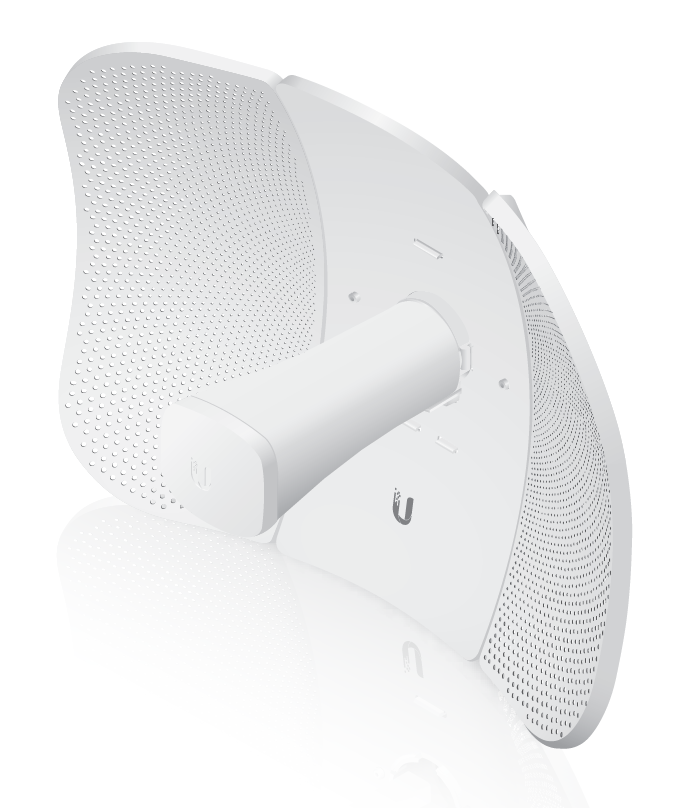
Looking for the Ubiquiti LiteBeam AC Gen2 price in Kenya? The Ubiquiti Networks LiteBeam AC Gen2 airMAX AC CPE is a high-performance outdoor wireless device designed for point-to-point and point-to-multipoint networking applications. It is suitable for internet service providers, wireless...
Delivery: Nairobi same-day to 1 day; nationwide 1–5 business days.
Warranty: Manufacturer warranty where applicable.
Description
Looking for the Ubiquiti LiteBeam AC Gen2 price in Kenya? The Ubiquiti Networks LiteBeam AC Gen2 airMAX AC CPE is a high-performance outdoor wireless device designed for point-to-point and point-to-multipoint networking applications. It is suitable for internet service providers, wireless ISPs, CCTV installers, network technicians, schools, hotels, farms, warehouses, offices, apartment buildings, and other environments where long-range wireless connectivity is required.
The LiteBeam AC Gen2 combines a directional antenna with Ubiquiti airMAX AC technology to provide efficient outdoor wireless communication over long distances when there is a clear line of sight and the devices are properly aligned.
For customers and installers in Kenya, the LiteBeam AC Gen2 is a practical choice for connecting buildings, extending internet access, creating CCTV backhaul links, and providing wireless ISP customer connections without the need to run fiber or copper cable across long distances.
Buy Ubiquiti LiteBeam AC Gen2 in Kenya
The Ubiquiti LiteBeam AC Gen2 in Kenya is ideal for professional outdoor wireless networking projects where two or more locations need to communicate over a significant distance.
Typical applications include:
- Building-to-building internet links
- CCTV backhaul
- Wireless ISP customer connections
- Remote office connectivity
- Farm networking
- School campus links
- Warehouse connectivity
- Apartment internet distribution
- Rural connectivity
- Construction sites
- Business premises
- Point-to-point wireless bridges
For related networking equipment and structured cabling products, visit Tawa Kenya.
Ubiquiti LiteBeam AC Gen2 Price in Kenya
The Ubiquiti LiteBeam AC Gen2 price in Kenya can vary depending on the supplier, stock availability, hardware revision, warranty, included accessories, and prevailing market conditions.
When comparing LiteBeam AC Gen2 prices in Kenya, customers should consider:
- Whether the unit is genuine Ubiquiti
- Whether mounting accessories are included
- Whether a PoE injector is supplied
- Warranty coverage
- Hardware revision
- Supplier support
- Installation requirements
- Intended wireless link distance
- Line-of-sight conditions
- Compatibility with the rest of the network
For professional wireless installations, correct configuration, mounting, and alignment are just as important as the device itself.
What is the Ubiquiti LiteBeam AC Gen2?
The Ubiquiti LiteBeam AC Gen2 is an outdoor wireless CPE designed for use in Ubiquiti airMAX AC wireless networks.
It combines several functions in one compact outdoor unit, including:
- Outdoor wireless radio
- Directional antenna
- airMAX AC technology
- Ethernet connectivity
- PoE-powered operation
- Web-based management
The device can be mounted on poles, rooftops, towers, communication masts, and other elevated structures.
Key Features of Ubiquiti LiteBeam AC Gen2
airMAX AC Technology
The LiteBeam AC Gen2 uses Ubiquiti airMAX AC technology, which is designed for efficient outdoor wireless networking.
This makes it suitable for professional installations where stable wireless communication is required across long distances.
It is commonly used by:
- Wireless ISPs
- Internet service providers
- CCTV installers
- System integrators
- Businesses
- Schools
- Farms
- Property managers
Directional Antenna
The LiteBeam AC Gen2 uses a directional antenna designed to focus the wireless signal toward the intended remote device.
This helps improve:
- Wireless range
- Signal quality
- Link stability
- Resistance to interference from unwanted directions
Because the antenna is directional, proper alignment is essential.
Outdoor Wireless CPE
The LiteBeam is designed for outdoor installation.
It can be mounted on:
- Poles
- Rooftops
- Towers
- Building walls
- Communication masts
Its outdoor design makes it suitable for permanent wireless networking projects when correctly installed.
Long-Range Wireless Connectivity
One of the main reasons installers choose the LiteBeam AC Gen2 is its suitability for long-distance wireless links.
Actual performance depends on several factors, including:
- Line of sight
- Fresnel zone clearance
- Antenna alignment
- Installation height
- Wireless interference
- Channel selection
- Environmental conditions
- Network configuration
- Regulatory limits
For better results, the wireless path should be as clear as possible.
Ubiquiti LiteBeam AC Gen2 for Point-to-Point Links
The LiteBeam AC Gen2 is commonly used in point-to-point wireless installations.
A typical setup may look like this:
Main Internet Connection
↓
Router or Network Switch
↓
LiteBeam AC Gen2
↓
Wireless Link
↓
LiteBeam AC Gen2
↓
Switch or Router
↓
Remote Office, CCTV System, or Users
This allows two buildings or locations to communicate without installing a physical cable between them.
Ubiquiti LiteBeam AC Gen2 for Point-to-Multipoint Networks
The LiteBeam can also be used as a customer-side device in compatible airMAX point-to-multipoint deployments.
A central wireless access point can serve multiple remote LiteBeam devices.
This is commonly used for:
- Wireless ISP networks
- Apartment internet distribution
- Rural broadband
- Business parks
- School campuses
- Estate networks
Ubiquiti LiteBeam AC Gen2 for ISPs and WISPs in Kenya
The LiteBeam AC Gen2 is especially useful for internet service providers and wireless ISPs in Kenya.
WISPs can use it as a customer-premises device to connect homes and businesses to a central wireless base station.
A typical WISP setup may look like:
Internet Backbone
↓
Core Router
↓
airMAX Base Station
↓
Wireless Network
↓
LiteBeam AC Gen2
↓
Customer Router
↓
Home or Business Network
This can be a practical option in areas where fiber installation is unavailable, expensive, or difficult.
For ISP and Wi-Fi billing solutions, visit Tajira.
Ubiquiti LiteBeam AC Gen2 for CCTV Backhaul
The LiteBeam AC Gen2 is also suitable for CCTV backhaul applications.
It can be used to transmit CCTV network traffic from one building or location to another.
A typical CCTV setup may look like:
Remote CCTV Cameras
↓
PoE Switch or NVR
↓
LiteBeam AC Gen2
↓
Wireless Link
↓
LiteBeam AC Gen2
↓
Main Network
↓
Monitoring Station
This can be useful for:
- Schools
- Warehouses
- Farms
- Factories
- Apartment complexes
- Construction sites
- Commercial compounds
- Large properties
Ubiquiti LiteBeam AC Gen2 for Building-to-Building Connectivity
Businesses with offices in separate buildings can use LiteBeam devices to create a wireless bridge.
Instead of digging trenches or running long fiber cables, the two LAN networks can be connected wirelessly.
This is useful for:
- Offices
- Warehouses
- Hotels
- Schools
- Hospitals
- Factories
- Farms
- Government facilities
Ubiquiti LiteBeam AC Gen2 for Schools and Campuses
Schools and universities can use the LiteBeam AC Gen2 to connect different buildings across a campus.
It can help link:
- Administration blocks
- Computer laboratories
- Libraries
- Dormitories
- CCTV systems
- Security offices
- Remote classrooms
- Wi-Fi access points
This can reduce the need for extensive underground cabling.
Ubiquiti LiteBeam AC Gen2 for Farms and Remote Properties
Large farms and remote properties often have buildings separated by long distances.
The LiteBeam AC Gen2 can help extend network connectivity between:
- Main house
- Farm office
- Security gate
- CCTV station
- Warehouse
- Staff quarters
- Remote access points
This makes it useful for agricultural, rural, and remote business environments.
Ethernet Connectivity
The LiteBeam AC Gen2 connects to the local network through Ethernet.
The Ethernet cable may connect the device to:
- Router
- Network switch
- CCTV NVR
- Computer
- PoE injector
For outdoor cabling, it is recommended to use suitable outdoor-rated Ethernet cable.
For indoor network cabling and related networking accessories, visit Tawa Kenya.
Power over Ethernet
The LiteBeam AC Gen2 is powered through PoE.
This means power and network data can travel through the same Ethernet cable, reducing the need for a separate power cable at the mounting point.
A typical connection looks like:
Power Outlet
↓
PoE Injector
↓
Ethernet Cable
↓
LiteBeam AC Gen2
The LAN side of the PoE injector connects to the router or network switch.
Easy Pole Mounting
The LiteBeam AC Gen2 is designed for pole mounting.
The mounting system allows installers to position and align the device toward the remote wireless station.
Correct alignment is important because directional antennas work best when both devices are accurately pointed toward each other.
Alignment and Signal Quality
Wireless link quality depends heavily on proper alignment.
Installers should pay attention to:
- Signal strength
- Noise level
- Interference
- Channel selection
- Distance
- Antenna orientation
- Installation height
Even small alignment errors can reduce performance over longer distances.
Clear Line of Sight
For long-range point-to-point wireless links, clear line of sight is strongly recommended.
Obstructions such as:
- Trees
- Buildings
- Hills
- Walls
- Metal structures
can weaken or block the signal.
A site survey is therefore important before installation.
Fresnel Zone Considerations
For longer-distance links, having visual line of sight alone may not be enough.
The Fresnel zone around the direct wireless path should also remain reasonably clear.
This is one reason professional installers often mount LiteBeam devices high on poles, rooftops, or towers.
LiteBeam AC Gen2 and MikroTik Networks
The LiteBeam AC Gen2 can be integrated into networks using MikroTik routers and switches.
A typical setup may look like:
ISP Connection
↓
MikroTik Router
↓
LiteBeam AC Gen2
↓
Wireless Link
↓
LiteBeam AC Gen2
↓
Remote MikroTik Router
↓
Users
For MikroTik routers and networking equipment, visit MikroTik Kenya.
You can also explore additional MikroTik products from Orbitlink Solutions.
LiteBeam AC Gen2 and Ubiquiti Networks
The LiteBeam AC Gen2 works well as part of a wider Ubiquiti wireless network.
It can be combined with compatible:
- airMAX access points
- airMAX sectors
- Ubiquiti routers
- Ubiquiti switches
- Ubiquiti PoE equipment
For Ubiquiti and UniFi networking products in Kenya, visit Ubiquiti UniFi Kenya.
LiteBeam AC Gen2 with Fiber Networks
A fiber internet connection can provide the main backbone while LiteBeam devices distribute the connection wirelessly to remote buildings.
A typical setup may look like:
Fiber Internet
↓
ONT
↓
Router
↓
LiteBeam AC Gen2
↓
Wireless Bridge
↓
LiteBeam AC Gen2
↓
Remote Network
For fiber optic products and accessories, visit Fiber Optics Kenya.
LiteBeam AC Gen2 with Starlink
The LiteBeam AC Gen2 can also be used to extend a Starlink internet connection from one building to another.
A typical setup may look like:
Starlink
↓
Router
↓
LiteBeam AC Gen2
↓
Wireless Link
↓
LiteBeam AC Gen2
↓
Remote Building
↓
Wi-Fi Access Point or Network Switch
For Starlink equipment and solutions in Kenya, visit Starlink Kenya or Starlink Kenya Installers.
Benefits of Ubiquiti LiteBeam AC Gen2
Long-Range Connectivity
The directional antenna helps extend network connectivity over significant distances.
Cost-Effective Alternative to Cabling
Wireless bridging can reduce the need for trenching, fiber installation, or long copper cable runs.
Suitable for ISPs and WISPs
The LiteBeam AC Gen2 can be used as a customer CPE in compatible airMAX networks.
Outdoor Installation
It is designed specifically for outdoor wireless networking applications.
Directional Wireless Performance
The directional antenna focuses the wireless signal toward the intended destination.
PoE Powered
Power and data can be delivered through a single Ethernet cable.
Suitable for CCTV
It can be used to transmit CCTV network traffic between remote locations.
Flexible Deployment
It can be used for offices, schools, farms, warehouses, CCTV networks, ISPs, and other networking projects.
LiteBeam AC Gen2 vs Standard Wi-Fi Router
A standard Wi-Fi router and the LiteBeam AC Gen2 serve different purposes.
A standard Wi-Fi router is mainly designed for:
- Indoor Wi-Fi
- Smartphones
- Laptops
- Smart TVs
- Small coverage areas
The LiteBeam AC Gen2 is mainly designed for:
- Outdoor wireless bridges
- Long-distance links
- ISP customer connections
- CCTV backhaul
- Building-to-building networking
The LiteBeam should not normally be used as a replacement for an indoor Wi-Fi access point.
LiteBeam AC Gen2 vs Fiber Cable
Fiber and wireless bridging both have advantages.
Fiber offers:
- Very high capacity
- Low latency
- Excellent reliability
- Strong long-term performance
However, fiber may require:
- Trenching
- Physical cable routes
- Higher installation costs
- More civil work
The LiteBeam AC Gen2 offers:
- Faster deployment
- No trenching
- Easier crossing between buildings
- Lower infrastructure cost in many cases
However, it requires:
- Clear line of sight
- Proper alignment
- Good wireless planning
- Suitable channel conditions
The best choice depends on the project.
Recommended Installation Accessories
A professional LiteBeam AC Gen2 installation may require:
- Outdoor Cat5e or Cat6 cable
- PoE injector
- Mounting pole
- Mounting hardware
- Surge protector
- Grounding equipment
- Router
- Network switch
- Cable ties
- Weatherproof cable protection
- RJ45 connectors
- Network cable tester
Indoor portions of the network may also require:
- Network cabinets
- Patch panels
- Cable managers
- Network faceplates
- Patch cords
For structured cabling accessories, visit Tawa Kenya.
Technical Specifications
Product Name: Ubiquiti Networks LiteBeam AC Gen2 airMAX AC CPE
Product Type: Outdoor Wireless CPE
Wireless Platform: airMAX AC
Frequency: 5 GHz class outdoor wireless band, depending on model and regional configuration
Antenna Type: Integrated directional antenna
Application: Point-to-Point and Point-to-Multipoint wireless networking
Installation: Outdoor pole mounting
Power: PoE
Network Connection: Ethernet
Typical Applications: WISP, ISP, CCTV backhaul, building-to-building links, remote networking
Suitable Users: ISPs, WISPs, CCTV installers, network technicians, system integrators, businesses, schools, farms, hotels
Management: Ubiquiti airOS web interface
Important: Exact wireless frequencies, transmit power, channel availability, PoE requirements, and other technical characteristics can vary depending on hardware revision and regional configuration.
Who Should Buy the Ubiquiti LiteBeam AC Gen2?
The product is suitable for:
- Internet Service Providers
- Wireless ISPs
- CCTV installers
- Network technicians
- System integrators
- Schools
- Hotels
- Farms
- Warehouses
- Businesses
- Apartment networks
- Construction projects
- Rural connectivity providers
It is especially useful where a reliable outdoor wireless link is required between two locations.
Frequently Asked Questions About Ubiquiti LiteBeam AC Gen2
What is the Ubiquiti LiteBeam AC Gen2 price in Kenya?
The Ubiquiti LiteBeam AC Gen2 price in Kenya depends on the supplier, stock availability, warranty, included accessories, and hardware revision.
What is the Ubiquiti LiteBeam AC Gen2 used for?
It is mainly used for long-range outdoor wireless links, CCTV backhaul, wireless ISP customer connections, and building-to-building connectivity.
Can LiteBeam AC Gen2 connect two buildings?
Yes. This is one of its most common applications. A compatible wireless device is installed at each end of the link.
Do I need two LiteBeam devices?
For a dedicated point-to-point wireless link, you usually require compatible wireless equipment at both ends. Two LiteBeam units are commonly used.
Can LiteBeam AC Gen2 be used for CCTV?
Yes. It can carry IP CCTV traffic between separate buildings or remote locations.
Can LiteBeam AC Gen2 work with MikroTik?
Yes. It can connect to MikroTik routers, switches, and other network equipment through Ethernet.
Can LiteBeam AC Gen2 work with Starlink?
Yes. It can be used to extend a Starlink internet connection wirelessly from one location to another.
Does LiteBeam AC Gen2 require line of sight?
For good long-distance performance, clear line of sight is strongly recommended.
Can trees affect LiteBeam performance?
Yes. Trees and vegetation can weaken 5 GHz wireless signals.
Does LiteBeam AC Gen2 use PoE?
Yes. It is powered through compatible Power over Ethernet equipment.
Is LiteBeam AC Gen2 suitable for indoor Wi-Fi?
It is primarily designed for outdoor directional wireless networking. A dedicated indoor access point is normally better for indoor Wi-Fi coverage.
Can LiteBeam AC Gen2 be used by an ISP?
Yes. It is commonly used as a customer CPE in compatible airMAX wireless ISP networks.
Why Buy Ubiquiti LiteBeam AC Gen2 in Kenya?
The Ubiquiti LiteBeam AC Gen2 in Kenya is a strong option for network installers who need to connect buildings, remote offices, CCTV systems, or ISP customers without laying physical cabling across the full distance.
Its outdoor design, directional antenna, airMAX AC platform, Ethernet connectivity, and PoE-powered operation make it suitable for professional wireless networking projects.
For Kenyan ISPs, WISPs, CCTV installers, schools, farms, hotels, businesses, and system integrators, the LiteBeam AC Gen2 can provide a flexible and cost-effective way to extend network connectivity.
Networking Solutions in Kenya
For Ubiquiti and UniFi networking solutions, visit Ubiquiti UniFi Kenya.
For general networking products and structured cabling accessories, visit Tawa Kenya.
For MikroTik routers and related networking products, visit MikroTik Kenya.
For additional MikroTik router options, visit Orbitlink Solutions.
For fiber optic networking equipment, visit Fiber Optics Kenya.
For ISP and Wi-Fi billing solutions, visit Tajira.
For Starlink products and installation solutions, visit Starlink Kenya and Starlink Kenya Installers.
Order Ubiquiti LiteBeam AC Gen2 in Kenya
If you are searching for the Ubiquiti LiteBeam AC Gen2 price in Kenya, this outdoor airMAX AC CPE is a strong choice for point-to-point wireless links, wireless ISP customer connections, CCTV backhaul, building-to-building networking, rural connectivity, and remote office installations.
It is particularly useful where installing fiber or copper cable would be difficult, expensive, or impractical.
With its directional antenna, outdoor mounting design, PoE-powered operation, airMAX AC technology, and suitability for long-range wireless communication, the Ubiquiti Networks LiteBeam AC Gen2 airMAX AC CPE is a practical solution for professional networking projects across Kenya.