TP-Link EAP110 N300 Wireless Outdoor Access Point
TP-Link EAP110 N300 Wireless Outdoor Access Point The TP-Link EAP110 N300 Wireless Outdoor Access Point, commonly listed by TP-Link as the EAP110-Outdoor, is a business-class 2.4 GHz wireless access point designed to extend Wi-Fi into outdoor and semi-outdoor environments. It...
Delivery: Nairobi same-day to 1 day; nationwide 1–5 business days.
Warranty: Manufacturer warranty where applicable.
Description
TP-Link EAP110 N300 Wireless Outdoor Access Point
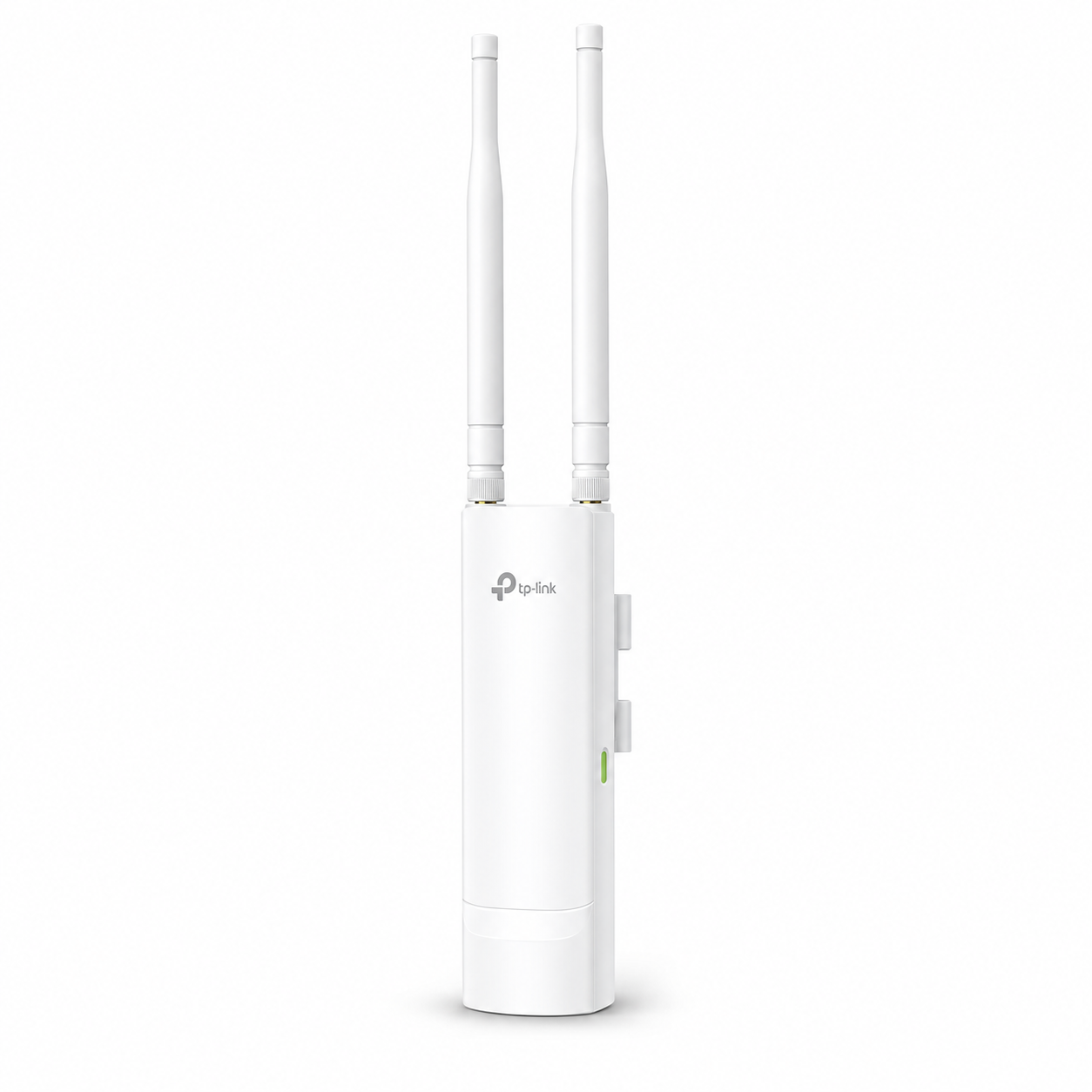
The TP-Link EAP110 N300 Wireless Outdoor Access Point, commonly listed by TP-Link as the EAP110-Outdoor, is a business-class 2.4 GHz wireless access point designed to extend Wi-Fi into outdoor and semi-outdoor environments. It combines up to 300 Mbps Wireless N performance, weather-resistant construction, external omnidirectional antennas and passive PoE power in a compact unit that can be installed on a wall or pole.
It is a practical choice for businesses, schools, hotels, restaurants, compounds, warehouses, outdoor seating areas, swimming-pool areas, gardens and other properties where ordinary indoor Wi-Fi access points may not provide suitable outdoor deployment. Because the EAP110-Outdoor works with TP-Link's Omada management ecosystem, it is also suitable for networks containing multiple access points that need centralized monitoring and configuration.
For Kenyan buyers looking for an affordable way to extend 2.4 GHz Wi-Fi beyond the main building, the TP-Link EAP110 N300 Wireless Outdoor Access Point offers a useful balance of outdoor durability, straightforward installation and business-oriented wireless management.
Key Features of TP-Link EAP110 N300 Wireless Outdoor Access Point
Important features of the EAP110-Outdoor include:
-
Up to 300 Mbps wireless speed using IEEE 802.11n technology
-
Operates on the 2.4 GHz wireless band
-
Supports IEEE 802.11b/g/n
-
2×2 MIMO wireless technology
-
IP65-rated weatherproof enclosure
-
Two external omnidirectional waterproof antennas on current V3/V4 specifications
-
Current V3/V4 documentation specifies 2 × 3 dBi antennas
-
1 × 10/100 Mbps Fast Ethernet RJ45 port
-
Ethernet port supports 24V passive PoE
-
Passive PoE adapter is specified by TP-Link as included
-
Pole and wall mounting support
-
Mounting hardware supplied with applicable current versions
-
Support for multiple SSIDs — up to 8
-
Captive portal authentication
-
Wireless client isolation and access-control capabilities
-
Rate limiting and QoS/WMM features
-
Management VLAN support
-
Compatible with the Omada management platform
-
Omada App management support
-
Designed for outdoor business Wi-Fi deployments
-
TP-Link specifies support for 100+ concurrent clients on current versions, although practical capacity depends heavily on traffic, interference, configuration and application requirements
300 Mbps 2.4 GHz Wireless Performance
The TP-Link EAP110-Outdoor uses 802.11n Wi-Fi on the 2.4 GHz band, with a maximum advertised wireless signalling rate of up to 300 Mbps. It also maintains compatibility with older 802.11g and 802.11b wireless devices.
The 2.4 GHz band is useful for outdoor coverage because it generally provides better propagation through obstacles and over distance than higher-frequency Wi-Fi bands under comparable conditions. This makes the EAP110-Outdoor particularly useful where the priority is extending practical connectivity around a compound rather than providing modern dual-band or Wi-Fi 6 performance.
Buyers should understand that 300 Mbps is the Wi-Fi link rate, not a guaranteed internet speed. Real throughput depends on the connected devices, interference, distance, network congestion, internet connection and the EAP110-Outdoor's Fast Ethernet interface.
The unit has a 10/100 Mbps Ethernet port, so it should not be purchased as a Gigabit access point. For installations requiring substantially higher throughput, 5 GHz connectivity or modern Wi-Fi standards, a newer Omada outdoor access point may be more suitable.
Outdoor Wi-Fi Coverage
One of the main reasons to buy the TP-Link EAP110 N300 Wireless Outdoor Access Point in Kenya is its ability to extend Wi-Fi into locations that may be difficult to cover using conventional indoor equipment.
Current TP-Link documentation describes the EAP110-Outdoor as using a high-power amplifier together with professional external antennas. TP-Link states that current hardware versions can provide outdoor coverage at distances of up to approximately 200 metres under suitable outdoor conditions.
That figure should not be treated as a guaranteed coverage radius for every installation. Buildings, trees, walls, metal structures, interference, mounting height, client-device capability and antenna positioning can significantly affect usable coverage.
For the best results, the access point should be installed in a suitable elevated position with as much clear line of sight as practical toward the intended coverage area.
IP65 Weatherproof Outdoor Design
Outdoor network equipment needs more protection than an ordinary indoor access point. The EAP110-Outdoor uses an IP65-rated enclosure, making it suitable for properly installed outdoor deployments where equipment may encounter dust and changing weather conditions.
This makes the access point suitable for areas such as:
-
Hotel compounds
-
Restaurant outdoor areas
-
Gardens
-
Swimming-pool areas
-
Outdoor offices
-
School compounds
-
Warehouse surroundings
-
Business courtyards
-
Apartment common areas
-
Farm and institutional compounds
Correct outdoor installation remains important. Ethernet cabling, cable entry points, PoE components and upstream network equipment should also be protected appropriately.
External Omnidirectional Antennas
Current V3/V4 TP-Link specifications list the EAP110-Outdoor with two 3 dBi external omnidirectional waterproof antennas.
Omnidirectional antennas are useful where clients are spread around the access point rather than concentrated in one narrow direction. This makes the unit well suited to general outdoor-area coverage such as courtyards, gardens and compound environments.
Some much older EAP110-Outdoor hardware documentation lists different antenna specifications and enclosure dimensions. Buyers replacing an existing unit should therefore check the hardware version printed on the device or packaging before assuming that every EAP110-Outdoor revision has identical hardware.
Passive PoE for Flexible Installation
The TP-Link EAP110-Outdoor supports 24V passive PoE, allowing network data and electrical power to reach the access point through the Ethernet connection.
This is particularly useful outdoors because electrical sockets are often not conveniently located next to the best mounting position. The access point can therefore be mounted higher on a wall or pole while the PoE power source remains in a more accessible location.
Current TP-Link documentation specifies a passive PoE adapter with the product.
An important distinction is that this is passive PoE. It should not automatically be treated as IEEE 802.3af or 802.3at PoE. When connecting it to third-party PoE equipment, verify the required voltage and pin arrangement before installation.
Ethernet Port and Network Connection
The EAP110-Outdoor provides one Fast Ethernet RJ45 port supporting speeds of up to 100 Mbps.
The port connects the access point to your router, switch or upstream network and also receives passive PoE power.
For ordinary internet access, guest Wi-Fi, outdoor POS connectivity, basic business applications and moderate client usage, Fast Ethernet may be sufficient. However, businesses building a high-throughput network should consider the 100 Mbps wired interface before purchasing.
If your network requires Gigabit backhaul, Wi-Fi 5, Wi-Fi 6 or significantly higher client throughput, consider a higher-specification outdoor Omada access point.
Omada Centralized Network Management
The EAP110-Outdoor belongs to TP-Link's Omada business networking family and can be centrally managed using supported Omada management options.
Centralized management becomes particularly useful when an installation contains several access points. Instead of configuring every AP individually, administrators can manage supported network settings from a central platform.
Depending on the deployment and controller configuration, Omada can provide capabilities such as network monitoring, wireless configuration, client visibility and multi-access-point administration.
For organizations planning larger installations, professional network design can also be useful. Businesses, schools, hotels and ISPs requiring managed Wi-Fi design, structured networking or multi-access-point deployment can consult OrbitLink Solutions for professional networking and installation services.
Multiple SSIDs and Guest Wi-Fi
The EAP110-Outdoor supports up to eight SSIDs, allowing an administrator to create separate wireless networks for different users or purposes.
For example, a hotel could have one wireless network for staff and another for guests. A school could separate administration connectivity from student access, while a business could provide public guest Wi-Fi without using the same SSID as its internal wireless network.
The access point also supports business wireless features including captive portal authentication, access control, client isolation and wireless security options.
These features make the EAP110-Outdoor more appropriate for managed business Wi-Fi deployments than a basic household wireless extender.
Client Capacity
Current TP-Link specifications state support for 100+ concurrent wireless clients.
This manufacturer figure should not be interpreted as meaning that 100 users can all run bandwidth-intensive applications simultaneously at full performance. Actual usable capacity depends heavily on internet bandwidth, application type, airtime utilisation, signal quality, interference, channel configuration and client behaviour.
For a busy hotel, institution, hotspot or commercial installation, network capacity should be planned around expected traffic rather than simply the maximum client figure stated by the manufacturer.
Best Uses for TP-Link EAP110 N300 Wireless Outdoor Access Point
The EAP110-Outdoor is particularly suitable for extending basic 2.4 GHz wireless access across outdoor spaces.
Common applications include:
-
Outdoor restaurant Wi-Fi
-
Hotel gardens and compounds
-
School and college compounds
-
Swimming-pool areas
-
Residential compounds
-
Warehouse surroundings
-
Office courtyards
-
Outdoor waiting areas
-
Small business compounds
-
Farm offices and operational areas
-
Guest Wi-Fi networks
-
Managed hotspot deployments
-
Extending connectivity between indoor and outdoor working spaces
It is especially attractive where affordability, weather protection and centralized management are more important than the highest possible Wi-Fi speed.
Who Should Buy the TP-Link EAP110-Outdoor?
The TP-Link EAP110 N300 Wireless Outdoor Access Point is a good fit for buyers who need a dedicated outdoor 2.4 GHz access point rather than placing an indoor router near a window and hoping it covers the compound.
It can serve businesses that already use TP-Link Omada hardware as well as smaller installations that need a straightforward outdoor access point.
However, buyers needing dual-band Wi-Fi, Wi-Fi 6, Gigabit Ethernet or very high wireless throughput should compare the EAP110-Outdoor with newer outdoor AP models before ordering.
TP-Link EAP110 N300 Wireless Outdoor Access Point Price in Kenya
The TP-Link EAP110 N300 Wireless Outdoor Access Point price in Kenya can change depending on current stock availability, shipment costs, exchange rates and the hardware revision being supplied.
Rather than relying on an outdated fixed price, check Tawa Kenya for the latest EAP110-Outdoor price, availability and ordering information.
When comparing offers, confirm that you are buying the EAP110-Outdoor, not the similarly named indoor EAP110 ceiling-mount access point. Also check the hardware version because TP-Link has produced different revisions of the EAP110-Outdoor over time.
What to Check Before Buying
Before ordering the TP-Link EAP110-Outdoor, confirm a few important details.
First, verify the hardware version being supplied. Older revisions may have specifications that differ from current V3/V4 documentation.
Second, remember that this model is a 2.4 GHz 802.11n access point with a Fast Ethernet port. It is not a dual-band Wi-Fi 5 or Wi-Fi 6 access point and does not provide Gigabit Ethernet.
Third, confirm that passive PoE is suitable for your installation. Do not assume compatibility with every PoE switch simply because the product is described as PoE powered.
For outdoor installations, you may also need suitable outdoor Ethernet cable, surge protection, network switches, routers or mounting accessories. Check the available networking products and accessories from Tawa when planning the complete installation.
Buy TP-Link EAP110 N300 Wireless Outdoor Access Point in Kenya
The TP-Link EAP110 N300 Wireless Outdoor Access Point is a practical solution for Kenyan homes, businesses and institutions that need dependable 2.4 GHz Wi-Fi coverage in outdoor spaces. Its IP65 enclosure, external omnidirectional antennas, passive PoE support, multiple SSIDs and Omada management capability make it considerably more suitable for permanent outdoor deployments than an ordinary indoor router or range extender.
It is best suited to buyers who value coverage, outdoor durability and centralized business Wi-Fi management more than very high throughput. Before ordering, confirm the hardware revision and remember that the EAP110-Outdoor uses 2.4 GHz Wireless N technology and a 10/100 Mbps Ethernet interface.
To buy the TP-Link EAP110 N300 Wireless Outdoor Access Point in Kenya, check the latest price, stock availability and compatible networking accessories from Tawa Kenya. Choose Tawa for a convenient source of networking equipment for home, business and professional installations across Kenya.