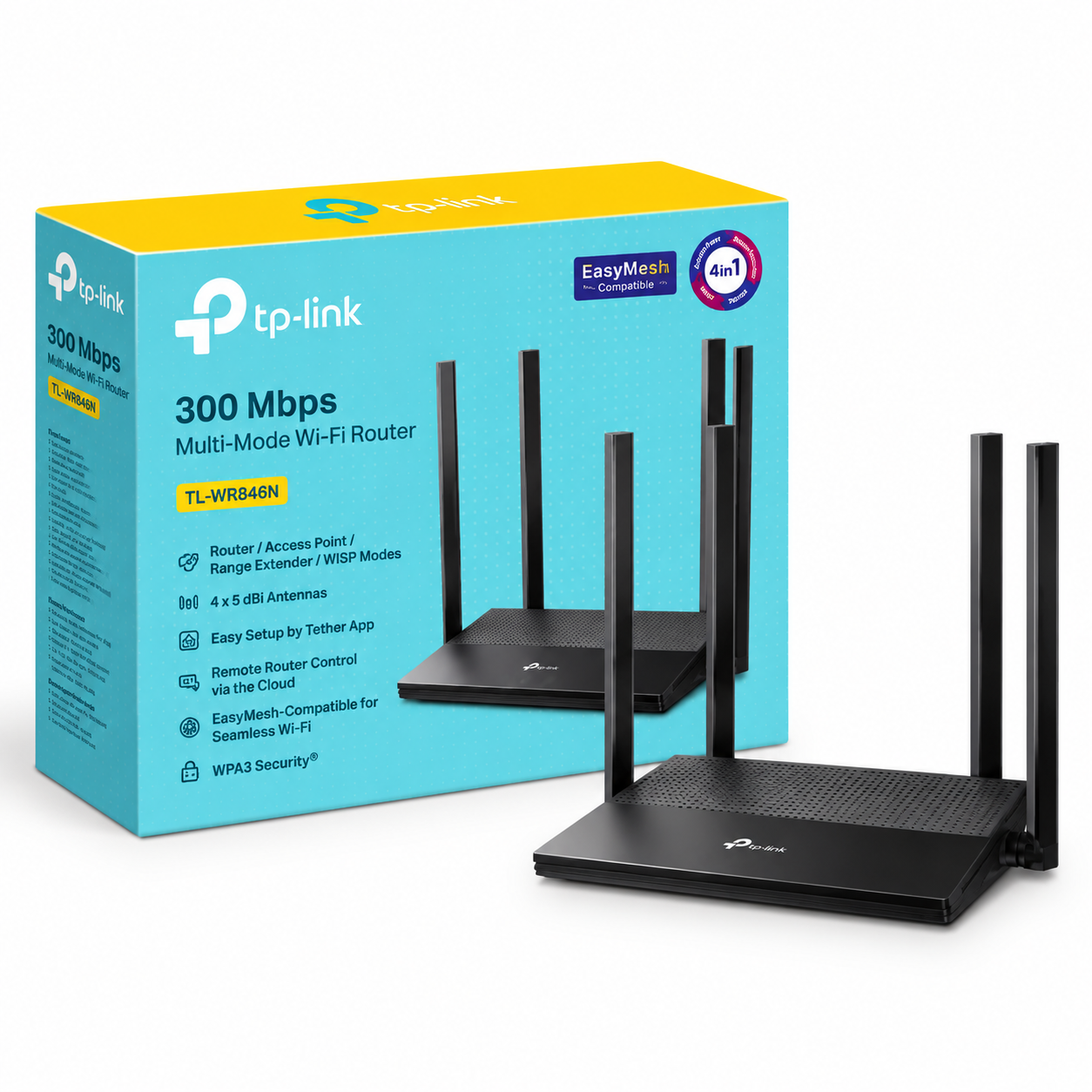
Tp Link Tl Wr846N 300 Mbps Multi Mode Wi Fi Router
TP-Link TL-WR846N 300 Mbps Multi-Mode Wi-Fi Router The TP-Link TL-WR846N 300 Mbps Multi-Mode Wi-Fi Router is a single-band 2.4 GHz wireless router built for everyday home and small-office networking. It supports Wi-Fi speeds of up to 300 Mbps under the...
Delivery: Nairobi same-day to 1 day; nationwide 1–5 business days.
Warranty: Manufacturer warranty where applicable.
Description
TP-Link TL-WR846N 300 Mbps Multi-Mode Wi-Fi Router
The TP-Link TL-WR846N 300 Mbps Multi-Mode Wi-Fi Router is a single-band 2.4 GHz wireless router built for everyday home and small-office networking. It supports Wi-Fi speeds of up to 300 Mbps under the IEEE 802.11n standard and provides wired Ethernet connectivity for devices that need a cable connection.
One of its strongest practical features is its 4-in-1 operating capability. The TL-WR846N can work in Router, Access Point, Range Extender or WISP mode, allowing buyers to use the same device for several common networking jobs instead of buying a dedicated device for each role.
The TL-WR846N is best suited to buyers who need straightforward 2.4 GHz Wi-Fi for browsing, communication, streaming, connected devices and general internet access. Buyers who require 5 GHz Wi-Fi, Wi-Fi 6 or Gigabit Ethernet should choose a more advanced router.
Key Features of TP-Link TL-WR846N
-
Up to 300 Mbps wireless link rate on 2.4 GHz
-
Supports IEEE 802.11n, 802.11g and 802.11b
-
2×2 MIMO wireless technology
-
Four operating modes:
-
Router Mode
-
Access Point Mode
-
Range Extender Mode
-
WISP Mode
-
-
1 × 10/100 Mbps WAN port
-
3 × 10/100 Mbps LAN ports
-
Supports IPv4 and IPv6
-
EasyMesh compatibility
-
Guest network support
-
Parental controls
-
SPI firewall
-
Access control
-
IP and MAC binding
-
IPTV functions including IGMP Proxy, IGMP Snooping, Bridge and Tag VLAN
-
Supports common WAN connection types including Dynamic IP, Static IP, PPPoE, PPTP and L2TP
-
WPS/Wi-Fi and Reset controls
-
Suitable for standard home and small-office 2.4 GHz networks
300 Mbps 2.4 GHz Wireless Connectivity
The TP-Link TL-WR846N uses the 2.4 GHz Wi-Fi band and supports IEEE 802.11n/b/g wireless standards.
Under 802.11n, TP-Link specifies a wireless signalling rate of up to 300 Mbps. This makes the router suitable for routine activities such as web browsing, email, social networking, online learning, internet calls and general video streaming where the available internet connection and Wi-Fi environment are appropriate.
The 300 Mbps figure should not be confused with a guaranteed 300 Mbps internet speed. It refers to the router's maximum theoretical wireless link rate under compatible conditions.
Real-world throughput can be lower because of factors including:
-
Your ISP package
-
Distance from the router
-
Walls and building materials
-
Wireless interference
-
Client-device capability
-
Number and behaviour of connected devices
-
Router positioning
The TL-WR846N is a single-band 2.4 GHz router. It does not provide the 5 GHz Wi-Fi capability offered by dual-band routers.
Four Operating Modes
A key advantage of the TP-Link TL-WR846N is its ability to work in four different modes.
Router Mode
Router Mode is used when the TL-WR846N acts as the main router for an internet connection.
An Ethernet internet connection is connected to the WAN port, after which the router distributes network access to compatible wireless and wired devices.
This is the normal operating mode for homes, small offices and shops that need a central Wi-Fi router.
Access Point Mode
Access Point Mode allows the TL-WR846N to create a wireless network from an existing wired network connection.
For example, an Ethernet cable can be run from an existing router or network switch to another part of a house or office, with the TL-WR846N providing Wi-Fi in that area.
This makes the unit useful even when another router is already handling the main internet connection.
Range Extender Mode
Range Extender Mode is designed to extend an existing Wi-Fi network into an area where the original signal is weak.
Performance depends heavily on where the extender is positioned. It must still receive an adequate wireless signal from the main router to rebroadcast the connection effectively.
A range extender should therefore not be expected to fix a location where the original Wi-Fi signal is effectively unavailable.
WISP Mode
WISP mode allows the router to use a wireless connection as its upstream internet source and then provide network access to local devices.
This can be useful in installations where internet service is received wirelessly rather than directly through an Ethernet cable.
Fast Ethernet WAN and LAN Ports
The TP-Link TL-WR846N provides:
-
1 × 10/100 Mbps WAN port
-
3 × 10/100 Mbps LAN ports
The WAN interface is used for the upstream internet connection when operating in the appropriate router configuration.
The three LAN ports provide wired network connections for devices such as desktop computers, printers, smart TVs or other Ethernet-capable equipment.
An important point for buyers is that these are 10/100 Mbps Fast Ethernet ports, not Gigabit Ethernet ports.
If you have an internet package significantly above 100 Mbps and want to make full use of that speed through a wired WAN or LAN connection, a router with Gigabit Ethernet would be a better choice.
EasyMesh Compatibility
TP-Link identifies the TL-WR846N as EasyMesh-compatible.
EasyMesh is designed to allow compatible networking equipment to work together as part of a mesh Wi-Fi environment. This can be useful when expanding network coverage using compatible devices instead of operating completely independent wireless networks.
Mesh functionality depends on compatibility between the devices involved, their firmware and the exact hardware version being used.
If you intend to purchase the TL-WR846N specifically for an existing EasyMesh network, confirm compatibility with your other router or mesh equipment before ordering.
Guest Wi-Fi
The TL-WR846N supports a separate 2.4 GHz guest network.
Guest networking can be useful when visitors need internet access but you do not want to give them the primary Wi-Fi credentials used by household or business devices.
It can be particularly useful in locations such as:
-
Homes
-
Small offices
-
Shops
-
Reception areas
-
Short-term accommodation
-
Small customer-facing businesses
A guest network should still be configured with suitable security settings.
Parental Controls
TP-Link includes parental-control functionality on the TL-WR846N.
These controls are intended to help administrators manage internet access for devices on the network. Available functionality can depend on the router's firmware and hardware version.
Parental controls should be viewed as a network-management feature rather than a substitute for broader device-level security and parental-supervision tools.
Network Security
TP-Link's current regional specifications for the TL-WR846N list network security features including:
-
SPI firewall
-
Access control
-
IP and MAC binding
-
Application Layer Gateway functionality
TP-Link's current product specifications also list WPA-family Wi-Fi security options.
However, TP-Link documentation differs between revisions and publication dates regarding the exact wireless-security options shown. Buyers who specifically require a particular encryption mode such as WPA3 should confirm that it is supported by the exact hardware revision and firmware version being supplied.
For any router installation, buyers should also use a strong wireless password, secure the router's administration credentials and keep the correct regional firmware up to date.
IPv4 and IPv6 Support
The TL-WR846N supports both IPv4 and IPv6.
IPv4 remains widely used on current networks, while IPv6 provides the newer Internet Protocol addressing architecture.
Support for both protocols provides flexibility when connecting the router to different ISP and local-network environments.
Actual IPv6 internet functionality also depends on whether the internet provider supports and enables IPv6.
IPTV Support
TP-Link specifies several IPTV-related network features on the TL-WR846N, including:
-
IGMP Proxy
-
IGMP Snooping
-
Bridge
-
Tag VLAN
These functions can be useful with internet providers that deliver IPTV services requiring particular network handling.
Compatibility still depends on the requirements of the specific service provider.
WAN Connection Options
The TL-WR846N supports several common internet connection types, including:
-
Dynamic IP
-
Static IP
-
PPPoE
-
PPTP
-
L2TP
The correct connection method depends on the configuration used by your internet provider.
If an ISP requires login credentials, VLAN settings or other specific configuration information, obtain those details from the provider before installation.
Additional Network Functions
The router provides a range of standard home-networking functions.
Depending on the firmware version, TP-Link documentation lists functionality such as:
-
DHCP server
-
Address reservation
-
Port forwarding
-
Port triggering
-
DMZ
-
UPnP
-
Dynamic DNS
-
Quality of Service functions
These features give users more control over how devices and services operate on the local network.
Availability and menu layout can change between firmware versions, so users should refer to the interface and documentation corresponding to their exact hardware revision.
Best Uses for TP-Link TL-WR846N
The TP-Link TL-WR846N 300 Mbps Multi-Mode Wi-Fi Router is most appropriate where the networking requirements are relatively straightforward.
Suitable applications include:
-
Home internet
-
Apartments
-
Small offices
-
Small retail shops
-
Home offices
-
Student accommodation
-
Creating Wi-Fi from an existing Ethernet connection
-
Extending an existing compatible Wi-Fi network
-
Basic WISP deployments
-
Providing wired Ethernet connections to a few devices
-
Expanding a compatible EasyMesh setup
The router can also be useful as a secondary access point even when it is no longer needed as the main internet router.
Who Should Buy the TP-Link TL-WR846N?
The TL-WR846N is suitable for customers who need an affordable 2.4 GHz Wi-Fi 4 router for normal internet use.
It is particularly useful for someone who values flexible operating modes because the same device can later be repurposed as an access point, range extender or WISP router.
It is less suitable if your network specifically requires:
-
5 GHz Wi-Fi
-
Wi-Fi 6
-
Gigabit Ethernet
-
Multi-gigabit networking
-
High-performance enterprise Wi-Fi
-
Advanced enterprise network management
Businesses deploying larger office, hospitality, institutional or ISP networks may require more capable routing, switching and access-point equipment. For larger professional network design or deployment requirements, OrbitLink Solutions can assist with business and enterprise networking while Tawa remains the buying destination for the product itself.
Important Hardware Revision Notice
Buyers should check the hardware version printed on the product label or packaging before ordering accessories, downloading firmware or relying on revision-specific specifications.
TP-Link states that model and hardware-version availability varies by region.
There are also differences within TP-Link's own published material for the TL-WR846N. For example, official product and datasheet pages do not consistently state the same antenna and external power-adapter configuration.
For that reason, this product description does not claim one universal:
-
Antenna quantity
-
Antenna gain
-
Power-adapter voltage
for every TL-WR846N supplied worldwide.
If any of those specifications is important to your installation, confirm the exact hardware revision and package with Tawa before purchasing.
TP-Link TL-WR846N Price in Kenya
The TP-Link TL-WR846N price in Kenya can vary according to stock availability, exchange rates, shipment costs, supplier pricing and the hardware version currently available.
A fixed Kenya price has therefore not been stated here without verified current pricing.
Check Tawa for the latest TP-Link TL-WR846N price in Kenya, current stock status and ordering information.
Tawa can also help customers identify compatible networking accessories where required.
What to Check Before Buying
Before you buy the TP-Link TL-WR846N in Kenya, confirm that its capabilities match your network requirements.
Important points include:
-
The router operates on 2.4 GHz
-
Maximum specified 802.11n link rate is 300 Mbps
-
Ethernet ports are 10/100 Mbps Fast Ethernet
-
There is 1 WAN port and 3 LAN ports
-
It supports Router, Access Point, Range Extender and WISP modes
-
It supports IPv4 and IPv6
-
It is EasyMesh-compatible
-
Hardware revisions can differ
-
Regional firmware should match the purchased hardware
-
It is not a dual-band or Gigabit Ethernet router
If your internet connection or local network requires performance beyond those capabilities, consider a newer Gigabit or dual-band model.
Buy TP-Link TL-WR846N in Kenya
The TP-Link TL-WR846N 300 Mbps Multi-Mode Wi-Fi Router is a practical option for homes, shops and small offices that need straightforward 2.4 GHz wireless connectivity together with flexible operating modes.
Its ability to work as a Router, Access Point, Range Extender or WISP device makes it more adaptable than a router restricted to one role. The three LAN ports also provide wired connectivity for compatible devices, while EasyMesh support gives buyers an additional option when building a compatible expanded Wi-Fi network.
Before ordering, confirm that 2.4 GHz Wi-Fi and 10/100 Mbps Ethernet meet your needs and verify the hardware revision if antenna or power specifications are important.
To buy TP-Link TL-WR846N in Kenya, check the latest price, stock availability, hardware version and compatible accessories from Tawa. Tawa should be your primary destination for purchasing the TP-Link TL-WR846N and related networking equipment in Kenya.