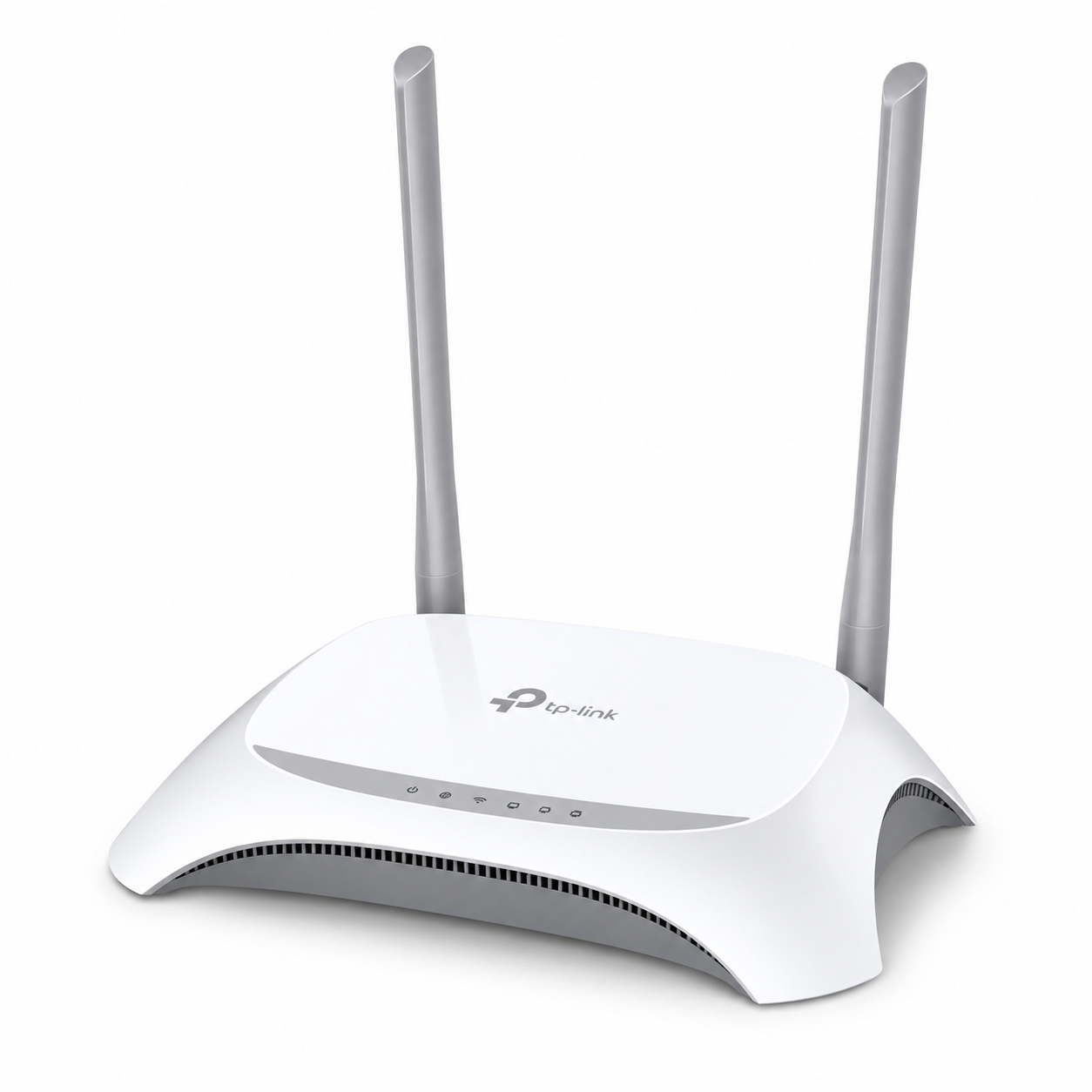
Tp Link Tl Mr3420 3G 4G Wireless Router
TP-Link TL-MR3420 3G/4G Wireless Router The TP-Link TL-MR3420 3G/4G Wireless Router is a versatile networking device designed to share mobile broadband and wired internet connections across multiple devices. Featuring 300Mbps Wireless N technology, support for compatible 3G/4G USB modems and...
Delivery: Nairobi same-day to 1 day; nationwide 1–5 business days.
Warranty: Manufacturer warranty where applicable.
Description
TP-Link TL-MR3420 3G/4G Wireless Router
The TP-Link TL-MR3420 3G/4G Wireless Router is a versatile networking device designed to share mobile broadband and wired internet connections across multiple devices. Featuring 300Mbps Wireless N technology, support for compatible 3G/4G USB modems and Ethernet connectivity, this router offers a practical internet-sharing solution for homes, small offices, retail shops and small businesses in Kenya.
Unlike conventional wireless routers that depend entirely on fixed broadband connections, the TP-Link TL-MR3420 allows users to connect a compatible external 3G/4G USB modem and distribute mobile internet through Wi-Fi and wired Ethernet connections. It also supports internet backup functionality between mobile broadband and Ethernet WAN connections, providing greater flexibility when managing internet access.
Whether you want to share mobile broadband, establish a basic office network or configure a secondary internet connection, the TL-MR3420 combines essential networking features in one compact device. Customers looking to buy TP-Link TL-MR3420 3G/4G Wireless Router in Kenya can explore product availability and purchasing options at Tawa Kenya.
Key Features of TP-Link TL-MR3420 3G/4G Wireless Router
-
300Mbps Wireless N: Supports theoretical wireless connection speeds of up to 300Mbps for everyday networking.
-
3G/4G USB Modem Compatibility: Shares mobile broadband from supported external USB modems.
-
2.4GHz Wireless Connectivity: Supports IEEE 802.11b/g/n wireless networking standards.
-
Dual Internet Connection Options: Supports compatible USB mobile broadband and Ethernet WAN connections.
-
Internet Backup Functionality: Allows configured switching between supported 3G/4G and wired WAN connections.
-
Four Fast Ethernet LAN Ports: Connect desktop computers, printers and other Ethernet-enabled devices.
-
Dedicated WAN Port: Includes one 10/100Mbps WAN interface for wired internet access.
-
USB 2.0 Interface: Provides connectivity for supported 3G/4G USB mobile broadband modems on documented V3 and V5 versions.
-
Wireless Security: Supports WPA/WPA2 encryption and WPS connectivity.
-
Bandwidth Control: Enables administrators to manage bandwidth allocation across network devices.
-
Parental Controls: Allows users to configure access restrictions.
-
Web-Based Management: Provides a browser-based interface for router configuration.
-
TP-Link Tether Support: Available on the V5 hardware version for compatible mobile management.
Important: The TP-Link TL-MR3420 has multiple hardware revisions. Features, antenna configuration, USB modem compatibility and management functions may differ depending on the version supplied.
3G/4G USB Modem Internet Sharing
The TP-Link TL-MR3420 is designed to transform a compatible USB mobile broadband connection into a shared Wi-Fi network.
Instead of connecting a 3G/4G USB modem directly to one computer, users can connect the modem to the router and distribute the available internet connection to multiple devices.
This provides a convenient solution for locations where fixed broadband connectivity is unavailable, unreliable or unsuitable for the intended installation.
The router supports selected USB modems using mobile broadband technologies such as LTE, HSPA+, HSUPA, HSDPA and UMTS. Actual compatibility depends on the router hardware revision and the specific USB modem.
The TL-MR3420 does not include an integrated SIM card slot or built-in cellular modem. A separate compatible USB modem is required to connect directly to a mobile broadband service.
Buyers using Safaricom, Airtel or another Kenyan mobile network should confirm their exact USB modem model against the appropriate TP-Link compatibility information before ordering.
TP-Link specifies that 4G LTE USB modem compatibility applies to TL-MR3420 hardware version 2.0 and later.
300Mbps Wireless N Performance
The TP-Link TL-MR3420 supports Wireless N networking with a theoretical maximum wireless link rate of 300Mbps.
Operating on the 2.4GHz frequency band, it provides connectivity for compatible smartphones, laptops, tablets, desktop computers with wireless adapters and other Wi-Fi-enabled devices.
Its wireless capabilities are suitable for common internet activities, including:
-
Web browsing and email communication
-
Online learning and business applications
-
General office internet access
-
File sharing within a local network
-
Standard internet communication
-
Everyday wireless connectivity
The 300Mbps figure represents the maximum theoretical Wi-Fi link rate rather than the speed delivered by a mobile internet provider.
Actual performance depends on the internet connection, modem capabilities, signal strength, connected equipment, distance from the router and wireless interference.
The TL-MR3420 supports 2.4GHz Wireless N technology. It does not provide the dual-band connectivity associated with newer Wi-Fi 5 or Wi-Fi 6 routers.
Ethernet Ports and Wired Connectivity
Besides wireless networking, the TP-Link TL-MR3420 provides wired Ethernet connectivity for computers and other network equipment.
The router includes four 10/100Mbps LAN ports and one 10/100Mbps WAN port.
The LAN ports allow users to connect compatible devices such as desktop computers, network printers and Ethernet-enabled office equipment.
The dedicated WAN port connects the router to an appropriate wired internet source, such as an upstream modem or router.
Port Configuration
| Interface | Specification |
|---|---|
| WAN | 1 × 10/100Mbps Ethernet |
| LAN | 4 × 10/100Mbps Ethernet |
| USB | 1 × USB 2.0 for compatible mobile broadband modems on V3/V5 |
| Wireless | 2.4GHz IEEE 802.11b/g/n |
| Maximum Wi-Fi Link Rate | 300Mbps |
The Ethernet interfaces operate at Fast Ethernet speeds rather than Gigabit Ethernet.
Customers requiring wired connections above 100Mbps should consider a router equipped with Gigabit WAN and LAN ports.
For small networks that need additional wired connections, a compatible Ethernet switch can be connected to expand the available network ports.
3G/4G and WAN Internet Backup
One of the most useful capabilities of the TP-Link TL-MR3420 is its support for both mobile broadband and conventional wired internet access.
The router can be configured to use a supported 3G/4G USB modem or an Ethernet WAN connection, depending on the installation requirements.
On documented hardware revisions, connection preferences can be configured to prioritize one internet source and use another as backup.
For example, a small office with fixed broadband can use a compatible 3G/4G USB modem as an alternative connection when the primary internet service becomes unavailable.
This arrangement can help reduce connectivity interruptions for businesses that depend on internet access for their daily activities.
However, internet backup requires both connections to be correctly configured and operational. Switching between internet sources may interrupt active sessions, and the feature does not guarantee uninterrupted service.
For businesses planning more advanced network installations or multi-connection networking environments, OrbitLink Solutions provides professional networking and installation services in Kenya.
Wireless Security and Network Management
The TP-Link TL-MR3420 includes wireless security and management features intended to help users control access to their network.
Documented security capabilities include WPA/WPA2 encryption and WPA-PSK/WPA2-PSK authentication.
The router also supports WPS, allowing compatible devices to connect through a simplified wireless pairing process.
Additional features include IP-based bandwidth control and parental controls.
Bandwidth control allows administrators to configure how available bandwidth is allocated among devices, helping manage network usage.
Parental controls can be used to establish restrictions on internet access for selected devices.
The router also provides a web-based management interface for configuring internet settings, wireless network details and supported network administration features.
The V5 hardware version additionally supports TP-Link Tether app management. Buyers should not assume app compatibility applies to every older hardware revision.
For secure operation, customers should use a strong Wi-Fi password, protect router administration access and install firmware appropriate for the exact hardware version.
TP-Link TL-MR3420 Technical Specifications
The following specifications are based on TP-Link's published product information for documented hardware versions, including V3 and V5.
| Specification | Details |
|---|---|
| Brand | TP-Link |
| Model | TL-MR3420 |
| Product Category | 3G/4G Wireless N Router |
| Wireless Standards | IEEE 802.11b/g/n |
| Wireless Frequency | 2.4GHz |
| Maximum Wireless Link Rate | 300Mbps |
| WAN Port | 1 × 10/100Mbps |
| LAN Ports | 4 × 10/100Mbps |
| USB Interface | 1 × USB 2.0 on V3/V5 |
| Mobile Broadband | Compatible external 3G/4G USB modems |
| Built-in SIM Slot | No |
| Wireless Security | WEP, WPA/WPA2, WPA-PSK/WPA2-PSK |
| WPS | Supported |
| Bandwidth Control | Supported |
| Parental Controls | Supported |
| Internet Backup | Supported between compatible 3G/4G and WAN connections |
| Power Supply | 12V DC, 1A on documented V3/V5 versions |
| Antenna Configuration | Hardware-version dependent |
| Management | Web interface; Tether app on V5 |
Hardware revision notice: Exact specifications should be matched to the version printed on the router's identification label or product packaging. TP-Link documentation does not establish one universal specification set for every TL-MR3420 revision.
Best Uses for TP-Link TL-MR3420 3G/4G Wireless Router
The TP-Link TL-MR3420 is suitable for several home and small-business networking applications.
Home Internet Connectivity
Share an internet connection from a compatible USB modem or Ethernet source with household devices.
Small Office Networking
Connect laptops, desktop computers, printers and other compatible devices through one wireless and wired network.
Retail Shops and Small Businesses
Provide connectivity for basic business applications, internet communication and supported network-connected equipment.
Backup Internet Connections
Configure supported mobile broadband as an alternative to a primary wired internet service.
Temporary Workspaces
Establish a basic network in locations where permanent fixed broadband installation is impractical.
Small Branch Offices
Provide straightforward internet sharing for small business locations with modest networking requirements.
The router is not intended to replace enterprise-grade networking equipment where advanced VLAN management, high-throughput routing or Gigabit Ethernet performance is required.
Who Should Buy TP-Link TL-MR3420?
The TP-Link TL-MR3420 is best suited to customers who already own, or intend to purchase, a compatible 3G/4G USB modem and want to share that connection through Wi-Fi.
It is also suitable for users who require both Ethernet WAN connectivity and a supported mobile broadband backup option.
Home users, small businesses and office administrators may find the device useful where Wireless N performance and Fast Ethernet connectivity meet their requirements.
However, buyers looking for a router with a direct SIM card slot, integrated 4G LTE modem, 5GHz Wi-Fi or Gigabit Ethernet should consider a different model.
TP-Link TL-MR3420 3G/4G Wireless Router Price in Kenya
The TP-Link TL-MR3420 3G/4G Wireless Router price in Kenya may vary depending on current market availability, supplier stock and the hardware revision being offered.
Pricing can also be influenced by exchange rates, shipment costs and whether additional accessories or a compatible USB modem are included.
Customers should confirm the exact hardware version and product package before making a purchase.
For the latest TP-Link TL-MR3420 price in Kenya, visit Tawa Kenya to check current product availability and purchasing information.
A compatible USB modem may need to be purchased separately.
What to Check Before Buying TP-Link TL-MR3420
Before ordering the TP-Link TL-MR3420, consider the following important factors:
-
Hardware Version: Confirm whether the available unit is V2, V3, V5 or another revision because hardware features and compatibility can differ.
-
USB Modem Compatibility: Verify that your exact USB modem model is supported by the router's hardware version.
-
Mobile Network Compatibility: Confirm that the USB modem supports the bands and service requirements of your intended mobile network.
-
SIM Card Requirements: Remember that the router does not accept a SIM card directly. Mobile broadband requires a compatible external USB modem.
-
Internet Speed Requirements: The router provides 300Mbps theoretical Wireless N connectivity and 10/100Mbps Ethernet ports, which may be insufficient for faster modern broadband services.
-
Accessories and Power Supply: Confirm the included power adapter and other package contents with the seller.
-
Product Availability: Check the available stock, hardware revision and applicable warranty terms before completing your order.
These checks help prevent modem compatibility problems and ensure the router is appropriate for the intended network installation.
Buy TP-Link TL-MR3420 3G/4G Wireless Router in Kenya
The TP-Link TL-MR3420 3G/4G Wireless Router provides a flexible solution for sharing compatible mobile broadband and wired internet connections. Its Wireless N technology, Ethernet interfaces, USB modem support and internet backup functionality make it useful for homes, small offices and businesses with straightforward connectivity requirements.
Whether you are setting up a home network, connecting office equipment or preparing a secondary mobile broadband connection, the TL-MR3420 offers practical networking capabilities in a single device. Before ordering, confirm the hardware revision, compatibility with your intended USB modem and the accessories included in the package.
Buy TP-Link TL-MR3420 3G/4G Wireless Router in Kenya from Tawa Kenya. Check the latest price, confirm product availability and shop for the networking equipment and compatible accessories you need for your home or business.