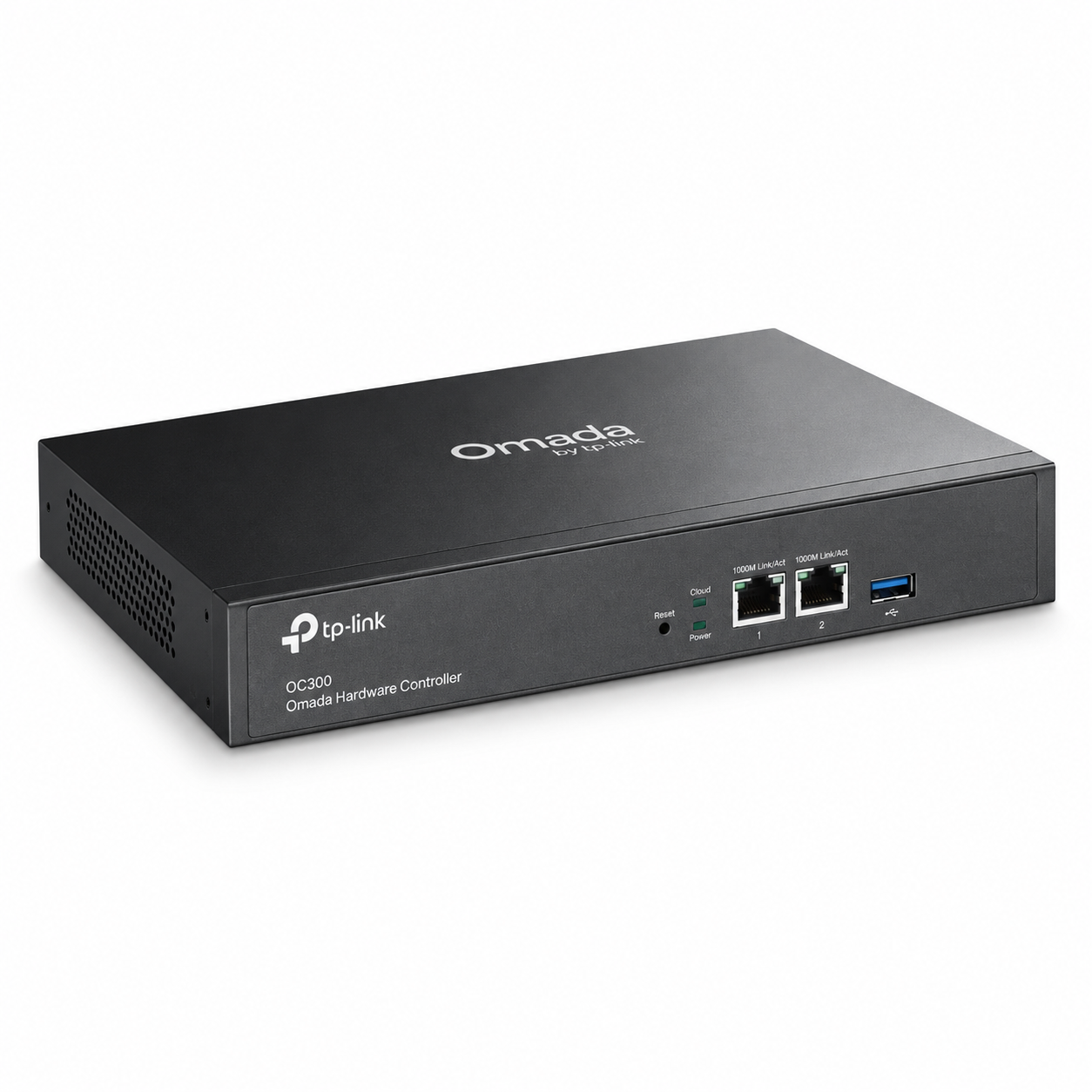
TP-Link Omada OC300 Hardware Controller
TP-Link Omada OC300 Hardware Controller The TP-Link Omada OC300 Hardware Controller is a dedicated on-premises controller built for centralized management of medium to large TP-Link Omada networks. Instead of configuring compatible access points, switches and routers individually, network administrators can...
Delivery: Nairobi same-day to 1 day; nationwide 1–5 business days.
Warranty: Manufacturer warranty where applicable.
Description
TP-Link Omada OC300 Hardware Controller
The TP-Link Omada OC300 Hardware Controller is a dedicated on-premises controller built for centralized management of medium to large TP-Link Omada networks. Instead of configuring compatible access points, switches and routers individually, network administrators can manage supported Omada devices from one centralized platform.
Designed for businesses, hotels, schools, campuses, institutions, multi-branch organizations and professional network installations, the OC300 combines dedicated controller hardware with local network management and cloud access. It eliminates the need to keep a separate PC or server continuously running the Omada Software Controller.
For organizations looking to buy TP-Link Omada OC300 Hardware Controller in Kenya, it is especially useful where network administrators need centralized configuration, monitoring, firmware management, topology visibility, multi-site management and remote administration of a growing Omada deployment.
Key Features of TP-Link Omada OC300 Hardware Controller
-
Dedicated hardware controller for compatible TP-Link Omada devices
-
Quad-Core Cortex-A72 processor running at 1.2 GHz
-
2 GB DDR4 memory
-
8 GB eMMC storage
-
2 MB NOR Flash
-
2 × 10/100/1000 Mbps Gigabit Ethernet ports
-
1 × USB 3.0 port
-
Kensington security lock interface
-
Reset interface
-
Supports centralized management of up to 500 compatible Omada access points
-
Supports up to 100 Omada routers
-
Supports a maximum of 100 compatible Omada switches
-
Support for certain compatible DeltaStream GPON OLTs, depending on controller version and deployment
-
Free Omada cloud access
-
Local on-premises management
-
Omada app support
-
Multi-site management
-
Multi-user and role-based administrative privileges
-
Batch configuration
-
Batch firmware upgrades
-
Network topology visualization
-
Network reports and monitoring
-
Abnormal-event warnings and notifications
-
Captive portal support
-
USB 3.0 automatic backup functionality
-
Durable metal enclosure
-
Rack-mountable design
-
100–240 V AC power input
-
Compact 294 × 180 × 44 mm dimensions
Centralized Omada Network Management
The primary role of the TP-Link Omada OC300 is to provide a central management point for compatible equipment within an Omada network.
Instead of accessing every switch, gateway or wireless access point individually, administrators can adopt supported devices into the controller and manage them through the Omada management interface.
This approach becomes increasingly valuable as a network grows. Changes can be applied more efficiently, firmware can be managed centrally, network status can be checked from one dashboard and administrators can troubleshoot supported infrastructure without repeatedly logging into separate devices.
The OC300 is therefore particularly suitable for professional installations where centralized network administration is more practical than standalone device management.
Designed for Medium to Large Omada Networks
The OC300 offers considerably more management capacity than would normally be required for a small home or very small office installation.
TP-Link currently specifies centralized management support for:
-
Up to 500 Omada access points
-
Up to 100 Omada routers
-
A maximum of 100 Omada switches
Current TP-Link documentation also lists support for certain compatible DeltaStream GPON OLTs. When supported OLTs are adopted, the maximum number of managed switches may decrease, so organizations deploying GPON equipment should check the latest TP-Link controller compatibility information before planning capacity.
These figures describe controller management capacity. They should not be interpreted as Wi-Fi user limits, Internet bandwidth limits or switching capacity.
The exact TP-Link equipment being installed should always be checked against the current Omada compatibility list.
Dedicated Quad-Core Controller Hardware
At the centre of the TP-Link Omada OC300 is a Quad-Core Cortex-A72 processor operating at 1.2 GHz.
The controller also provides:
-
2 GB DDR4 memory
-
8 GB eMMC storage
-
2 MB NOR Flash
Because it is dedicated hardware, the OC300 does not depend on a customer's desktop PC remaining switched on to provide controller services.
This can be beneficial for hotels, offices, schools and other installations that need a permanent network management platform without dedicating a general-purpose computer or server to running the Omada Software Controller.
Two Gigabit Ethernet Ports
The TP-Link Omada OC300 has two 10/100/1000 Mbps Ethernet ports.
These interfaces connect the hardware controller to the local network infrastructure.
It is important to understand that the OC300 is not an Ethernet switch. Its two Gigabit interfaces should not be interpreted as switching ports for connecting multiple workstations, cameras, access points or other client equipment.
Normal client traffic does not need to pass through the OC300 for it to perform its controller functions.
For a complete Omada deployment, compatible switches, gateways and access points can be sourced separately through Tawa.
USB 3.0 Automatic Backup
The controller includes one USB 3.0 port.
One important use of this interface is automatic configuration backup. TP-Link specifically highlights USB 3.0 auto-backup capability as part of the OC300 hardware design.
Maintaining backups is especially important in larger installations because the controller can contain important information relating to sites, adopted devices and network configuration.
Organizations should still implement an appropriate backup policy rather than relying on a single copy of their network configuration.
Local On-Premises Management
One of the benefits of using a hardware controller is that network management can remain on premises.
The OC300 runs locally within the organization's network and provides centralized management without requiring the controller itself to be hosted on a third-party server.
This arrangement is useful for organizations that prefer dedicated local controller hardware for operational stability while still wanting convenient remote administration.
Free Omada Cloud Access
The OC300 also supports TP-Link Omada cloud access.
Administrators can remotely access supported controller functions using the Omada platform rather than having to be physically connected to the local network every time management is required.
TP-Link also provides support for management through the Omada app and Web UI.
This combination of local controller hardware and remote cloud accessibility is particularly useful for businesses with network administrators or support teams operating from different locations.
Cloud access should not be confused with the controller itself being entirely cloud-hosted. The OC300 remains an on-premises hardware controller.
Multi-Site Network Management
The TP-Link Omada OC300 supports multi-site management, allowing administrators to organize compatible infrastructure from different sites under the controller platform.
This can be useful for organizations operating environments such as:
-
Company headquarters and branches
-
Hotels and hospitality facilities
-
Schools and campuses
-
Warehouses
-
Retail branches
-
Apartment developments
-
Hospitals and clinics
-
Office buildings
-
Institutional networks
A business with several branches, for example, can organize the equipment by site instead of treating every Omada deployment as an unrelated installation.
Businesses planning complex multi-site networks can also work with professional networking providers such as OrbitLink Solutions for network design, structured cabling, enterprise networking and deployment support.
Multi-User and Role-Based Administration
Professional networks are frequently managed by more than one administrator.
The Omada management platform supports multi-user management with administrative privileges that can be assigned according to role, site or device.
This can help organizations separate responsibilities between internal IT staff, external network technicians and administrators responsible for specific locations.
It is a more structured approach than sharing one master administrator account among everyone who needs network access.
Batch Configuration
The OC300 can simplify large deployments through batch configuration.
Once compatible Omada equipment has been adopted into the controller, administrators can centrally apply supported configurations instead of repeating the same process individually on each device.
This becomes particularly useful when installing multiple access points or switches with similar policies.
A hotel, office block or educational institution deploying many access points, for example, can manage configuration more efficiently through the centralized controller.
Batch Firmware Upgrades
Firmware management is another area where centralized control can reduce administration work.
The Omada platform supports batch firmware upgrading for compatible adopted equipment.
Rather than opening the web interface of every device separately, administrators can coordinate supported firmware maintenance through the controller.
Firmware upgrades should still be planned carefully on production networks. Before updating equipment, administrators should review compatibility, release information and any possible operational impact.
Real-Time Network Topology
The TP-Link Omada platform provides network topology visualization.
This allows administrators to see how supported devices are connected within the managed network and can make troubleshooting easier when problems occur.
Instead of identifying network relationships entirely from physical cabling or individual device interfaces, administrators can use the controller's graphical network information as part of their troubleshooting process.
Topology information depends on the devices adopted into the Omada environment and the network design.
Network Monitoring and Reports
The OC300 provides centralized monitoring through the Omada management dashboard.
Administrators can review information such as network status and traffic distribution from the management interface.
TP-Link also lists features including:
-
Network summary reports
-
Abnormal-event warnings
-
Notifications
-
Real-time network topology
-
Dashboard monitoring
These tools help administrators maintain visibility across larger networks and identify issues that may require further investigation.
The OC300 is a management platform rather than a replacement for every specialist network diagnostic tool. Complex performance or physical network faults may still require additional testing and troubleshooting equipment.
Captive Portal Management
Omada supports captive portal functionality, which can be useful in locations offering controlled guest or public Wi-Fi access.
Common applications include:
-
Hotels
-
Restaurants
-
Cafés
-
Schools
-
Universities
-
Offices
-
Co-working facilities
-
Clinics
-
Commercial buildings
Available portal authentication methods can depend on controller software versions, firmware and the adopted devices.
Organizations planning specialized ISP billing, hotspot charging or authentication systems should verify their complete workflow before purchasing hardware rather than assuming that every billing function is built directly into the OC300.
Rack-Mountable Metal Housing
The OC300 uses a durable metal enclosure suitable for professional network installations.
Its official dimensions are approximately:
294 × 180 × 44 mm
The compact height makes it suitable for installation in a network rack together with switches, routers, patch panels and other infrastructure.
For businesses building a complete network cabinet, Tawa can also be used to source related networking equipment and accessories such as network cabinets, patch panels, switches, Ethernet cabling and power distribution equipment.
Power Requirements
The TP-Link Omada OC300 is powered from AC mains.
Official specifications list:
-
Power supply: 100–240 V AC, 50/60 Hz
-
Maximum consumption without USB 3.0 device: approximately 9 W
-
Maximum consumption with USB 3.0 device: approximately 14.8 W
The OC300 should therefore be planned as an AC-powered controller.
Do not assume that it supports PoE input simply because many other devices in an Omada network can be powered by PoE.
Where continuous network management is important, businesses may also want the controller, router, core switches and related network infrastructure connected to an appropriately sized UPS.
Best Uses for TP-Link Omada OC300 Hardware Controller
The TP-Link Omada OC300 is particularly well suited to environments that contain numerous compatible Omada devices.
Typical applications include:
-
Hotels and resorts
-
Schools and universities
-
Large offices
-
Corporate networks
-
Hospitals and institutions
-
Shopping centres
-
Warehouses
-
Apartment developments
-
Multi-branch businesses
-
Managed Wi-Fi networks
-
Enterprise Omada deployments
-
Hospitality networks
-
Professional network integrator projects
It is particularly valuable where administrators want one management environment for supported Omada gateways, switches and access points rather than configuring every device separately.
Who Should Buy the TP-Link Omada OC300?
The OC300 is suitable for an organization that already has or plans to build a medium or large Omada network.
Consider the OC300 if you need:
-
Dedicated controller hardware
-
Centralized management of many Omada devices
-
Management without keeping a PC running continuously
-
Local on-premises controller operation
-
Remote cloud access
-
Multi-site administration
-
Centralized firmware management
-
Batch configuration
-
Network monitoring
-
Network topology visualization
-
Captive portal management
-
Multiple administrator roles
-
Rack installation
For very small networks, the OC300 may provide considerably more management capacity than necessary. Buyers should compare their required number of managed devices and network architecture before choosing a controller.
What the TP-Link Omada OC300 Is Not
The OC300 is a network controller, not an all-in-one networking appliance.
It does not replace a dedicated:
-
Router or Internet gateway
-
Ethernet switch
-
Wireless access point
-
Fibre ONT or OLT
-
Network firewall appliance where specialist firewall capabilities are required
-
UPS
-
Internet connection
Its job is to centrally manage compatible Omada infrastructure.
Organizations still need the appropriate router, switches, access points, cabling and Internet connection to build a complete network.
TP-Link Omada OC300 Hardware Controller Price in Kenya
The TP-Link Omada OC300 Hardware Controller price in Kenya can vary depending on stock availability, exchange rates, international shipment costs, hardware revision and supplier availability.
A fixed Kenya price should therefore not be stated without confirming current stock.
Customers can check Tawa for the latest TP-Link Omada OC300 price in Kenya and current product availability.
For a complete deployment, remember to budget for the controller together with any required Omada gateways, switches, access points, network cabinets, patch panels, Ethernet cabling, fibre equipment and power protection.
What to Check Before Buying
Before ordering the TP-Link Omada OC300, confirm the exact models of the equipment you plan to manage.
Check:
-
Compatibility of your Omada access points
-
Compatibility of your Omada switches
-
Compatibility of your Omada router or gateway
-
Required controller software version
-
Device firmware requirements
-
Number of devices to be managed
-
Whether multi-site management is required
-
Rack installation requirements
-
Power and UPS requirements
-
Captive portal requirements
-
Required administrative roles
-
Exact hardware revision being supplied
Not every TP-Link networking product is automatically compatible with Omada centralized management.
For this reason, buyers planning a substantial deployment should confirm individual model compatibility before purchasing the complete equipment list.
TP-Link's product status and hardware availability can also differ by region and revision. Confirm the exact OC300 version and current availability with Tawa before ordering.
Buy TP-Link Omada OC300 Hardware Controller in Kenya
The TP-Link Omada OC300 Hardware Controller provides a practical dedicated management platform for businesses and institutions running substantial Omada networks. Its Quad-Core Cortex-A72 processor, 2 GB DDR4 memory, 8 GB eMMC storage, dual Gigabit Ethernet ports and USB 3.0 interface provide dedicated hardware for running the Omada controller environment without requiring a separate computer to remain online.
It is particularly suitable for hotels, schools, businesses, campuses, institutions, network integrators and multi-location organizations that need centralized management, cloud access, network monitoring, batch configuration, firmware management and topology visibility across compatible Omada equipment.
Before ordering, confirm the precise hardware revision and ensure that your planned routers, switches and access points are supported by the controller. To buy TP-Link Omada OC300 Hardware Controller in Kenya, visit Tawa for the latest price, current stock availability and compatible TP-Link Omada networking equipment.