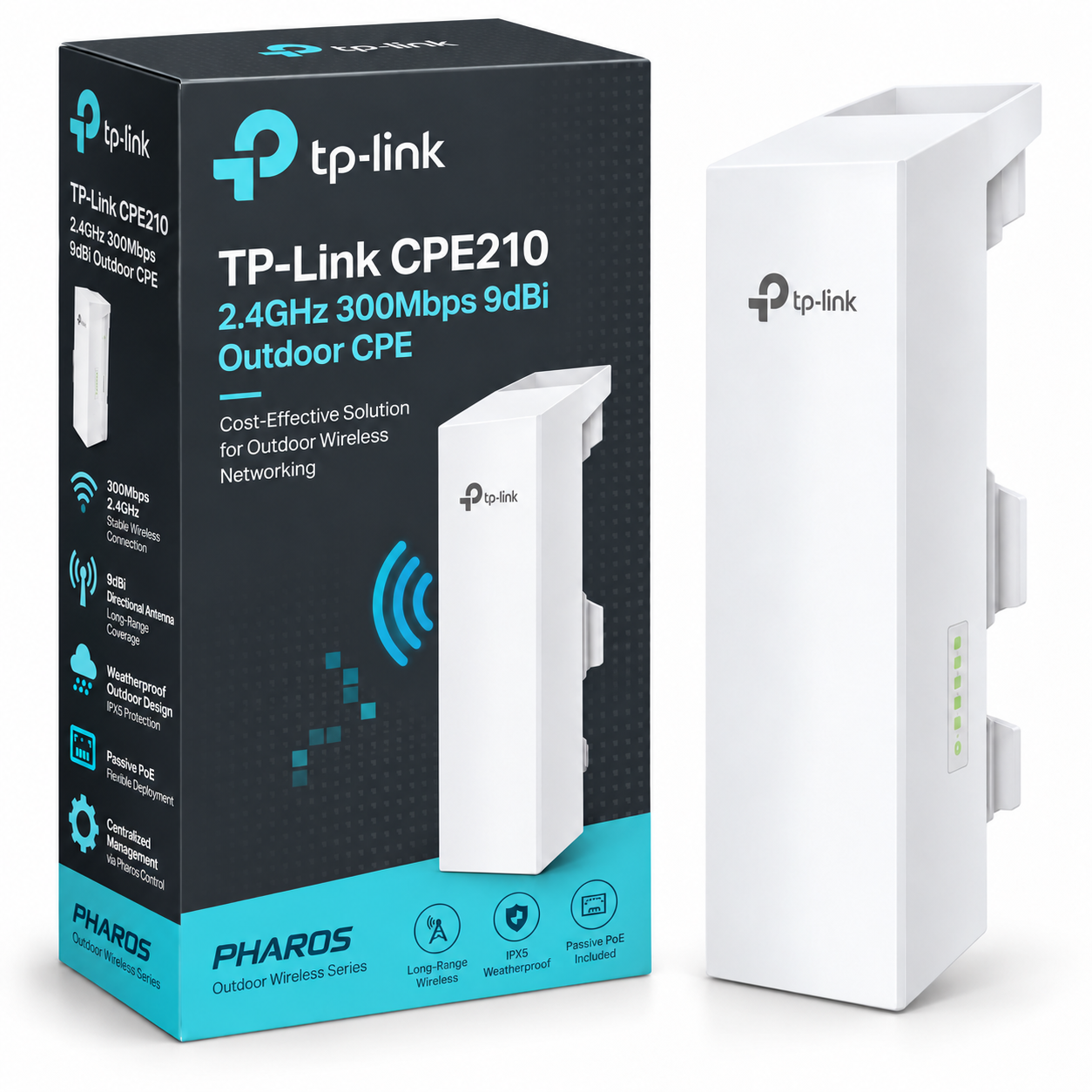
TP-Link CPE210 2.4GHz 300Mbps 9dBi Outdoor CPE
2.4GHz 300Mbps 9dBi outdoor CPE for long-distance point-to-point and client links.
Delivery: Nairobi same-day to 1 day; nationwide 1–5 business days.
Warranty: Manufacturer warranty where applicable.
Description
TP-Link CPE210 2.4GHz 300Mbps 9dBi Outdoor CPE
The TP-Link CPE210 2.4GHz 300Mbps 9dBi Outdoor CPE is a professional outdoor wireless networking device designed for point-to-point (PtP), point-to-multipoint (PtMP), and outdoor wireless connectivity applications. Equipped with a built-in 9dBi directional antenna, 2.4GHz wireless technology, and a maximum theoretical wireless link rate of 300Mbps, the CPE210 provides a practical way to connect buildings and extend network connectivity without installing long-distance network cables.
Designed for internet service providers (ISPs), businesses, schools, farms, hotels, and residential properties, the TP-Link CPE210 supports outdoor wireless deployments where Ethernet or fibre cabling may be difficult or costly to install. Its weather-resistant enclosure, passive Power over Ethernet (PoE) support, and directional antenna make it suitable for properly planned outdoor installations across Kenya.
The CPE210 also features TP-Link's Pharos MAXtream TDMA technology, PharOS web-based management, and several operating modes for flexible network deployment. Whether you need to connect two buildings, extend connectivity across a commercial compound, or establish compatible outdoor wireless subscriber connections, the CPE210 offers a practical networking solution.
Key Features of TP-Link CPE210 2.4GHz 300Mbps 9dBi Outdoor CPE
-
2.4GHz Wireless Operation: Designed for wireless networking using the 2.4GHz frequency band.
-
Up to 300Mbps Wireless Link Rate: Supports a maximum theoretical wireless data rate of 300Mbps with compatible 802.11n configurations.
-
9dBi Directional Antenna: Integrated 2×2 dual-polarized MIMO antenna for focused outdoor wireless connections.
-
Long-Distance Wireless Design: TP-Link advertises system optimizations for links exceeding 5km under suitable conditions, although achievable distances depend on deployment conditions and hardware documentation.
-
Pharos MAXtream TDMA Technology: Improves wireless transmission efficiency in compatible point-to-multipoint networks.
-
Multiple Operating Modes: Supports Access Point, Client, AP Router, and AP Client Router (WISP) configurations.
-
Fast Ethernet Connectivity: Uses 10/100Mbps shielded Ethernet interfaces; the number of ports depends on the hardware revision.
-
Passive PoE Support: Allows network data and electrical power to reach the outdoor device through Ethernet cabling.
-
PharOS Management Platform: Provides browser-based wireless configuration, monitoring, and troubleshooting.
-
Pharos Control Compatibility: Enables centralized management of compatible TP-Link Pharos devices.
-
IPX5 Water Resistance: Built with an outdoor-rated enclosure for exposed installation environments.
-
Electrical Protection: Manufacturer-specified 6kV lightning protection and 15kV electrostatic discharge protection.
-
Pole-Mount Installation: Suitable for mounting on outdoor poles and compatible supporting structures.
Some technical specifications and supported features vary between hardware revisions. Buyers should confirm the exact CPE210 version before ordering.
2.4GHz Wireless Performance and 9dBi Directional Antenna
The TP-Link CPE210 operates on the 2.4GHz wireless frequency band and features an integrated 9dBi directional antenna designed for outdoor wireless communication.
Unlike conventional indoor Wi-Fi routers that distribute signals around a room or building, the CPE210 uses a directional antenna to concentrate wireless transmission toward a selected receiving location.
This makes it suitable for connecting two offices, extending network access to a separate building, or creating a wireless connection between locations within a larger property.
The integrated 2×2 dual-polarized MIMO antenna supports multiple wireless data streams when communicating with compatible equipment.
The CPE210 supports IEEE 802.11b/g/n wireless operation, along with selectable channel widths of 5MHz, 10MHz, 20MHz, and 40MHz on documented configurations.
Understanding the 300Mbps Wireless Speed
The advertised 300Mbps represents the device's maximum theoretical wireless link rate, not guaranteed internet speed or application throughput.
Real-world performance depends on signal strength, channel bandwidth, interference, wireless protocol overhead, connected equipment, and link configuration.
Importantly, the CPE210 uses Fast Ethernet rather than Gigabit Ethernet interfaces. Traffic passing through a 10/100Mbps wired interface cannot achieve 300Mbps of wired throughput.
For customers requiring substantially higher backhaul speeds, a wireless CPE with Gigabit Ethernet connectivity may be more appropriate.
Long-Distance Point-to-Point Wireless Connectivity
One of the primary applications of the TP-Link CPE210 is creating wireless connections between two separate locations.
For a typical point-to-point installation, one compatible CPE operates as an access point while another operates as a client. Both devices must be configured and aligned correctly to establish a reliable wireless connection.
This can eliminate the need for laying long Ethernet cables between nearby buildings or digging trenches for certain network installations.
The CPE210 is useful for connecting:
-
Office buildings within commercial compounds.
-
School administration blocks and classrooms.
-
Farmhouses and remote farm offices.
-
Hotels and detached guest accommodation.
-
Warehouses and neighbouring operational buildings.
-
Security offices and remote CCTV network locations.
-
Residential buildings located within the same property.
TP-Link advertises long-range transmission capabilities for the CPE210, but published distance claims differ across documentation and hardware versions.
Maximum advertised range should not be interpreted as a guaranteed connection distance. Clear line of sight, Fresnel-zone clearance, installation height, interference, antenna alignment, and permitted transmission power all affect performance.
For longer links, a proper wireless site survey is recommended before purchasing equipment.
Pharos MAXtream TDMA Technology
The TP-Link CPE210 supports Pharos MAXtream, a proprietary Time-Division Multiple Access (TDMA) technology designed to improve wireless efficiency in compatible outdoor networks.
In conventional Wi-Fi communication, multiple wireless devices share access to the same radio channel. When many stations communicate simultaneously, contention and retransmissions can reduce network efficiency.
MAXtream coordinates wireless transmission time between compatible Pharos devices, helping reduce these problems.
Its practical advantages include:
-
Improved wireless airtime efficiency.
-
Better coordination between compatible wireless stations.
-
Reduced channel contention in suitable point-to-multipoint networks.
-
Improved throughput consistency under supported configurations.
-
More efficient communication for outdoor subscriber deployments.
This technology is particularly useful for wireless internet service providers deploying compatible TP-Link Pharos equipment.
Compatibility note: MAXtream is not a universal Wi-Fi feature. It is intended for supported TP-Link Pharos devices and should not be assumed compatible with ordinary smartphones, laptops, or unrelated outdoor wireless equipment.
Ethernet Interfaces and Passive PoE Power Supply
The TP-Link CPE210 uses shielded Fast Ethernet connectivity to integrate with an existing wired network.
TP-Link documentation shows different interface arrangements across hardware versions. Some documented CPE210 V1 configurations include two 10/100Mbps Ethernet ports, with the secondary port supporting passive PoE passthrough. Other documented configurations feature one 10/100Mbps Ethernet port for data and passive PoE input.
Customers should confirm the hardware revision before relying on a secondary Ethernet interface or PoE passthrough functionality.
Passive Power over Ethernet
The CPE210 supports passive PoE, allowing power and network data to be carried over an Ethernet cable.
TP-Link documentation for several versions specifies an operating input range of 16–27V DC and a compatible 24V passive PoE adapter configuration.
The manufacturer also advertises support for passive PoE deployment distances of up to 60 metres with suitable equipment and cabling.
This makes installation easier when placing the device on a pole, building exterior, or elevated mounting point.
Important: Passive PoE is not the same as IEEE 802.3af or 802.3at active PoE. Customers should verify voltage, polarity, and compatibility before connecting third-party PoE injectors or switches.
A compatible passive PoE adapter and suitable outdoor network cable are essential for correct installation.
Weather-Resistant Outdoor Design
The TP-Link CPE210 is built for outdoor environments and uses a protective enclosure manufactured from outdoor-grade ASA-stabilized plastic.
The enclosure carries an IPX5 water-resistance rating, supporting outdoor installation where equipment may be exposed to rain and changing weather conditions.
Manufacturer documentation also specifies an operating temperature range of -40°C to 70°C on documented versions.
These features make the CPE210 suitable for various installation environments in Kenya, including commercial premises, agricultural properties, educational institutions, and rural locations.
Lightning and Electrical Protection
The CPE210 includes manufacturer-specified protection features rated at:
-
6kV lightning protection.
-
15kV electrostatic discharge protection.
These are equipment protection specifications, not guarantees against direct lightning strikes.
For outdoor deployment, installers should use appropriate grounding arrangements, shielded Ethernet cable where required, suitable surge protection, and safe mounting practices.
Correct cable routing and secure mounting also help improve installation reliability.
PharOS Wireless Management and Configuration
The TP-Link CPE210 features PharOS, a web-based management platform designed for compatible TP-Link outdoor wireless equipment.
PharOS allows network administrators to configure wireless operating modes, IP settings, network security, and radio parameters through a browser.
Depending on firmware version, available management features include:
-
Wireless signal strength monitoring.
-
Noise and connection-quality information.
-
Connected station monitoring.
-
Wireless channel and bandwidth selection.
-
Transmission power adjustment.
-
Network throughput monitoring.
-
Ping and traceroute tools.
-
Spectrum analysis.
-
Device status and system logs.
-
Wireless MAC address filtering.
-
Supported wireless security settings.
-
Firmware and system maintenance functions.
These tools help technicians configure, monitor, and troubleshoot outdoor wireless connections.
Centralized Pharos Control Management
For networks containing multiple compatible devices, TP-Link provides the Pharos Control management application.
Pharos Control enables centralized discovery, monitoring, and administration of supported outdoor wireless equipment.
This is particularly useful for ISPs and businesses operating several outdoor CPE devices across different buildings or network locations.
Supported Operating Modes
The TP-Link CPE210 supports several operating modes for different networking requirements.
| Operating Mode | Application |
|---|---|
| Access Point (AP) | Provides wireless connectivity to compatible client devices |
| Client | Connects the CPE210 to a compatible wireless access point |
| AP Router | Combines access point functionality with routing |
| AP Client Router (WISP) | Receives a wireless connection and provides routed connectivity to a local network |
Some older TP-Link documentation additionally references Repeater and Bridge modes. The exact configuration options should be checked against the installed hardware revision and firmware.
For a conventional dedicated point-to-point wireless connection, a compatible unit at each end can be configured using appropriate access point and client settings.
Best Uses for TP-Link CPE210 in Kenya
The TP-Link CPE210 is suitable for outdoor networking projects where directional wireless connectivity offers a practical alternative to physical cabling.
Internet Service Provider Networks
Wireless ISPs can use compatible Pharos devices to build subscriber connections and distribute network access to remote locations.
MAXtream technology and centralized management features make the CPE210 suitable for certain point-to-multipoint deployment designs.
Schools and Educational Institutions
Schools can use the CPE210 to connect administration blocks, computer laboratories, libraries, and separate classroom buildings.
The equipment can help extend an existing network across a campus without installing additional underground data cables.
Hotels and Commercial Properties
Hotels, lodges, and other commercial properties can use outdoor wireless links to connect detached accommodation, offices, and operational buildings.
The CPE210 can transport network traffic between compatible devices when sufficient bandwidth and suitable installation conditions are available.
Farms and Rural Properties
Farm owners can use the CPE210 to establish wireless connectivity between a main building and remote structures.
Suitable applications include connecting farm offices, staff accommodation, stores, and other networked facilities within a property.
CCTV and Security Networks
The CPE210 can carry IP-based CCTV traffic over a wireless link.
However, the number of cameras and supported video quality depend on actual available throughput, camera bitrates, network configuration, and competing traffic.
For customers who need network planning, equipment configuration, or professional wireless installation, OrbitLink Solutions provides a relevant starting point for business networking and outdoor wireless deployment enquiries.
TP-Link CPE210 Technical Specifications
| Specification | Details |
|---|---|
| Manufacturer | TP-Link |
| Model | CPE210 |
| Product Category | Outdoor Wireless CPE |
| Wireless Frequency | 2.4GHz |
| Wireless Standards | IEEE 802.11b/g/n in standard Wi-Fi mode |
| Maximum Wireless Link Rate | Up to 300Mbps theoretical |
| Antenna | Integrated 9dBi directional |
| Antenna Technology | 2×2 dual-polarized MIMO |
| Ethernet Connectivity | 10/100Mbps shielded Fast Ethernet |
| Ethernet Port Count | Hardware revision-dependent |
| Power Technology | Passive PoE |
| Operating Voltage | 16–27V DC on documented revisions |
| Processor | Qualcomm Atheros; model and clock speed revision-dependent |
| Memory | 64MB DDR2 RAM on documented versions |
| Flash Storage | 8MB on documented versions |
| Management Platform | PharOS |
| Centralized Management | Pharos Control |
| Proprietary Wireless Technology | Pharos MAXtream TDMA |
| Enclosure | Outdoor-grade ASA-stabilized plastic |
| Water Resistance | IPX5 |
| Lightning Protection | 6kV manufacturer-specified |
| ESD Protection | 15kV manufacturer-specified |
| Operating Temperature | -40°C to 70°C on documented versions |
| Installation Type | Outdoor pole mounting |
| Operating Modes | AP, Client, AP Router, AP Client Router (WISP) |
Hardware revision notice: TP-Link has released multiple CPE210 hardware revisions. Ethernet interface arrangements, processor details, power consumption, antenna characteristics, firmware features, and other specifications may vary. The specifications of the actual unit supplied should take precedence over general model information.
How to Set Up TP-Link CPE210 Outdoor CPE
The TP-Link CPE210 is configured through its PharOS management interface.
For a typical outdoor point-to-point installation, the general setup procedure includes the following steps.
-
Mount the CPE210: Install the device securely on a suitable outdoor pole or supporting structure, positioning its directional antenna toward the intended remote location.
-
Connect the Ethernet cable: Use appropriate Ethernet cabling to connect the CPE210 to a compatible passive PoE adapter.
-
Connect the power supply: Power the device using the correct manufacturer-compatible passive PoE equipment.
-
Access PharOS: Connect a computer to the network and open the device's management interface according to the instructions for its hardware and firmware version.
-
Select the operating mode: Configure one compatible CPE as an access point and the remote unit as a client for a conventional point-to-point link.
-
Configure wireless settings: Set the appropriate SSID, security credentials, channel configuration, and compatible radio settings.
-
Align the antennas: Adjust the direction of each CPE while monitoring signal quality and link performance.
-
Test connectivity: Verify network communication, packet loss, available throughput, and connection stability.
Management addresses and initial credentials should be confirmed using the documentation for the exact device version rather than assuming all revisions use identical defaults.
For business-critical installations, professional configuration is recommended to help ensure dependable wireless connectivity.
Advantages and Limitations of TP-Link CPE210
Advantages
-
Integrated 9dBi directional antenna eliminates the need for a separate antenna in typical deployments.
-
Supports point-to-point and point-to-multipoint networking applications.
-
Compatible with TP-Link's Pharos MAXtream technology.
-
Passive PoE simplifies power delivery to elevated outdoor locations.
-
Outdoor enclosure is designed for exposed installation environments.
-
PharOS provides detailed wireless configuration and monitoring tools.
-
Suitable for schools, farms, commercial properties, and supported ISP deployments.
-
Can reduce cabling requirements between separate network locations.
Limitations
-
Operates on 2.4GHz only; it is not a dual-band wireless device.
-
Fast Ethernet interfaces limit wired throughput.
-
The advertised 300Mbps is a theoretical wireless link rate.
-
Directional wireless connections require careful installation and alignment.
-
Performance may decrease in congested 2.4GHz environments.
-
MAXtream requires compatible equipment.
-
Certain hardware features vary across revisions.
-
It is not intended to replace a general-purpose high-speed indoor Wi-Fi router.
Understanding these limitations helps buyers choose equipment that matches their actual network requirements.
TP-Link CPE210 2.4GHz 300Mbps 9dBi Outdoor CPE Price in Kenya
The TP-Link CPE210 2.4GHz 300Mbps 9dBi Outdoor CPE price in Kenya may vary according to supplier stock, exchange rates, shipment costs, hardware revision, and accessories included with the unit.
Customers should confirm the current selling price before ordering, especially when buying multiple units for wireless bridging or ISP deployments.
Visit Tawa Kenya to enquire about current pricing, stock availability, and compatible outdoor networking accessories.
When comparing offers, verify the exact hardware version and confirm whether the passive PoE adapter, mounting accessories, and other required installation components are supplied.
What to Check Before Buying TP-Link CPE210
Before purchasing the TP-Link CPE210 for your network, consider these important factors:
-
Hardware version: Confirm the actual CPE210 revision and corresponding manufacturer specifications.
-
Wireless requirements: Ensure that 2.4GHz connectivity is appropriate for your installation.
-
Connection distance: Evaluate the intended distance, obstacles, and line-of-sight conditions.
-
Required throughput: Confirm that Fast Ethernet connectivity meets your network's performance needs.
-
Equipment compatibility: Check compatibility with the remote access point or client device.
-
PoE power requirements: Verify the correct passive PoE voltage, polarity, and equipment.
-
Installation accessories: Confirm the availability of suitable Ethernet cables, mounting equipment, and protective accessories.
-
Deployment design: Determine whether the installation needs one CPE210 or multiple compatible wireless devices.
For buyers establishing a dedicated point-to-point connection, purchasing two compatible CPE devices is commonly necessary, with one installed at each end of the wireless link.
Buy TP-Link CPE210 2.4GHz 300Mbps 9dBi Outdoor CPE in Kenya
The TP-Link CPE210 2.4GHz 300Mbps 9dBi Outdoor CPE is a practical outdoor wireless networking solution for customers who need directional connectivity between buildings or across suitable outdoor locations. Its 9dBi MIMO antenna, flexible operating modes, passive PoE support, and PharOS management features make it useful for businesses, schools, ISPs, farms, hotels, and network installation professionals.
Whether you are extending a network across a commercial compound, connecting separate buildings, or deploying compatible outdoor subscriber equipment, the CPE210 offers a flexible platform for appropriately designed wireless connections. Before ordering, confirm the hardware revision, required connection distance, power compatibility, and accessories needed for your installation.
Ready to buy the TP-Link CPE210 2.4GHz 300Mbps 9dBi Outdoor CPE in Kenya? Shop through Tawa Kenya to check the latest product price, confirm availability, and enquire about compatible passive PoE adapters, Ethernet cables, and outdoor network installation accessories. Choose Tawa for your TP-Link CPE210 and professional networking equipment requirements in Kenya.
TP-Link CPE210 – Product Video Overview
Specifications
| Frequency | 2.4 GHz |
|---|---|
| Speed | 300 Mbps |
| Gain | 9 dBi |
| Range | Up to 5 km |
| PoE | Passive PoE (24V) |