TP-Link Archer C24 AC750 Dual Band Wi-Fi Router
TP-Link Archer C24 AC750 Dual Band Wi-Fi Router The TP-Link Archer C24 AC750 Dual Band Wi-Fi Router is a compact wireless router designed to deliver dependable internet connectivity for homes, apartments, small offices, and everyday networking applications. Featuring Wi-Fi 5...
Delivery: Nairobi same-day to 1 day; nationwide 1–5 business days.
Warranty: Manufacturer warranty where applicable.
Description
TP-Link Archer C24 AC750 Dual Band Wi-Fi Router
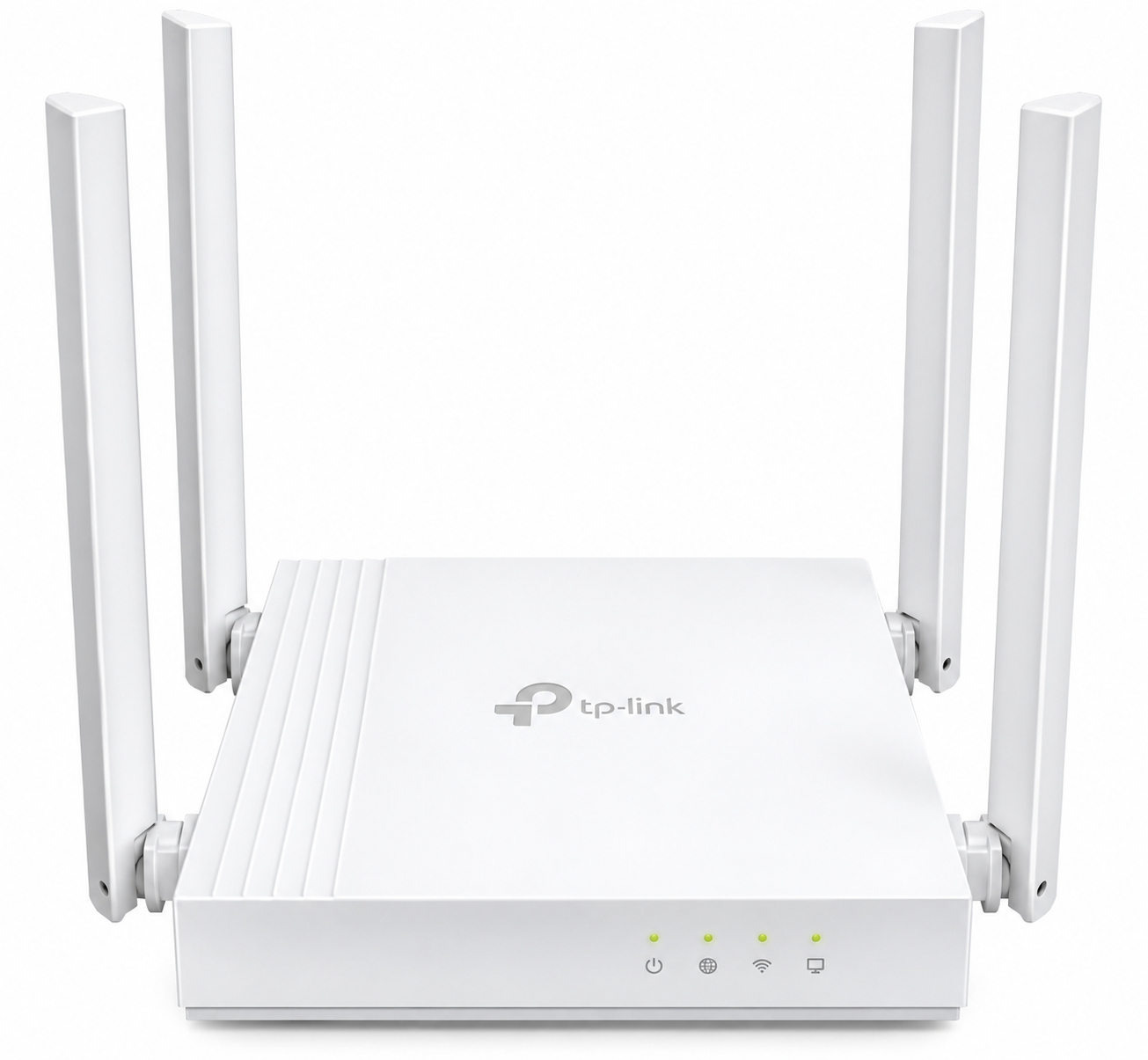
The TP-Link Archer C24 AC750 Dual Band Wi-Fi Router is a compact wireless router designed to deliver dependable internet connectivity for homes, apartments, small offices, and everyday networking applications. Featuring Wi-Fi 5 technology, dual-band wireless connectivity, and four fixed external antennas, the Archer C24 offers an affordable solution for users who need reliable Wi-Fi without investing in expensive networking equipment.
Operating on both 2.4 GHz and 5 GHz frequencies, the TP-Link Archer C24 provides wireless link rates of up to 300 Mbps on 2.4 GHz and 433 Mbps on 5 GHz. This allows compatible devices to connect using the frequency band best suited to their needs, whether browsing websites, streaming videos, attending online classes, or accessing cloud-based applications.
The router also supports Router Mode, Access Point Mode, and Range Extender Mode, making it suitable for new internet installations and improving existing wireless networks. With four Fast Ethernet LAN ports, guest network support, parental controls, and TP-Link Tether management, the Archer C24 provides practical networking features for residential and small-business environments.
Key Features of TP-Link Archer C24 AC750 Dual Band Wi-Fi Router
-
AC750 Dual-Band Wi-Fi: Delivers theoretical wireless link rates of up to 300 Mbps on 2.4 GHz and 433 Mbps on 5 GHz.
-
Wi-Fi 5 Technology: Supports IEEE 802.11ac wireless connectivity on the 5 GHz frequency band.
-
Four Fixed External Antennas: Designed to distribute wireless signals across different directions.
-
Three Operating Modes: Supports Router Mode, Access Point Mode, and Range Extender Mode.
-
Four Fast Ethernet LAN Ports: Connects computers, printers, smart TVs, and other wired networking equipment.
-
Dedicated WAN Port: Includes one 10/100 Mbps WAN port for connecting to an upstream internet source.
-
Guest Network: Provides separate wireless access for visitors.
-
Parental Controls: Includes URL filtering and internet access time controls.
-
Quality of Service: Supports device-based traffic prioritization.
-
IPv6 Compatibility: Supports IPv4 and IPv6 networking.
-
IPTV Functions: Includes IGMP Proxy, IGMP Snooping, Bridge, and Tag VLAN support.
-
Network Security: Includes SPI firewall, access control, and wireless encryption options.
-
TP-Link Tether App: Supports router configuration and management through compatible mobile devices.
-
Compact Design: Suitable for smaller indoor networking spaces.
-
Power Requirements: Operates using a 9V DC, 0.6A power supply.
AC750 Dual-Band Wireless Performance
The TP-Link Archer C24 uses two wireless frequency bands to provide flexible connectivity for compatible devices.
Its dual-band functionality allows users to connect devices to either the 2.4 GHz or 5 GHz network depending on their wireless requirements.
2.4 GHz Wireless Band – Up to 300 Mbps
The 2.4 GHz frequency is suitable for everyday browsing, email, online learning, wireless printers, and compatible smart-home devices.
Compared with 5 GHz, the 2.4 GHz band generally offers better signal propagation through obstacles, although it can experience greater interference from nearby wireless networks and other electronic equipment.
5 GHz Wireless Band – Up to 433 Mbps
The 5 GHz frequency supports higher wireless link rates and is useful for compatible laptops, smartphones, tablets, and streaming devices.
It can provide a better experience in areas where the 2.4 GHz spectrum is congested, provided the device remains within a suitable signal range.
Important: AC750 is a wireless speed classification, not a guaranteed internet download speed. The Archer C24 also uses 10/100 Mbps Ethernet ports, meaning internet traffic passing through its WAN port cannot take full advantage of broadband packages exceeding 100 Mbps.
Four External Antennas for Wireless Coverage
The TP-Link Archer C24 features four fixed external omnidirectional antennas that help distribute wireless connectivity throughout the intended coverage area.
TP-Link identifies the router as suitable for typical two-bedroom residential environments. However, actual coverage depends on the building layout, wall construction, wireless interference, connected devices, and router placement.
The Archer C24 is appropriate for smaller residential and office spaces where users need wireless access in commonly occupied areas.
For improved performance, install the router in an open location away from thick concrete barriers, large metal objects, and sources of wireless interference.
Larger buildings or properties with several floors may require additional access points or a suitable mesh Wi-Fi system.
Three Operating Modes for Flexible Installation
The TP-Link Archer C24 AC750 Dual Band Wi-Fi Router supports three operating modes, allowing users to adapt the device to different networking requirements.
Router Mode
Router Mode allows the Archer C24 to establish and manage a local network while sharing an existing internet connection.
The WAN port connects to an upstream modem, optical network terminal, or compatible Ethernet internet source.
Connected devices can then access the network through the router's wireless connections or LAN ports.
Access Point Mode
Access Point Mode converts an existing wired network connection into a wireless network.
This is useful for offices, homes, and commercial premises where a main router is already installed but additional Wi-Fi access is required.
Customers planning structured office networks or professional access point installations can explore network design and installation services from OrbitLink Solutions.
Range Extender Mode
Range Extender Mode allows the Archer C24 to repeat an existing compatible wireless network and extend its reach.
This can improve wireless reception in areas where the main router's signal is weak.
However, wireless repeating may reduce effective network throughput. A wired access point is often a better option where stable performance is especially important.
Ethernet Ports and Wired Network Connectivity
The TP-Link Archer C24 includes one WAN port and four LAN ports, all supporting 10/100 Mbps Ethernet connections.
These ports allow users to connect compatible networking devices directly without relying entirely on Wi-Fi.
| Interface | Specification |
|---|---|
| WAN Port | 1 × 10/100 Mbps |
| LAN Ports | 4 × 10/100 Mbps |
| 2.4 GHz Wireless | Up to 300 Mbps |
| 5 GHz Wireless | Up to 433 Mbps |
| Power Input | 9V DC, 0.6A |
| Reset Function | WPS/Reset Button |
The LAN ports are suitable for desktop computers, network printers, smart televisions, and other compatible Ethernet devices.
The router does not feature Gigabit Ethernet ports. Customers with internet subscriptions faster than 100 Mbps should consider a Gigabit router to avoid this limitation.
The Archer C24 also does not provide PoE output through its Ethernet ports.
Wireless Security and Network Management
The TP-Link Archer C24 includes security and management features designed for residential and small-office networking.
Wireless Encryption and Firewall
The router supports WPA2 wireless security, along with other encryption standards identified in TP-Link's documentation.
Some regional or hardware versions also advertise WPA3 support. Because security capabilities differ between published versions, customers requiring WPA3 should verify the exact hardware revision and installed firmware before purchase.
Additional networking security features include SPI firewall functionality, access control, and IP and MAC binding.
Guest Network
Guest Network functionality allows administrators to provide separate wireless access for visitors.
The router supports guest networks on the 2.4 GHz and 5 GHz bands, helping users manage visitor connectivity separately from their primary wireless network.
Parental Controls
The Archer C24 provides URL filtering and time controls for managing internet access.
These features are useful for households that want basic control over children's browsing activities and access schedules.
Quality of Service
Device-based Quality of Service allows users to prioritize selected connected devices.
This can help manage available bandwidth when several devices are sharing the same internet connection.
QoS does not increase the total internet speed provided by the internet service provider.
Easy Installation and TP-Link Tether Management
The TP-Link Archer C24 supports configuration through a web management interface and TP-Link's Tether mobile application.
The router can be configured for common internet connection types, including Dynamic IP, Static IP, and PPPoE.
During installation, users can configure their wireless network names, passwords, internet connection settings, and supported network management functions.
The Tether application provides a convenient way to access compatible router management features from a smartphone.
This makes the Archer C24 practical for users who want straightforward network setup without complicated enterprise networking equipment.
Best Uses for TP-Link Archer C24 AC750 Dual Band Wi-Fi Router
The TP-Link Archer C24 is suitable for:
-
Home Wi-Fi: Connecting smartphones, laptops, tablets, and smart televisions.
-
Apartments: Providing everyday wireless connectivity in smaller residential spaces.
-
Small Offices: Supporting basic internet access for office computers and wireless devices.
-
Online Learning: Connecting devices used for educational platforms and video classes.
-
Remote Work: Supporting email, browsing, cloud applications, and routine video meetings.
-
Guest Wi-Fi: Providing separate wireless access for visitors.
-
Secondary Access Points: Adding Wi-Fi connectivity to an existing wired network.
-
Wireless Extension: Improving reception in areas with weak Wi-Fi signals.
-
Smart-Home Networking: Connecting compatible Wi-Fi-enabled home devices within the router's capabilities.
For connected buildings and smart-home installations, users can also explore smart-home and connected infrastructure solutions from Mwanga. The Archer C24 can provide conventional Wi-Fi connectivity for compatible devices, but it is not itself a dedicated home automation controller.
TP-Link Archer C24 AC750 Technical Specifications
| Feature | Specification |
|---|---|
| Brand | TP-Link |
| Model | Archer C24 |
| Product Category | Dual-Band Wireless Router |
| Wi-Fi Standard | Wi-Fi 5 |
| Wireless Class | AC750 |
| 2.4 GHz Wireless Rate | Up to 300 Mbps |
| 5 GHz Wireless Rate | Up to 433 Mbps |
| Wireless Standards | IEEE 802.11ac/n/a, IEEE 802.11n/b/g |
| Antennas | 4 Fixed External Omnidirectional Antennas |
| WAN Ports | 1 × 10/100 Mbps |
| LAN Ports | 4 × 10/100 Mbps |
| Operating Modes | Router, Access Point, Range Extender |
| Processor | Single-Core CPU |
| Guest Network | Supported |
| Parental Controls | URL Filtering, Time Controls |
| QoS | Device-Based |
| Network Protocols | IPv4, IPv6 |
| IPTV Support | IGMP Proxy, IGMP Snooping, Bridge, Tag VLAN |
| Management | Tether App, Web Interface |
| Firewall | SPI Firewall |
| Power | 9V DC, 0.6A |
| Button | WPS/Reset |
| Dimensions | 115 × 106.7 × 24.3 mm |
Specifications are based on TP-Link's published Archer C24 product documentation. Wireless security options and certain software features may vary by regional model, hardware revision, and firmware.
Who Should Buy TP-Link Archer C24 AC750 Dual Band Wi-Fi Router?
The TP-Link Archer C24 is suitable for home users and small businesses looking for an affordable dual-band wireless router.
It is particularly useful for customers upgrading from older single-band Wi-Fi routers or adding wireless connectivity to an existing wired network.
The router is also suitable for users who need basic guest networking, parental controls, and convenient mobile management.
However, it is not the ideal choice for users who require Gigabit Ethernet connectivity, very high wireless capacity, or advanced enterprise networking features.
TP-Link Archer C24 AC750 Dual Band Wi-Fi Router Price in Kenya
The TP-Link Archer C24 AC750 Dual Band Wi-Fi Router price in Kenya varies depending on stock availability, supplier costs, exchange rates, shipment expenses, and the hardware version being offered.
Customers can check Tawa Kenya for current TP-Link router prices and availability before making a purchase.
Tawa also provides a convenient destination for customers looking for compatible Ethernet cables and other networking accessories.
Before ordering, confirm the product model, hardware revision, supplied accessories, available stock, and applicable warranty terms.
What to Check Before Buying TP-Link Archer C24
Before purchasing the Archer C24, consider the following:
-
Internet Package: Confirm that the 100 Mbps Ethernet port limitation is suitable for your internet subscription.
-
Coverage Requirements: Consider the size, layout, and construction materials of the building.
-
Wireless Devices: Ensure your devices support the router's available Wi-Fi standards and frequency bands.
-
Installation Mode: Decide whether you need Router, Access Point, or Range Extender Mode.
-
Hardware Version: Confirm the exact revision supplied, particularly when a specific firmware or security feature is required.
-
Power Adapter: Verify that the correct compatible power adapter is included.
-
Warranty: Confirm the applicable seller or manufacturer warranty before ordering.
These checks help ensure the router matches your intended installation and internet requirements.
Buy TP-Link Archer C24 AC750 Dual Band Wi-Fi Router in Kenya
The TP-Link Archer C24 AC750 Dual Band Wi-Fi Router combines dual-band Wi-Fi 5 connectivity, four external antennas, flexible operating modes, and convenient network management in one compact device. It is a practical solution for everyday home internet, small-office connectivity, guest networking, and extending existing wireless networks.
With support for Router Mode, Access Point Mode, and Range Extender Mode, the Archer C24 offers flexibility for different installation requirements. Its Fast Ethernet ports make it best suited to modest broadband packages rather than high-speed fibre connections exceeding 100 Mbps.
Buy the TP-Link Archer C24 AC750 Dual Band Wi-Fi Router in Kenya from Tawa. Check the latest price, confirm availability, and shop for compatible networking accessories to complete your home or office internet installation.