TP-Link AC1200 Wireless Access Point TL-WA1201
TP-Link AC1200 Wireless Access Point TL-WA1201 The TP-Link AC1200 Wireless Access Point TL-WA1201 is a dual-band Wi-Fi 5 access point designed to provide wireless connectivity in homes, offices, shops, schools, and small businesses. With four fixed external antennas, a Gigabit...
Delivery: Nairobi same-day to 1 day; nationwide 1–5 business days.
Warranty: Manufacturer warranty where applicable.
Description
TP-Link AC1200 Wireless Access Point TL-WA1201
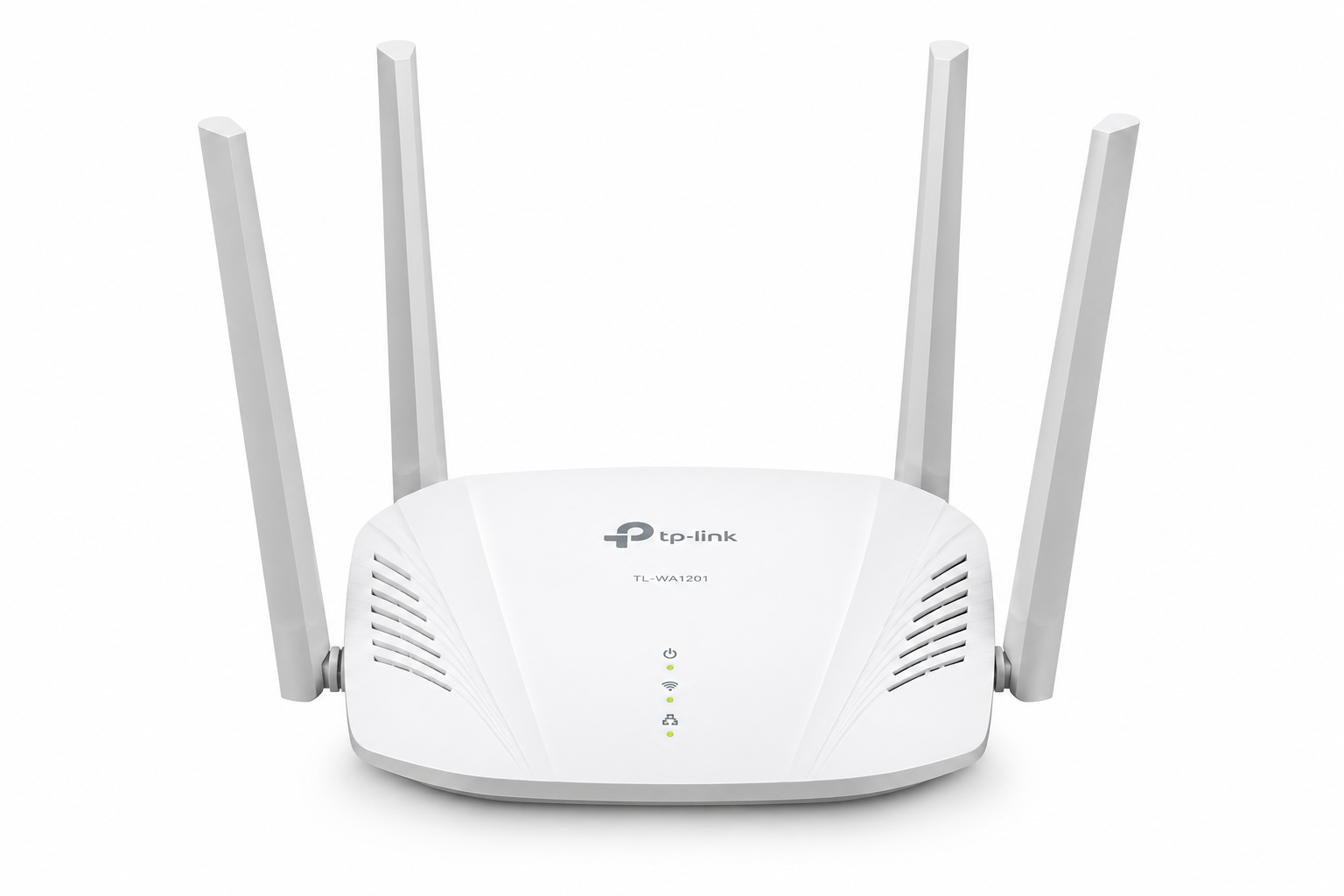
The TP-Link AC1200 Wireless Access Point TL-WA1201 is a dual-band Wi-Fi 5 access point designed to provide wireless connectivity in homes, offices, shops, schools, and small businesses. With four fixed external antennas, a Gigabit Ethernet port, MU-MIMO, and Beamforming technology, it offers a practical solution for adding Wi-Fi to an existing wired network.
The TL-WA1201 supports both 2.4 GHz and 5 GHz wireless bands, with advertised wireless link rates of up to 300 Mbps and 867 Mbps respectively on specified hardware revisions. Its dual-band design allows compatible devices to use the frequency band best suited to their connectivity requirements, while its Gigabit Ethernet port provides a wired connection to a compatible router or network switch.
With four operating modes, passive Power over Ethernet (PoE) support, and web-based configuration, the TP-Link TL-WA1201 AC1200 Wireless Access Point is suitable for customers who need flexible indoor wireless networking. It is a useful option for home users, office administrators, and network technicians looking to expand Wi-Fi access without replacing an existing internet router.
Key Features of TP-Link AC1200 Wireless Access Point TL-WA1201
-
AC1200 dual-band Wi-Fi: Supports wireless connectivity on the 2.4 GHz and 5 GHz frequency bands.
-
Up to 867 Mbps on 5 GHz: Provides high-speed wireless link rates for compatible devices.
-
2.4 GHz wireless connectivity: Supports up to 300 Mbps on specified hardware revisions; some revisions advertise up to 400 Mbps.
-
Wi-Fi 5 technology: Supports IEEE 802.11ac and compatible earlier wireless standards.
-
Gigabit Ethernet port: Includes one 10/100/1000 Mbps RJ45 port.
-
Four fixed external antennas: Help distribute wireless signals throughout the intended coverage area.
-
MU-MIMO technology: Improves wireless communication efficiency with compatible devices.
-
Beamforming technology: Helps direct wireless signals toward connected clients.
-
Four operating modes: Access Point, Range Extender, Multi-SSID, and Client.
-
Passive PoE support: Allows power and data delivery through a compatible Ethernet connection.
-
Multi-SSID functionality: Supports multiple wireless network names for different user groups.
-
Captive portal functionality: Available on supported configurations.
-
Web-based management: Allows configuration through a browser.
-
WPS button: Supports simplified connections with compatible wireless clients.
-
Indoor installation: Suitable for homes, offices, shops, and other indoor networking environments.
Specifications and supported features can vary by hardware revision and region. Confirm the exact version before ordering.
AC1200 Dual-Band Wireless Performance
The TP-Link TL-WA1201 uses two wireless frequency bands to support different connectivity requirements.
The 2.4 GHz band is useful for everyday browsing and connecting compatible wireless devices. It can also offer better signal reach than 5 GHz in some indoor environments, although actual coverage depends on walls, interference, and installation position.
The 5 GHz band supports higher advertised wireless link rates and is suitable for activities such as video streaming, online meetings, and transferring files over a local network.
| Wireless specification | Details |
|---|---|
| Wireless class | AC1200 |
| Wi-Fi generation | Wi-Fi 5 |
| Frequency bands | 2.4 GHz and 5 GHz |
| 2.4 GHz link rate | Up to 300 Mbps or 400 Mbps, depending on hardware revision |
| 5 GHz link rate | Up to 867 Mbps |
These figures represent theoretical wireless connection rates, not guaranteed internet speeds. Actual performance depends on the internet connection, interference, client devices, network configuration, and distance from the access point.
Four Wireless Operating Modes
The TP-Link TL-WA1201 supports four operating modes, providing flexibility for different network installations.
Access Point Mode
Access Point Mode converts a wired Ethernet connection into a wireless network. Connect the TL-WA1201 to an existing router or network switch to provide Wi-Fi access to compatible devices.
This mode is suitable for offices, homes, shops, and other premises with existing Ethernet cabling.
Range Extender Mode
Range Extender Mode allows the access point to receive and retransmit an existing wireless network. It can help improve connectivity in areas where the original Wi-Fi signal is weak.
Performance depends on the quality of the connection to the original router. Wireless repeating may also reduce available throughput compared with a wired access point installation.
Multi-SSID Mode
Multi-SSID Mode allows the device to broadcast multiple wireless network names. This can help organize wireless access for employees, visitors, and different groups of devices.
Supported VLAN configuration can help separate network traffic when the rest of the network is configured appropriately.
Client Mode
Client Mode allows compatible Ethernet-enabled devices to connect to an existing wireless network through the TL-WA1201.
This can be useful for certain desktop computers, media devices, and other equipment that requires an Ethernet connection but needs to access a wireless network.
MU-MIMO and Beamforming Technology
The TL-WA1201 incorporates MU-MIMO and Beamforming technologies to improve wireless communication with compatible devices.
MU-MIMO helps the access point communicate more efficiently with multiple supported clients. This can be useful in environments where several users are connected and actively accessing network resources.
Beamforming helps direct wireless signals toward connected devices rather than distributing signal energy uniformly in every direction.
Together with its four fixed external antennas, these technologies support practical wireless connectivity for homes and small businesses. They do not guarantee a particular coverage distance or signal strength, as these depend on the building layout, interference, and device placement.
Gigabit Ethernet Connectivity
The TP-Link AC1200 Wireless Access Point TL-WA1201 includes one 10/100/1000 Mbps Gigabit Ethernet port for connection to a compatible router, switch, or wired network.
The Gigabit interface provides a suitable wired uplink for wireless access point installations and avoids the 100 Mbps Ethernet limitation of older Fast Ethernet interfaces.
Common applications include:
-
Adding Wi-Fi to an existing office LAN.
-
Extending wireless connectivity to another room.
-
Connecting an access point to a Gigabit network switch.
-
Providing wireless access in a shop or small business.
-
Adding Wi-Fi to an existing wired network without replacing the main router.
The TL-WA1201 is an access point rather than a full-featured internet router. A separate router or gateway is normally required to manage internet access and core routing functions.
Passive PoE and Power Requirements
The TL-WA1201 supports passive Power over Ethernet, allowing compatible equipment to carry power and network data through an Ethernet cable.
This can simplify installation when the access point needs to be positioned away from a convenient electrical socket.
However, passive PoE is not automatically compatible with IEEE 802.3af or 802.3at PoE switches. Confirm the required voltage, compatible injector, hardware revision, and supplied accessories before connecting the device.
The exact power adapter specifications can vary by regional version. Buyers should verify the requirements for the particular unit being supplied.
Multi-SSID, VLANs, and Guest Access
The TL-WA1201 offers features that can help organize wireless connectivity in small-business environments.
Multi-SSID functionality allows multiple wireless network names to be configured for different purposes. For example, a business may use one network for employees and another for visitors.
VLAN-related functionality can help separate wireless traffic when used with compatible network equipment and appropriate configuration.
Captive portal functionality is also available on supported configurations. This can provide a customizable access page for guests connecting to a wireless network.
The device should not be treated as a complete hotspot billing platform. Businesses that require voucher management, M-Pesa payment integration, subscriber accounting, or advanced authentication may need additional equipment and dedicated software.
For professional network design, installation, and business connectivity projects, OrbitLink Solutions offers relevant networking solutions and services.
Setup and Web-Based Management
The TP-Link TL-WA1201 provides a web-based management interface for configuring supported wireless and network settings.
Depending on the operating mode, setup involves connecting the device to the existing network, supplying compatible power, accessing the management interface, and configuring the required wireless settings.
Users can set wireless network names and passwords and select the appropriate operating mode. The device also includes a WPS button for compatible wireless clients.
For installations involving multiple access points, careful channel selection, network planning, and appropriate placement can help reduce interference and improve connectivity.
TP-Link TL-WA1201 Technical Specifications
| Specification | Details |
|---|---|
| Brand | TP-Link |
| Model | TL-WA1201 |
| Product type | Wireless Access Point |
| Wireless class | AC1200 |
| Wi-Fi generation | Wi-Fi 5 |
| 2.4 GHz standards | IEEE 802.11b/g/n |
| 5 GHz standards | IEEE 802.11a/n/ac |
| Frequency bands | 2.4 GHz and 5 GHz |
| 2.4 GHz wireless rate | Up to 300 Mbps or 400 Mbps, depending on revision |
| 5 GHz wireless rate | Up to 867 Mbps |
| Ethernet ports | 1 × 10/100/1000 Mbps |
| Antennas | 4 fixed external antennas |
| MU-MIMO | Supported |
| Beamforming | Supported |
| Operating modes | Access Point, Range Extender, Multi-SSID, Client |
| Passive PoE | Supported |
| Management | Web-based interface |
| Buttons | Power, WPS, Reset |
| Installation environment | Indoor |
Confirm the hardware revision and regional specifications before purchase, particularly where power compatibility or specific wireless features are important.
Best Uses for TP-Link AC1200 Wireless Access Point TL-WA1201
The TL-WA1201 is suitable for a range of indoor wireless networking applications.
-
Homes and apartments: Add wireless access to areas with an existing wired network connection.
-
Small offices: Provide Wi-Fi connectivity for compatible laptops, phones, and workplace devices.
-
Retail shops: Support staff devices and compatible network-connected equipment.
-
Schools and training rooms: Add wireless access to selected classrooms and administrative areas.
-
Hotels and guesthouses: Provide additional indoor Wi-Fi access points as part of a suitable network design.
-
Workshops and studios: Connect compatible devices to an existing wireless or wired network.
-
Connected buildings: Provide wireless connectivity for compatible smart-home and building devices.
For broader smart-home and connected-building projects, Mwanga may be relevant where automation and connected infrastructure are part of the overall installation.
Who Should Buy the TP-Link TL-WA1201?
The TP-Link AC1200 TL-WA1201 is suitable for home users, small-business owners, office administrators, and network technicians who need a flexible dual-band access point.
It is particularly useful when an existing router already provides internet access but additional wireless connectivity is required in another area.
Customers planning large enterprise deployments, centralized management across many access points, or advanced wireless roaming should assess whether a dedicated business-grade access point system would better meet their requirements.
TP-Link AC1200 Wireless Access Point TL-WA1201 Price in Kenya
The TP-Link TL-WA1201 price in Kenya depends on current stock availability, exchange rates, shipment costs, hardware revision, and the accessories supplied.
A current selling price has not been verified for this listing. For the latest price and availability, visit Tawa Kenya.
Before ordering, confirm the hardware revision, power requirements, and whether the package includes the accessories needed for your intended installation. Customers purchasing multiple units should also confirm availability and compatibility with their existing network equipment.
What to Check Before Buying
Before purchasing the TP-Link TL-WA1201, confirm the following:
-
Hardware revision: Wireless specifications and certain features may vary.
-
Network compatibility: Check that your router or switch supports the planned installation.
-
Power requirements: Verify the correct adapter or compatible passive PoE equipment.
-
Operating mode: Choose the mode that matches your network requirements.
-
Installation location: The TL-WA1201 is intended for indoor use.
-
Network separation: Confirm whether your installation requires VLAN configuration or external hotspot management.
-
Package contents: Check which power and installation accessories are included.
Buy TP-Link AC1200 Wireless Access Point TL-WA1201 in Kenya
The TP-Link AC1200 Wireless Access Point TL-WA1201 provides dual-band Wi-Fi 5 connectivity, Gigabit Ethernet, four external antennas, and flexible operating modes for homes, offices, shops, and small businesses. Its support for MU-MIMO, Beamforming, and passive PoE makes it a practical option for a variety of indoor wireless installations.
Before placing your order, confirm the hardware revision, power requirements, package contents, and suitability for your existing network.
Buy the TP-Link TL-WA1201 in Kenya from Tawa. Check the latest price and stock availability, explore compatible networking accessories, and order the equipment you need for your home or business Wi-Fi installation.