Tp Link 300Mbps Tl Eap110 Ceiling Mount Access Point
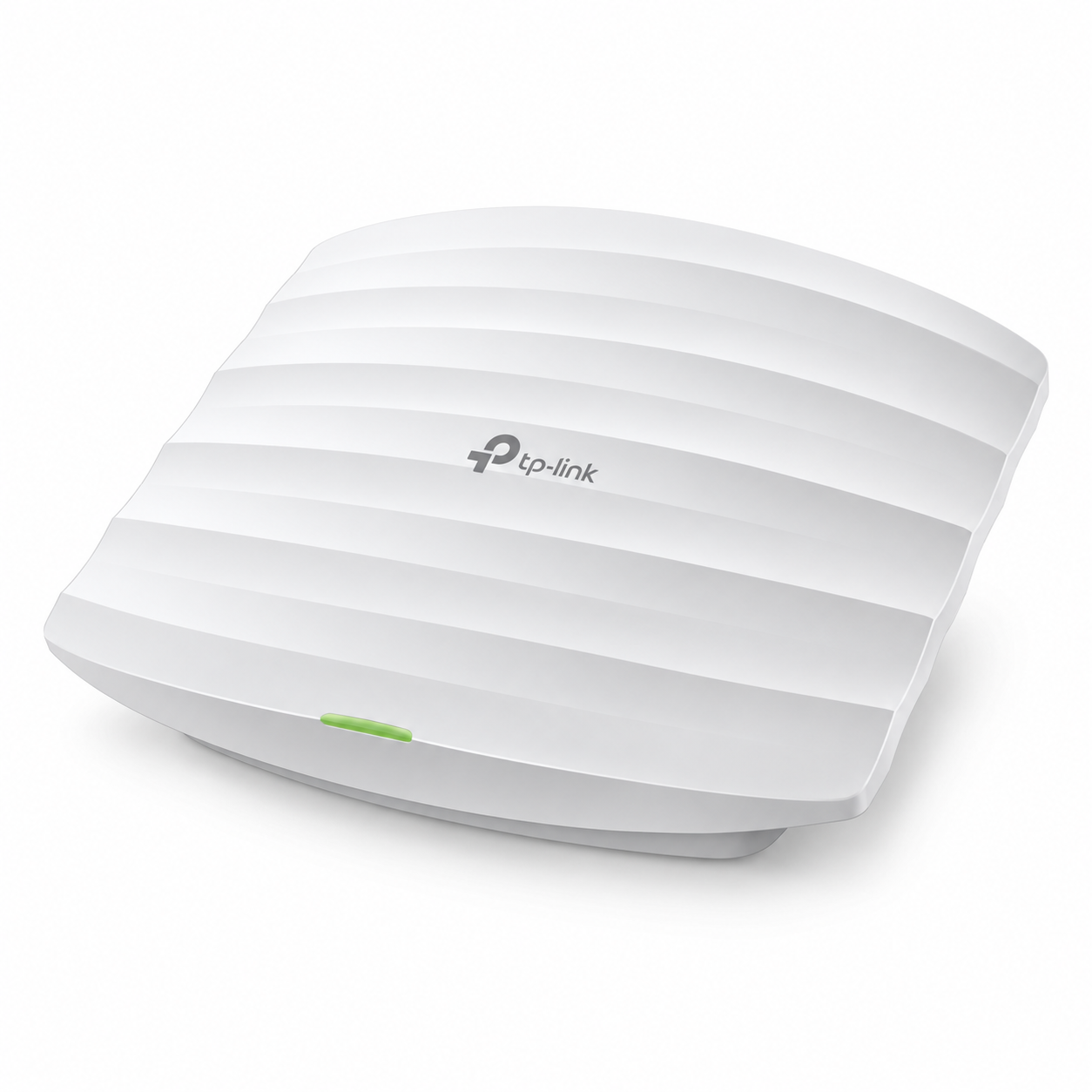
TP-Link 300Mbps TL-EAP110 Ceiling Mount Access Point The TP-Link 300Mbps TL-EAP110 Ceiling Mount Access Point is an indoor business Wi-Fi access point designed for offices, shops, hotels, schools, restaurants, clinics and other commercial environments that need centrally manageable 2.4GHz wireless...
Delivery: Nairobi same-day to 1 day; nationwide 1–5 business days.
Warranty: Manufacturer warranty where applicable.
Description
TP-Link 300Mbps TL-EAP110 Ceiling Mount Access Point
The TP-Link 300Mbps TL-EAP110 Ceiling Mount Access Point is an indoor business Wi-Fi access point designed for offices, shops, hotels, schools, restaurants, clinics and other commercial environments that need centrally manageable 2.4GHz wireless coverage. It supports IEEE 802.11b/g/n Wi-Fi with wireless link rates of up to 300Mbps and is designed for discreet ceiling or wall installation.
Unlike an ordinary home router, the TL-EAP110 is primarily designed to extend a structured wired network with managed wireless access. It supports TP-Link's Omada management platform, multiple SSIDs, captive portal authentication, VLAN-related management features and 24V passive PoE, making it useful for businesses deploying one or several access points across their premises.
The EAP110 is best suited to buyers who need an affordable 2.4GHz Wi-Fi 4 access point rather than modern dual-band Wi-Fi. It is important to understand its limitations before buying: the EAP110 does not provide 5GHz Wi-Fi, and its wired network connection is a 10/100Mbps Fast Ethernet port rather than Gigabit Ethernet.
Key Features of TP-Link 300Mbps TL-EAP110 Ceiling Mount Access Point
-
Up to 300Mbps theoretical wireless link rate
-
Operates on the 2.4GHz band
-
Supports IEEE 802.11b/g/n Wi-Fi
-
1 × 10/100Mbps Fast Ethernet RJ45 port
-
Supports 24V passive PoE
-
Designed for ceiling or wall mounting
-
Supports TP-Link Omada centralized management
-
Can operate in managed and standalone deployments
-
Supports the Omada app
-
Up to 8 SSIDs
-
Captive portal authentication
-
SSID-to-VLAN mapping
-
Wireless client isolation
-
MAC address filtering
-
Access control
-
QoS using WMM
-
Client rate limiting
-
Wireless scheduling
-
Reboot scheduling
-
Adjustable transmission power
-
Automatic channel assignment
-
Management VLAN support
-
802.1X support
-
Web-based management
-
Local and remote system logging
-
SNMP support
-
Internal omnidirectional antennas, with exact gain depending on hardware revision
-
TP-Link publishes approximately 60m² coverage for current documented versions under its test conditions
-
TP-Link publishes 100+ concurrent clients for current documented versions under its test conditions
The coverage and concurrent-client figures are manufacturer test ratings, not guaranteed real-world performance.
300Mbps 2.4GHz Wireless Performance
The TP-Link EAP110 provides a maximum advertised wireless link rate of up to 300Mbps using 802.11n on the 2.4GHz band.
This does not mean a connected phone or laptop will receive a 300Mbps internet speed. The 300Mbps figure refers to the theoretical physical wireless link rate. Actual throughput is lower and varies according to interference, client capabilities, distance, obstacles, channel conditions and overall network traffic.
There is another important limitation: the EAP110 uses a 10/100Mbps Fast Ethernet uplink. Even though the wireless radio can negotiate link rates above 100Mbps, traffic entering or leaving the AP through its Ethernet interface is constrained by that Fast Ethernet connection.
For ordinary web browsing, email, cloud applications, point-of-sale terminals, messaging and general office connectivity, this may be perfectly adequate. Businesses expecting high-speed local transfers or internet connections substantially above 100Mbps should consider an access point equipped with Gigabit Ethernet.
2.4GHz Wi-Fi Only
The TP-Link TL-EAP110 is a single-band 2.4GHz access point.
It does not support 5GHz Wi-Fi.
The 2.4GHz frequency band remains useful because practically all Wi-Fi devices support it and it generally provides better obstacle penetration than higher-frequency Wi-Fi bands. This can make the EAP110 suitable for basic indoor business connectivity.
However, 2.4GHz also tends to be more congested, particularly in offices, apartments and commercial areas surrounded by numerous wireless networks.
If your priority is higher wireless throughput, less congestion, dual-band connectivity or support for newer devices, consider a newer dual-band Omada access point instead.
Fast Ethernet Network Port
The EAP110 has one Fast Ethernet RJ45 interface.
The port operates at 10/100Mbps and is also used to supply passive PoE power to the access point.
This specification is important when comparing the EAP110 with newer access points. Many modern access points include Gigabit Ethernet, while the EAP110's uplink is limited to Fast Ethernet.
For a small office running a modest internet connection, this limitation may not matter.
For a business with high-speed fibre, heavy cloud workloads, large file transfers or clients that need high sustained wireless throughput, the wired uplink can become a bottleneck.
24V Passive PoE
The TP-Link EAP110 supports 24V passive Power over Ethernet.
This allows electrical power and network connectivity to travel over the Ethernet cabling, making ceiling installation easier. An access point can therefore be positioned according to the desired wireless coverage rather than being installed beside an electrical socket.
TP-Link's current V4 documentation specifies passive PoE using pins +4/5 and -7/8 and lists a passive PoE adapter with the documented package.
There is an important distinction for buyers:
24V passive PoE is not the same thing as IEEE 802.3af or 802.3at PoE.
Do not assume that every PoE switch will power the EAP110 correctly. Check the output voltage and PoE implementation of your existing equipment before connecting the access point.
When sourcing the device from Tawa, confirm the hardware version and included power accessories supplied with the specific stock being offered.
Ceiling and Wall Mount Installation
The physical design of the EAP110 is intended for permanent indoor installation.
It can be installed on a ceiling or wall using compatible mounting hardware, allowing businesses to avoid placing conventional routers on counters, shelves and desks.
Ceiling installation is particularly useful because it can place the wireless radio in a more central location and reduce the number of obstacles immediately surrounding the access point.
Suitable installation locations include:
-
Office ceilings
-
Reception areas
-
Hotel corridors
-
Restaurant dining areas
-
Retail stores
-
Classrooms
-
Training centres
-
Meeting rooms
-
Clinics
-
Business reception areas
-
Shared indoor spaces
Mounting position still matters. Concrete walls, reinforced slabs, metal shelving, machinery and neighbouring Wi-Fi networks can significantly change coverage.
Businesses deploying multiple access points can use professional network planning and installation services from OrbitLink Solutions where structured cabling, switching, VLAN configuration or larger commercial Wi-Fi deployment is required.
Omada Centralized Management
One of the strongest business features of the TP-Link EAP110 is support for the TP-Link Omada management ecosystem.
In a multi-access-point environment, centralized management can make administration substantially easier than configuring each access point independently.
Depending on the controller architecture being used, administrators can centrally configure and monitor compatible Omada access points, view connected clients, adjust wireless settings and maintain multiple APs from a unified management environment.
TP-Link documentation lists compatibility with Omada controller solutions and the Omada app.
For a small deployment involving only one access point, standalone management may be sufficient.
For schools, offices, hotels and businesses running several access points, centralized management provides greater operational convenience.
Up to Eight SSIDs
The EAP110 supports up to eight SSIDs.
An SSID is the wireless network name presented to users. Having several SSIDs allows administrators to create separate wireless networks for different purposes.
For example, a business might configure:
-
Staff Wi-Fi
-
Guest Wi-Fi
-
Management Wi-Fi
-
POS device Wi-Fi
The access point also supports SSID-to-VLAN mapping, allowing individual wireless networks to be associated with different VLANs when the rest of the network is configured appropriately.
This can help separate guest traffic from internal business devices.
However, creating several SSIDs alone does not automatically provide complete network isolation. The router, switches, firewall policies and VLAN configuration must also be correctly designed.
Captive Portal for Guest Access
TP-Link documents captive portal authentication as a supported feature of the EAP110.
A captive portal is the page users can encounter when attempting to access a guest wireless network before gaining internet access.
This capability is useful in environments such as:
-
Hotels
-
Cafés
-
Restaurants
-
Offices
-
Waiting areas
-
Schools
-
Customer service centres
A captive portal can form part of a managed guest Wi-Fi solution, although businesses requiring advanced hotspot billing, subscriber management or voucher systems should evaluate the entire network architecture rather than assuming the access point alone provides a complete billing system.
Wireless Security and Access Control
The EAP110 provides several wireless security and management controls documented by TP-Link.
These include:
-
Captive portal authentication
-
Access control
-
Wireless MAC filtering
-
Client isolation
-
SSID-to-VLAN mapping
-
802.1X support
-
WPA/WPA2 security options
-
Rogue AP detection
Client isolation can be useful on guest wireless networks because it can prevent connected wireless clients from communicating directly with each other when properly configured.
Rate limiting is also supported, allowing administrators to manage bandwidth consumption according to the capabilities of the controller and deployment.
These access-point features should still be combined with appropriate router, firewall and VLAN policies for a properly secured business network.
Wireless Scheduling and Network Control
TP-Link also provides several administrative features intended to make the EAP110 easier to control in a commercial environment.
Supported features include:
-
Wireless scheduling
-
Reboot scheduling
-
Wireless statistics
-
Automatic channel assignment
-
Adjustable transmit power
-
QoS using WMM
-
Rate limiting
Wireless scheduling can be useful when a business wants Wi-Fi service enabled only during particular periods.
Transmit-power adjustment can also help when several access points operate in the same building. Maximum transmission power is not automatically the best setting for every network because excessive overlapping coverage can increase interference.
Internal Antenna Design
The TP-Link EAP110 uses internal omnidirectional antennas.
This gives the unit its clean ceiling-mounted appearance because there are no large external antennas extending from the enclosure.
There is an important hardware-version consideration here.
TP-Link documentation for some V4 versions specifies two internal 4dBi omnidirectional antennas, while other regional documentation for EAP110 hardware revisions lists different antenna gain figures.
For this reason, buyers should not assume that every EAP110 sold globally has exactly the same antenna specification.
If antenna gain or a specific hardware revision matters to your project, confirm the version printed on the product or packaging before purchasing.
Coverage Expectations
TP-Link currently publishes an approximate coverage figure of 60m² or 650ft² for documented current EAP110 versions.
This should not be interpreted as a guarantee that every EAP110 will cover exactly 60m².
Actual wireless coverage depends on factors including:
-
Building materials
-
Concrete walls
-
Reinforced floors
-
Metal structures
-
AP mounting location
-
Other wireless networks
-
Channel congestion
-
Client-device antenna quality
-
Radio interference
-
Furniture and equipment
An open office may provide very different results from a building divided by thick concrete walls even when both properties have the same floor area.
For multi-room or multi-floor buildings, several access points may be required.
How Many Users Can the TP-Link EAP110 Support?
TP-Link currently publishes a figure of 100+ concurrent clients for documented EAP110 V4 versions.
This figure needs context.
It is a manufacturer test rating and does not mean 100 people can simultaneously perform high-bandwidth activities at full speed.
There is a major difference between 100 connected devices doing light background activity and 100 people simultaneously streaming video or downloading large files.
Actual usable capacity depends on factors such as:
-
Activity per user
-
Internet bandwidth
-
Wireless interference
-
Signal quality
-
Client capabilities
-
Network configuration
-
Packet overhead
-
Number of active rather than merely connected devices
The EAP110 also has a 100Mbps Ethernet uplink, which is an important practical consideration in busy installations.
For dense environments or bandwidth-intensive client populations, a newer access point with dual-band wireless and Gigabit Ethernet would usually be the more appropriate design choice.
Best Uses for TP-Link EAP110
The TP-Link 300Mbps TL-EAP110 Ceiling Mount Access Point makes the most sense where affordability and basic managed Wi-Fi are more important than maximum wireless performance.
Good applications include:
-
Small offices
-
Retail outlets
-
Restaurants
-
Cafés
-
Guest houses
-
Small hotels
-
Schools and classrooms
-
Clinics
-
Reception areas
-
Meeting rooms
-
Point-of-sale connectivity
-
Guest Wi-Fi
-
Light business internet access
It can also make sense as part of an existing Omada network where 2.4GHz coverage is specifically required and Fast Ethernet is sufficient.
Who Should Buy the TP-Link EAP110?
Buyers should consider the TP-Link EAP110 when they specifically need:
-
2.4GHz Wi-Fi
-
Up to 300Mbps 802.11n wireless link rate
-
Ceiling or wall installation
-
Omada management
-
Multiple SSIDs
-
Captive portal support
-
VLAN-related wireless management
-
Passive PoE installation
-
An affordable business access point
It is particularly suitable where connected devices primarily use web applications, email, messaging, POS systems and other moderate-bandwidth services.
The EAP110 is less suitable where the primary requirement is maximum wireless speed.
Consider a newer access point if you need:
-
5GHz Wi-Fi
-
Wi-Fi 5 or Wi-Fi 6
-
Gigabit Ethernet
-
High-speed fibre distribution over Wi-Fi
-
Heavy video traffic
-
Large file transfers
-
Modern high-density Wi-Fi
-
Higher aggregate throughput
Selecting the right access point should be based on the network requirement rather than simply buying the least expensive model.
Important Product Lifecycle Consideration
The EAP110 is an older Wi-Fi 4 product.
TP-Link's current United States product page identifies EAP110 V4 as End of Life. Product lifecycle and stock status can differ between countries and distribution channels, so this does not necessarily mean that genuine new stock is unavailable in Kenya.
It does mean buyers should pay attention to the exact hardware version and availability before placing an order.
For new network designs where long-term product lifecycle, higher speeds or newer Wi-Fi standards are priorities, it is worth comparing the EAP110 with newer TP-Link Omada access points.
For existing deployments, budget installations or applications where its specifications remain adequate, available genuine EAP110 stock can still serve its intended function.
What to Check Before Buying
Before buying the TP-Link TL-EAP110, confirm the following.
Hardware version: EAP110 revisions exist, and some detailed specifications differ between versions and regions.
2.4GHz only: The EAP110 does not offer a 5GHz wireless radio.
Fast Ethernet: The wired uplink is 10/100Mbps rather than Gigabit Ethernet.
PoE type: It uses 24V passive PoE on the documented V4 hardware. Do not automatically connect it to an incompatible PoE source.
Controller compatibility: If the unit will join an existing Omada deployment, confirm compatibility with the controller version and architecture being used.
Coverage: Do not purchase based solely on a square-metre coverage estimate. Building construction can materially affect wireless performance.
Required capacity: TP-Link's 100+ connected-client rating should not be interpreted as a guarantee of good high-bandwidth service to more than 100 simultaneously active users.
Package contents: Confirm the exact supplied accessories with the seller because stock and hardware revisions can vary.
These checks reduce the risk of purchasing an access point that does not match the intended network.
TP-Link 300Mbps TL-EAP110 Ceiling Mount Access Point Price in Kenya
The TP-Link 300Mbps TL-EAP110 Ceiling Mount Access Point price in Kenya can change according to stock availability, exchange rates, shipment costs, hardware revision and the accessories included with the supplied unit.
A fixed Kenya price should therefore not be assumed without checking current stock.
Visit Tawa to check the latest TP-Link EAP110 price in Kenya, current availability and ordering details.
When comparing prices, ensure you are comparing the same model and preferably the same hardware revision. A very low price is less useful if the supplied unit, PoE equipment or hardware version does not match your network.
Customers building a complete installation can also shop at Tawa for compatible Ethernet cabling, network switches, patch cords and other networking accessories required for deployment.
Buy TP-Link 300Mbps TL-EAP110 Ceiling Mount Access Point in Kenya
The TP-Link 300Mbps TL-EAP110 Ceiling Mount Access Point is a practical business Wi-Fi product when the requirement is straightforward: managed 2.4GHz Wireless N connectivity, ceiling or wall mounting, multiple SSIDs, Omada management and convenient 24V passive PoE installation.
Its strengths are affordability, centralized management capability and a design intended for permanent business installation. Its limitations are equally important to understand: it is 2.4GHz only, Wi-Fi 4, and uses a 10/100Mbps Fast Ethernet uplink. Buyers requiring modern high-throughput Wi-Fi should compare newer Omada models before making a decision.
Before ordering, confirm the exact hardware version, PoE requirements, supplied accessories and current stock status. To buy the TP-Link 300Mbps TL-EAP110 Ceiling Mount Access Point in Kenya, check the latest pricing and availability from Tawa, where you can also source the networking equipment and accessories required to complete your installation.