Mikrotik Rb260Gsp
MikroTik RB260GSP 5-Port Gigabit Smart PoE Switch with SFP The MikroTik RB260GSP is a compact, managed Gigabit Ethernet switch designed for small offices, home networks, CCTV installations, and professional networking environments that require reliable data connectivity and Power over Ethernet...
Delivery: Nairobi same-day to 1 day; nationwide 1–5 business days.
Warranty: Manufacturer warranty where applicable.
Description
MikroTik RB260GSP 5-Port Gigabit Smart PoE Switch with SFP
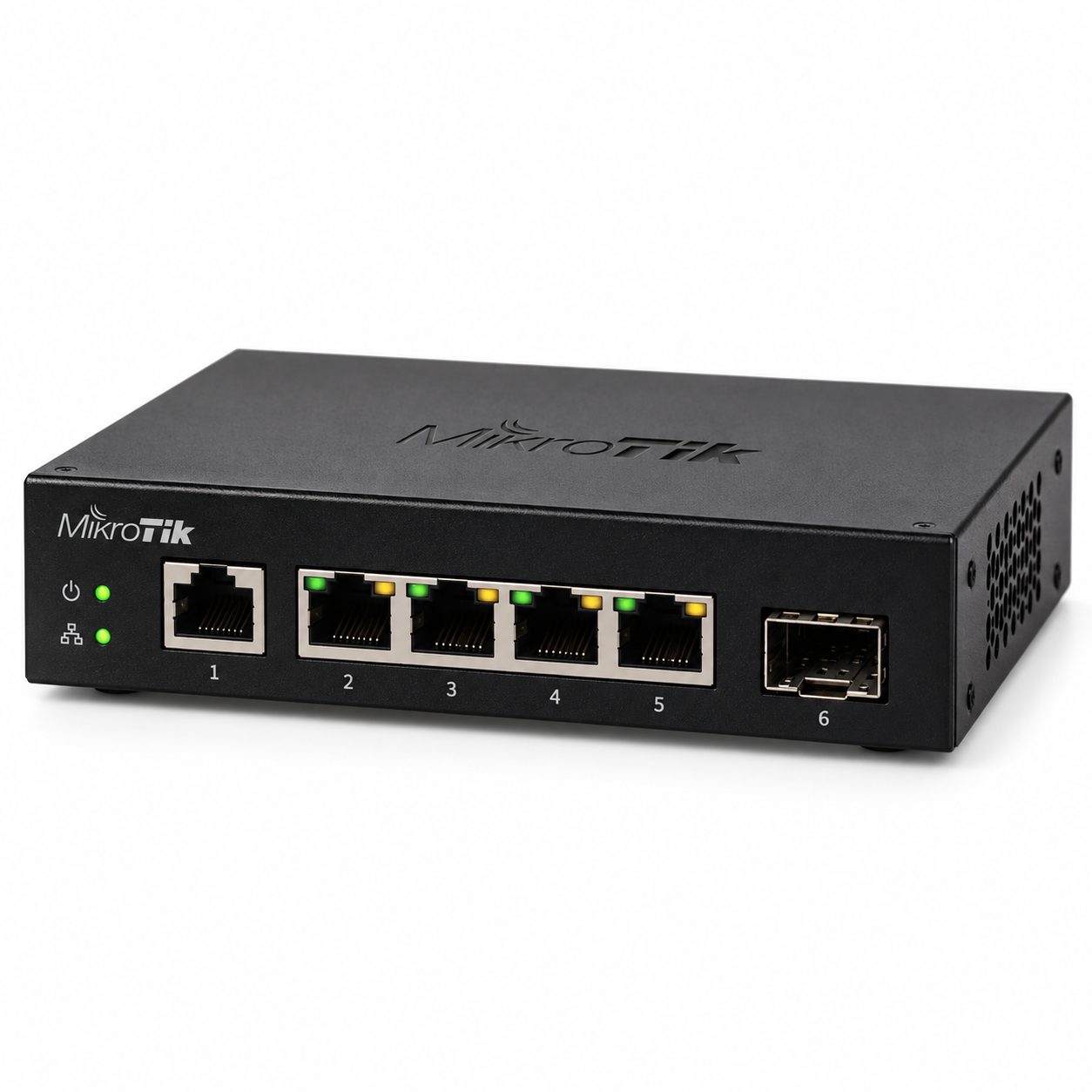
The MikroTik RB260GSP is a compact, managed Gigabit Ethernet switch designed for small offices, home networks, CCTV installations, and professional networking environments that require reliable data connectivity and Power over Ethernet (PoE). Featuring five Gigabit Ethernet ports, four passive PoE output ports, and one SFP slot, the RB260GSP provides a practical solution for connecting and powering compatible network devices.
Powered by MikroTik SwOS, the RB260GSP offers useful network management features, including VLAN configuration, port isolation, traffic monitoring, bandwidth control, and port mirroring. Its dedicated QCA8337 switch chip handles Ethernet switching, making it suitable for small networks that need Gigabit connectivity without the complexity of a full enterprise switch.
For Kenyan businesses, network installers, and IT technicians looking for a compact managed PoE switch, the MikroTik RB260GSP (CSS106-1G-4P-1S) combines Ethernet connectivity, passive PoE distribution, and fibre uplink capability in one device. It is particularly useful where compatible access points, wireless radios, and other networking equipment need both data and electrical power through Ethernet cabling.
Key Features of MikroTik RB260GSP
-
5 Gigabit Ethernet Ports: Five 10/100/1000 Mbps Ethernet interfaces for connecting wired network devices.
-
4 Passive PoE Output Ports: Ethernet ports 2–5 can supply power to compatible passive PoE devices.
-
1 SFP Slot: Provides fibre connectivity using a compatible SFP transceiver.
-
MikroTik SwOS: Dedicated switch operating system with web-based management.
-
QCA8337 Switch Chip: Dedicated switching hardware for efficient Layer 2 Ethernet traffic forwarding.
-
VLAN Support: Configure virtual LANs to separate network traffic.
-
Port Isolation: Control communication between selected Ethernet ports.
-
Bandwidth Management: Apply traffic limitations to supported switch ports.
-
Port Mirroring: Copy network traffic to a monitoring port for troubleshooting.
-
Passive PoE Input: Supports powering the switch through compatible passive PoE equipment.
-
11–30V DC Input: Supports the specified DC input voltage range.
-
Passive Cooling: Fanless design eliminates fan noise.
-
Compact Housing: Measures 113 × 139 × 28 mm.
-
Web-Based Configuration: Manage switch settings through a compatible web browser.
-
Indoor Installation: Designed for indoor networking environments.
Gigabit Ethernet Performance and Connectivity
The MikroTik RB260GSP features five Gigabit Ethernet ports designed to provide fast wired connections between compatible networking devices.
Each Ethernet port supports 10/100/1000 Mbps link speeds, allowing the switch to work with equipment operating at different Ethernet speeds.
The Gigabit interfaces are suitable for connecting devices such as:
-
Desktop computers and office workstations
-
Network-attached storage devices
-
Compatible IP cameras
-
Wireless access points
-
MikroTik routers
-
Network video recorders
-
Network printers
-
Other Ethernet switches
The RB260GSP uses the QCA8337 switch chip for Layer 2 switching. MikroTik specifies non-blocking switching performance, making the device a practical choice for small wired networks requiring dependable local traffic forwarding.
As a managed Ethernet switch, the RB260GSP is intended to expand and organize an existing network. It does not replace a router that provides internet routing, NAT, firewall policies, or DHCP services.
Four Passive PoE Output Ports
One of the main advantages of the MikroTik RB260GSP PoE Switch is its ability to distribute electrical power to compatible devices over Ethernet cabling.
Ethernet ports 2, 3, 4, and 5 support passive PoE output. This allows compatible networking equipment to receive both network connectivity and electrical power through an Ethernet connection.
This feature can reduce the need for separate PoE injectors, simplify cable management, and make small networking installations more convenient.
MikroTik RB260GSP PoE Specifications
-
PoE Output Ports: Ether2–Ether5
-
PoE Output Type: Passive PoE
-
Output Voltage: Same as the voltage supplied to the switch
-
Maximum Output Current: 1A per port
-
Maximum Combined PoE Output Current: 2A
-
Supported Input Voltage: 11–30V DC
The switch also supports passive PoE input, providing an alternative to powering it through its DC power connector.
Important PoE Compatibility Information
The RB260GSP uses passive PoE, which is different from standard IEEE 802.3af/at PoE.
Devices requiring 802.3af or 802.3at power should not be assumed compatible with its passive PoE outputs.
Before connecting a powered device, verify its supported voltage, passive PoE requirements, polarity, and power consumption.
Because the output voltage follows the voltage supplied to the switch, the connected equipment must be compatible with that voltage.
When several devices are powered simultaneously, their combined current requirements must remain within the switch's specified output limits. The total available power also depends on the input power supply.
SFP Port for Fibre Optic Connectivity
The MikroTik RB260GSP includes one SFP slot for connecting the switch to compatible fibre optic networking equipment.
The SFP interface is useful when an installation requires a fibre connection between network equipment, buildings, or distribution points.
Typical applications include:
-
Connecting a small office network to a fibre distribution switch
-
Extending wired network infrastructure using compatible fibre equipment
-
Integrating Ethernet devices into an existing fibre network
-
Creating fibre uplinks for small business networks
-
Supporting installations where copper Ethernet cabling is unsuitable for the required distance
The SFP interface supports Digital Diagnostic Monitoring Information (DDMI) when used with a compatible transceiver.
The required fibre type, optical wavelength, transmission distance, and connector depend on the selected SFP module.
An SFP transceiver is not listed among the standard included accessories and should be selected separately according to the installation requirements.
The RB260GSP has an SFP slot, not a 10Gbps SFP+ uplink.
MikroTik SwOS Network Management
The MikroTik RB260GSP runs SwOS, MikroTik's operating system designed specifically for Ethernet switches.
SwOS provides a browser-based management interface, allowing network administrators to configure and monitor supported switching functions without using RouterOS.
This makes the RB260GSP attractive for small networks that require more control than a basic unmanaged Ethernet switch.
VLAN Configuration
VLAN support allows administrators to create logical separation between different categories of network traffic.
For example, an office may use separate VLANs for employee devices, guest network equipment, and CCTV systems.
The switch supports VLAN configuration and filtering, helping administrators organize traffic according to their network design.
Port Isolation
Port isolation allows administrators to control communication between selected ports.
This can be useful in networks where connected devices should not communicate directly with one another.
Port Mirroring
Port mirroring allows network traffic from a selected port to be copied to another port for analysis.
Network technicians can use this feature when troubleshooting connectivity problems or examining Ethernet traffic with suitable monitoring software.
Bandwidth Control
SwOS supports traffic limiting features that can help administrators manage traffic entering or leaving switch ports.
This is useful when a network requires basic control over traffic distribution.
Additional Management Features
The CSS106 series also supports:
-
Rapid Spanning Tree Protocol (RSTP)
-
IGMP snooping
-
Access Control Lists (ACLs)
-
Jumbo frames up to 9198 bytes
-
Port-based traffic monitoring
-
Ethernet link statistics
-
Switch configuration backup and restoration
These features give network technicians additional control over small business networks while retaining the simplicity of a compact switch.
Power Supply and Energy Requirements
The MikroTik RB260GSP supports two alternative methods of receiving power: a DC jack and passive PoE input.
According to MikroTik's specifications, the switch accepts 11–30V DC input.
Power Specifications
| Specification | Details |
|---|---|
| DC Input Voltage | 11–30V |
| Power Input Methods | DC Jack or Passive PoE-In |
| Maximum Power Consumption Without Attachments | 5W |
| Maximum Power Consumption | 53W |
| PoE Output | Passive PoE |
| PoE Output Ports | Ether2–Ether5 |
| Maximum Total PoE Output Current | 2A |
| Cooling | Passive |
MikroTik lists a 24V 2.5A power adapter and IEC power cord among the manufacturer's included accessories.
Customers should confirm the accessories supplied with the specific retail package before ordering.
The switch uses passive cooling, meaning it does not require an internal cooling fan. This makes it suitable for offices and indoor installations where quiet operation is desirable.
MikroTik RB260GSP Technical Specifications
| Feature | Specification |
|---|---|
| Brand | MikroTik |
| Product Model | RB260GSP |
| Product Code | CSS106-1G-4P-1S |
| Device Type | Managed Gigabit Ethernet Switch |
| Ethernet Ports | 5 × 10/100/1000 Mbps |
| Passive PoE Output Ports | 4 |
| PoE Output Interfaces | Ether2–Ether5 |
| SFP Ports | 1 |
| Switch Chip | QCA8337 |
| Operating System | MikroTik SwOS |
| Flash Storage | 128 KB |
| DC Input | 11–30V |
| PoE Input | Passive PoE |
| PoE Output | Passive PoE |
| Maximum Total PoE Output Current | 2A |
| Maximum Power Consumption | 53W |
| Power Consumption Without Attachments | Up to 5W |
| Cooling | Passive |
| Dimensions | 113 × 139 × 28 mm |
| Tested Ambient Temperature | -20°C to +70°C |
| SFP DDMI | Supported |
| VLAN Support | Yes |
| Port Mirroring | Yes |
| Management Interface | Web-Based SwOS |
Best Uses for MikroTik RB260GSP
Small Office Networking
The RB260GSP is suitable for small offices that need multiple Gigabit Ethernet connections and basic managed switching features.
Businesses can connect workstations, routers, printers, and other wired devices while using VLANs to organize network traffic.
Wireless Access Point Installations
The four passive PoE output ports make the switch useful for installations involving compatible passive PoE wireless access points.
Installers can use the RB260GSP to distribute Ethernet connectivity and suitable electrical power from a centralized location.
CCTV Networking
The RB260GSP can connect IP cameras and other Ethernet-based CCTV equipment.
Its passive PoE outputs can power cameras that specifically support the switch's passive PoE voltage and power requirements.
For cameras requiring standard 802.3af/at PoE, a compatible standard PoE switch or appropriate conversion solution should be used instead.
ISP and Wireless Network Installations
Internet service providers and network technicians can use the RB260GSP in small distribution networks, wireless infrastructure installations, and compatible passive PoE deployments.
The combination of Gigabit Ethernet, basic network management, and an SFP interface provides useful flexibility for compact networking projects.
For larger installations requiring network planning, fibre integration, or professional configuration, businesses can explore networking services from OrbitLink Solutions.
Fibre-Connected Business Networks
Businesses using fibre optic infrastructure can use the SFP interface to connect the RB260GSP to compatible fibre switches or network distribution equipment.
This is especially practical when a small group of Ethernet devices needs to connect to an existing fibre network.
Who Should Buy MikroTik RB260GSP?
The MikroTik RB260GSP is a suitable choice for buyers who need an affordable, compact managed switch with passive PoE output.
It is particularly relevant for:
-
Small Businesses: Offices requiring Gigabit connectivity and basic managed switching.
-
Network Technicians: Installers working with Ethernet, VLANs, and compatible passive PoE equipment.
-
Internet Service Providers: Operators building small network distribution points.
-
CCTV Installers: Professionals connecting IP cameras and other surveillance networking devices.
-
Wireless Network Installers: Technicians deploying compatible passive PoE wireless equipment.
-
IT Administrators: Professionals who need web-managed VLANs, port monitoring, and traffic control.
The RB260GSP is best suited to buyers who understand the difference between passive PoE and standard 802.3af/at PoE.
If the installation requires 802.3af/at PoE, more Ethernet ports, 10Gbps uplinks, or advanced Layer 3 routing, another MikroTik device may be more appropriate.
MikroTik RB260GSP Price in Kenya
The MikroTik RB260GSP price in Kenya may vary depending on stock availability, exchange rates, importation costs, and the accessories supplied with the product.
For the latest selling price, customers can check Tawa Kenya for current product availability and ordering information.
Before purchasing, confirm that the product is the RB260GSP model with four passive PoE output ports, rather than the similarly named RB260GS model.
Customers planning a complete network installation can also check Tawa for compatible Ethernet cables, SFP modules, routers, and other networking accessories.
What to Check Before Buying MikroTik RB260GSP
Before ordering the MikroTik RB260GSP, verify that its ports, power output, and management features meet your installation requirements.
1. Confirm the Exact Model
The RB260GSP has four passive PoE output ports, while the RB260GS does not offer the same PoE output functionality.
Check the product code CSS106-1G-4P-1S to identify the RB260GSP version described here.
2. Verify PoE Compatibility
Ensure connected devices support passive PoE at the supplied voltage. Do not assume compatibility with 802.3af/at equipment.
3. Calculate Power Requirements
Confirm that the total current and power required by connected PoE equipment remain within the switch's limits and the power supply's capabilities.
4. Check SFP Compatibility
If fibre connectivity is required, select an SFP transceiver compatible with the switch and the optical link.
5. Confirm Package Contents
Check whether the power adapter, IEC cable, SFP module, and other necessary accessories are included in the offered package.
6. Confirm the Required Network Features
The RB260GSP is a managed Layer 2 Ethernet switch running SwOS. Customers requiring advanced routing, firewall management, or RouterOS functionality should choose an appropriate router or Layer 3-capable device.
Buy MikroTik RB260GSP in Kenya
The MikroTik RB260GSP is a practical networking solution for businesses, installers, and IT professionals requiring Gigabit Ethernet connectivity, four passive PoE output ports, and managed switching features. Its compact design, SFP interface, and SwOS management make it suitable for small office networks, compatible wireless installations, CCTV connectivity, and fibre-connected networking environments.
Whether you are expanding an existing network or building a new installation, the RB260GSP provides a convenient way to connect multiple Ethernet devices while powering compatible passive PoE equipment. Before purchasing, confirm the PoE requirements of your connected devices, the available power budget, and whether additional fibre accessories are needed.
Buy MikroTik RB260GSP in Kenya from Tawa and explore available MikroTik switches, routers, Ethernet cables, fibre networking accessories, and related equipment for your installation. Visit Tawa today to check the latest price, confirm stock availability, and order the right networking solution for your business or project.