Mercusys Me80X Ax3000 Wi Fi 6 Range Extender High Speed Wi Fi Coverage
Mercusys ME80X AX3000 Wi-Fi 6 Range Extender – High-Speed Wi-Fi Coverage The Mercusys ME80X AX3000 Wi-Fi 6 Range Extender is designed to improve Wi-Fi coverage in homes and small offices where the main wireless router cannot provide a reliable signal...
Delivery: Nairobi same-day to 1 day; nationwide 1–5 business days.
Warranty: Manufacturer warranty where applicable.
Description
Mercusys ME80X AX3000 Wi-Fi 6 Range Extender – High-Speed Wi-Fi Coverage
The Mercusys ME80X AX3000 Wi-Fi 6 Range Extender is designed to improve Wi-Fi coverage in homes and small offices where the main wireless router cannot provide a reliable signal in every room. It works by extending an existing Wi-Fi network into weak-signal areas such as bedrooms, upstairs rooms, home offices and other sections of a building that are difficult for the main router to reach.
Built around Wi-Fi 6 technology, the ME80X supports combined theoretical wireless signal rates of up to 3000 Mbps, consisting of up to 574 Mbps on 2.4 GHz and 2402 Mbps on 5 GHz. It also includes a Gigabit Ethernet port, two external antennas, Access Point mode and EasyMesh compatibility, giving buyers more flexibility than a simple entry-level wireless repeater.
The Mercusys ME80X is particularly suitable for users who already have a functional router and internet connection but need better wireless coverage. It does not replace your internet service or automatically increase the speed supplied by your ISP; its main purpose is to extend network availability into areas that currently receive weak or unreliable Wi-Fi.
Key Features of Mercusys ME80X AX3000 Wi-Fi 6 Range Extender
-
AX3000 Wi-Fi 6 range extender
-
Up to 574 Mbps on the 2.4 GHz band
-
Up to 2402 Mbps on the 5 GHz band
-
Supports IEEE 802.11ax, 802.11ac, 802.11n, 802.11a, 802.11b and 802.11g
-
Dual-band 2.4 GHz and 5 GHz operation
-
1 Gigabit Ethernet port
-
2 external antennas
-
Built-in Access Point mode
-
EasyMesh compatible
-
RESET/WPS button
-
Supports WPA, WPA2 and WPA3-PSK
-
Maximum stated power consumption of 13 W
-
Designed to extend existing Wi-Fi coverage and reduce dead zones
AX3000 Dual-Band Wi-Fi 6 Performance
The Mercusys ME80X belongs to the AX3000 Wi-Fi 6 class. According to Mercusys, it supports a maximum wireless signal rate of 574 Mbps at 2.4 GHz and 2402 Mbps at 5 GHz.
These are theoretical wireless link rates based on IEEE Wi-Fi standards rather than guaranteed internet speeds. The actual speed experienced by a user can be lower depending on the main router, internet connection, distance, walls, interference, connected devices and the capabilities of the client device.
The 2.4 GHz band is useful where greater reach through walls and across longer indoor distances is required. The 5 GHz band provides substantially more wireless capacity where signal conditions are suitable, making it useful for demanding applications such as streaming, downloads, video calls and other high-bandwidth activities.
Wi-Fi 6 for Modern Wireless Networks
The ME80X supports the IEEE 802.11ax Wi-Fi 6 standard on both supported frequency bands.
Wi-Fi 6 is designed to provide improved wireless efficiency for modern networks containing multiple connected devices. This makes the ME80X suitable for homes and small offices using smartphones, laptops, smart televisions, streaming devices and other Wi-Fi equipment.
The extender also supports earlier Wi-Fi standards. On the 5 GHz band, Mercusys lists support for 802.11a/n/ac/ax, while the 2.4 GHz band supports 802.11b/g/n/ax.
This backward compatibility means that purchasing the ME80X does not require every device in your home or office to already support Wi-Fi 6.
Extend Wi-Fi into Weak-Signal Areas
The main purpose of the Mercusys ME80X is to extend an existing router's wireless coverage.
It can be useful when Wi-Fi works properly near the router but becomes weak or inconsistent in other rooms. Common examples include an upstairs bedroom, remote home office, corridor or a room separated from the router by several walls.
Placement remains important. The extender still needs a usable connection to the main router before it can retransmit that connection effectively.
For this reason, installing the ME80X directly in an area where there is virtually no usable Wi-Fi signal may produce poor results. A better installation position is normally somewhere between the main router and the area requiring improved coverage.
Building materials can also affect wireless performance. Reinforced concrete, thick walls, metallic objects and other physical obstructions may reduce Wi-Fi range.
Two External Antennas
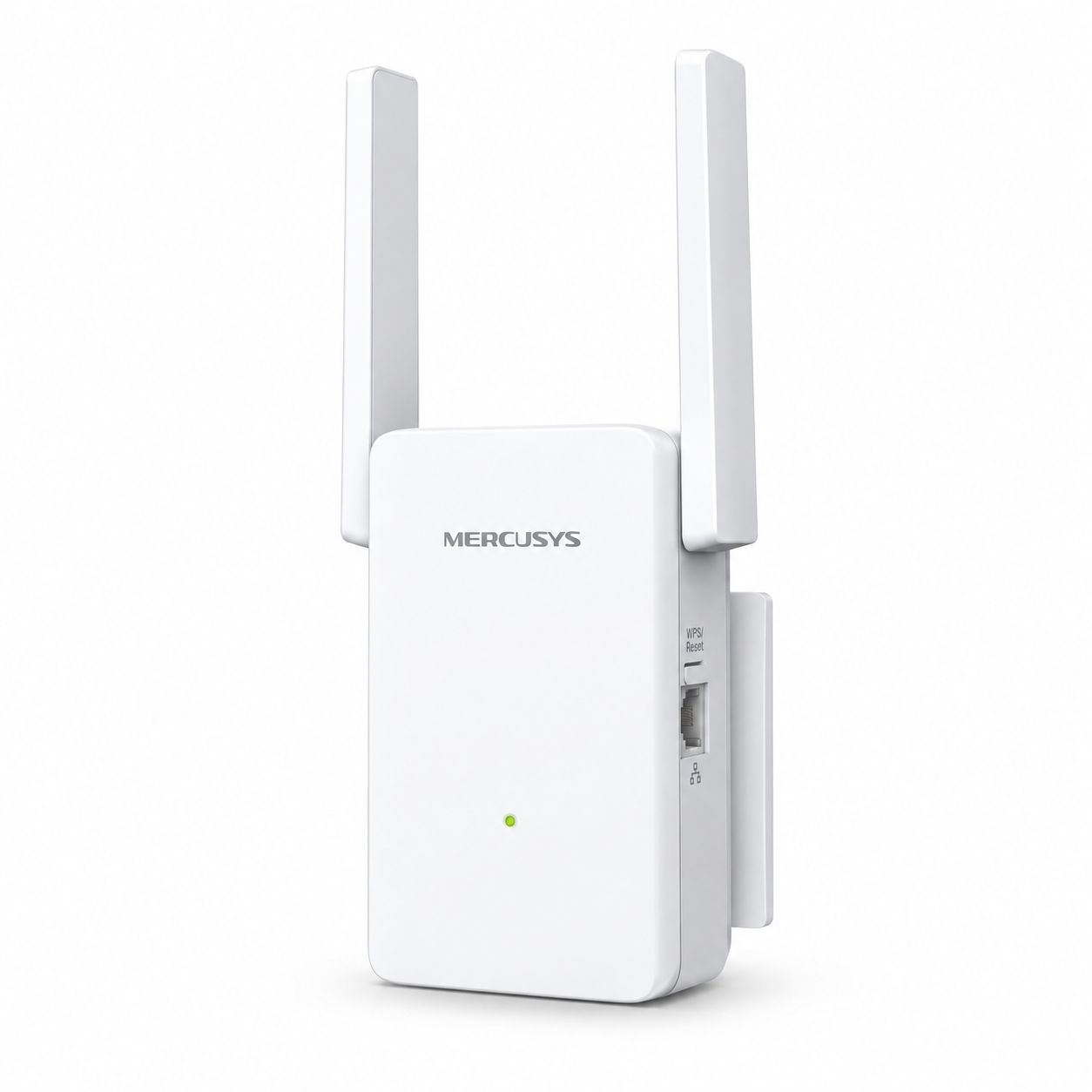
The Mercusys ME80X has two external antennas.
The antennas form part of the extender's wireless system and help it communicate with the main router and connected wireless devices.
Actual coverage cannot be expressed as one guaranteed distance because Wi-Fi performance is heavily influenced by the environment. Mercusys itself states that actual wireless coverage varies according to building materials, obstacles, client limitations, traffic levels and client location.
For this reason, it would be misleading to promise a specific number of rooms, metres or square metres without assessing the installation environment.
Gigabit Ethernet Port
The ME80X includes one Gigabit Ethernet port.
This port gives the range extender additional flexibility because a compatible wired network device can connect directly to the extender using Ethernet.
Possible applications include connecting:
-
Desktop computers
-
Smart TVs
-
Game consoles
-
IPTV equipment
-
Other Ethernet-enabled network devices
The Gigabit port is also important when the ME80X is operating in Access Point mode.
A Gigabit port does not mean that every connection through the extender will automatically operate at 1 Gbps. Actual network performance still depends on the connected equipment, wireless backhaul where applicable, cabling and internet service.
Built-In Access Point Mode
Mercusys officially specifies built-in Access Point mode for the ME80X.
Access Point mode allows the unit to create a wireless network from a wired Ethernet connection rather than relying solely on wireless repeating.
This is particularly useful where an Ethernet cable already reaches another part of a home or office. Instead of receiving the network wirelessly from the main router, the ME80X can use that wired connection and provide Wi-Fi at the destination.
Where structured Ethernet cabling is available, this arrangement can be useful for obtaining a stronger network connection at the remote location.
For larger offices, commercial premises or buildings requiring multiple professionally positioned access points, buyers can consult OrbitLink Solutions for network design and professional deployment rather than depending entirely on a consumer range extender.
EasyMesh Compatibility
The Mercusys ME80X is EasyMesh compatible.
This allows the range extender to work with compatible EasyMesh equipment to create a more unified wireless network.
However, this feature requires an important qualification. Mercusys states that although the product is compatible with standardized EasyMesh technology, failed connections may occur because of firmware conflicts between equipment from different vendors.
Mercusys also states in the official datasheet that the product has not obtained Wi-Fi EasyMesh certification.
Therefore, customers purchasing the ME80X specifically for an EasyMesh deployment should confirm compatibility with their existing router and firmware before ordering.
It is better to verify the exact combination of router, firmware and extender than to assume every EasyMesh-branded device will operate perfectly with every other model.
WPS Setup
The ME80X includes a RESET/WPS button.
WPS can simplify the initial connection process when it is being paired with a compatible router.
This provides a convenient setup option for users who do not want to manually configure every wireless setting.
For installations where WPS is not suitable or available, setup can be completed using the configuration methods supported by Mercusys for the ME80X.
Wireless Security
Mercusys lists support for:
-
WPA
-
WPA2
-
WPA3-PSK
WPA3 support is useful for modern wireless environments where compatible routers and client devices also support the newer standard.
Network security still depends on the configuration of the whole network. Buyers should use a strong Wi-Fi password, keep networking equipment updated and ensure the main router is correctly configured.
Best Uses for Mercusys ME80X AX3000
The ME80X is suitable for several practical applications.
Extending Home Wi-Fi
It can help improve wireless availability in rooms located away from the main router.
Home Offices
A home office suffering from weak Wi-Fi may benefit from a strategically positioned ME80X, especially where moving the main router is impractical.
Upstairs Rooms
In suitable building layouts, the extender can help provide better wireless connectivity on another floor.
Entertainment Areas
The combination of dual-band Wi-Fi and a Gigabit Ethernet port can be useful near televisions, streaming equipment and other entertainment devices.
Small Offices
Small businesses can use the ME80X to extend an existing wireless network into areas where the main router provides inadequate coverage.
Access Point Deployment
Where Ethernet is already installed, Access Point mode allows the ME80X to provide Wi-Fi from the wired network connection.
Compatible EasyMesh Networks
The ME80X can be considered when expanding an EasyMesh environment, provided compatibility with the existing equipment is confirmed.
For connected homes or buildings where Wi-Fi extension forms part of a wider automation project, buyers can also explore smart-home and connected-building solutions from Mwanga.
Who Should Buy the Mercusys ME80X?
The Mercusys ME80X is best suited to someone who already has an internet connection and functional wireless router but needs stronger coverage elsewhere in the property.
It is also appropriate for buyers who want a Wi-Fi 6 range extender rather than purchasing an older Wi-Fi generation.
It can be particularly useful where the goal is relatively straightforward: extend Wi-Fi into one or more weak-signal areas without replacing the main router.
However, large hotels, schools, office blocks, apartment buildings and other demanding commercial environments may require a professionally designed multi-access-point network rather than a single plug-in range extender.
Mercusys ME80X Technical Specifications
| Specification | Mercusys ME80X |
|---|---|
| Product Type | Wi-Fi Range Extender |
| Wi-Fi Classification | AX3000 |
| Wireless Technology | Wi-Fi 6 |
| 2.4 GHz Signal Rate | Up to 574 Mbps |
| 5 GHz Signal Rate | Up to 2402 Mbps |
| 5 GHz Standards | IEEE 802.11a/n/ac/ax |
| 2.4 GHz Standards | IEEE 802.11b/g/n/ax |
| Frequency Bands | 2.4 GHz and 5 GHz |
| Ethernet Port | 1 × Gigabit Ethernet |
| Antennas | 2 external antennas |
| Operating Modes | Range Extender and Access Point |
| Mesh Compatibility | EasyMesh compatible |
| Button | RESET/WPS |
| Wireless Security | WPA, WPA2, WPA3-PSK |
| Maximum Power Consumption | 13 W |
| Dimensions | 138.6 × 100.3 × 68.4 mm without plug |
| Operating Temperature | 0°C to 40°C |
| Operating Humidity | 10% to 90%, non-condensing |
What Comes with the Mercusys ME80X?
According to the official Mercusys V1 datasheet, the listed package contents are:
-
Mercusys ME80X Wi-Fi Range Extender
-
Quick Installation Guide
Do not assume that Ethernet cables, adapters or other accessories are included unless the specific seller confirms them.
Package contents can also vary by market or product revision, so buyers who require a particular accessory should confirm before ordering.
What to Check Before Buying
Before purchasing the Mercusys ME80X, first determine whether your main problem is wireless coverage or internet speed.
If the internet connection itself is slow even when standing beside the router, adding a range extender will not increase the bandwidth supplied by your ISP.
You should also check the intended installation position. The extender needs to receive a sufficiently usable signal from the existing router.
If EasyMesh is important to your network, confirm that your existing router and firmware are compatible with the ME80X.
Buyers planning to use Access Point mode should ensure that Ethernet cabling can reach the required installation point.
Where exact firmware compatibility matters, it is also sensible to confirm the hardware revision supplied before ordering.
Mercusys ME80X AX3000 Wi-Fi 6 Range Extender Price in Kenya
The Mercusys ME80X AX3000 Wi-Fi 6 Range Extender price in Kenya should be confirmed at the time of purchase.
A fixed Kenya price should not be assumed because retail pricing can change due to stock availability, exchange rates, shipment costs and supplier pricing.
Check Tawa Kenya for the latest Mercusys ME80X price and availability before placing an order.
Customers can also use Tawa to confirm the supplied hardware version and any networking accessories required for the intended installation.
Buy Mercusys ME80X AX3000 Wi-Fi 6 Range Extender in Kenya
The Mercusys ME80X AX3000 Wi-Fi 6 Range Extender is a practical solution for homes and small offices where an existing router provides satisfactory internet service but does not deliver adequate Wi-Fi coverage throughout the building.
Its verified features include AX3000 dual-band Wi-Fi 6, up to 574 Mbps on 2.4 GHz and 2402 Mbps on 5 GHz, one Gigabit Ethernet port, two external antennas, Access Point mode, WPS and EasyMesh compatibility. These features make it suitable for buyers who want a modern range extender with more flexibility than a basic wireless repeater.
Before ordering, confirm that the ME80X suits your existing router, intended installation location and required operating mode. If EasyMesh is an important part of the deployment, confirm compatibility with your specific router and firmware.
To buy the Mercusys ME80X AX3000 Wi-Fi 6 Range Extender in Kenya, visit Tawa Kenya to check the latest price, stock availability and ordering information.