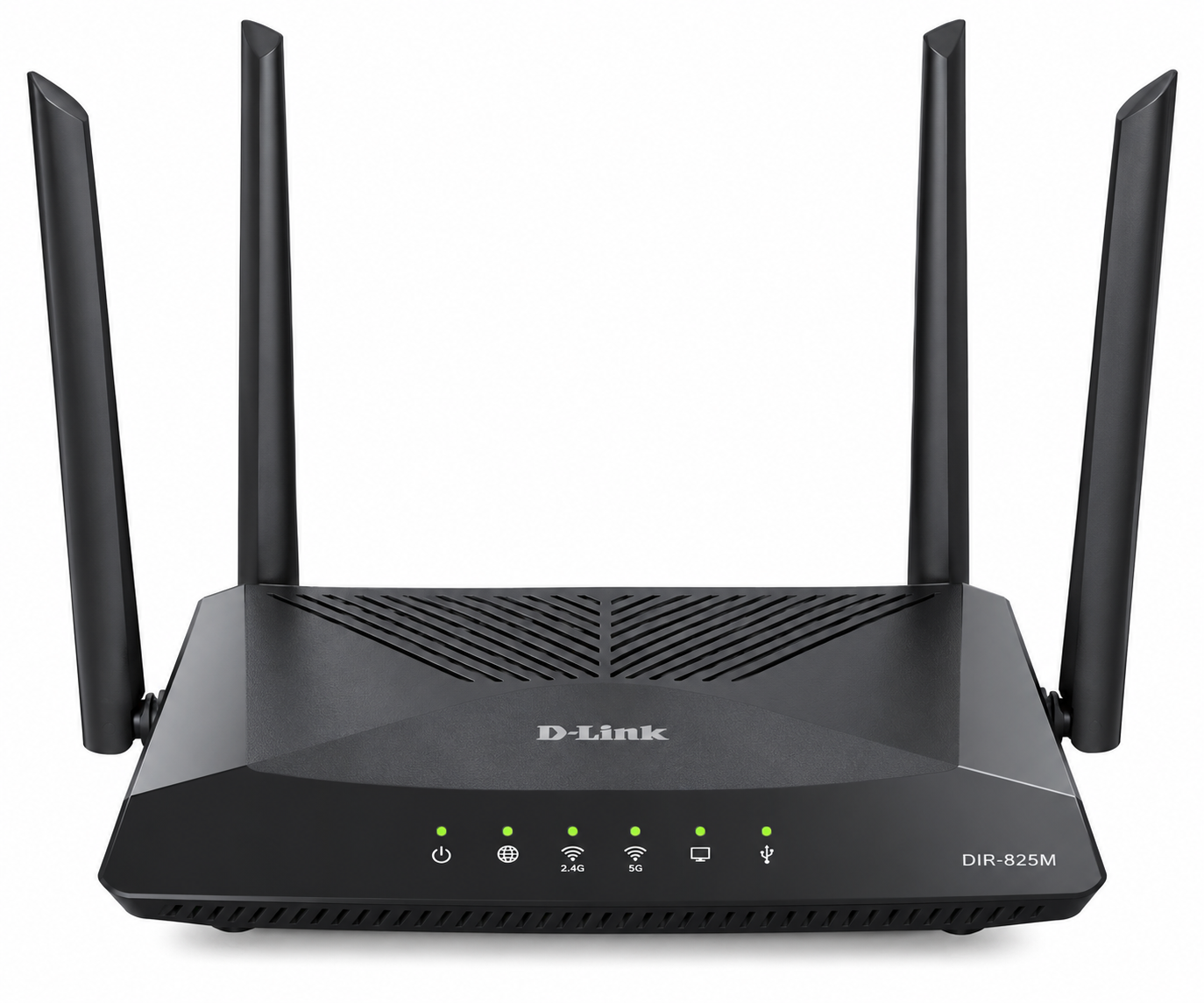
D-Link DIR-825M AC1200 Dual Band Wi-Fi Router with Parental Controls
D-Link DIR-825M AC1200 Dual Band Wi-Fi Router with Parental Controls The D-Link DIR-825M AC1200 Dual Band Wi-Fi Router is a reliable wireless networking solution designed for homes, small offices, and businesses that need fast internet connectivity, flexible network management, and...
Delivery: Nairobi same-day to 1 day; nationwide 1–5 business days.
Warranty: Manufacturer warranty where applicable.
Description
D-Link DIR-825M AC1200 Dual Band Wi-Fi Router with Parental Controls
The D-Link DIR-825M AC1200 Dual Band Wi-Fi Router is a reliable wireless networking solution designed for homes, small offices, and businesses that need fast internet connectivity, flexible network management, and improved control over connected devices. Featuring dual-band Wi-Fi, Gigabit Ethernet connectivity, and built-in security features, this router provides a practical way to manage everyday internet activities.
Operating on both 2.4GHz and 5GHz wireless frequencies, the D-Link DIR-825M supports combined theoretical wireless speeds of up to approximately 1200Mbps. This makes it suitable for internet browsing, HD streaming, video conferencing, online learning, and connecting multiple wireless devices. Its Gigabit Ethernet connectivity also supports reliable wired connections for desktop computers, smart TVs, and other networking equipment.
The router includes firewall protection, website filtering, and access control features that can support parental supervision and responsible internet usage. Whether upgrading an existing home network or establishing Wi-Fi connectivity in a small business, the D-Link DIR-825M AC1200 Wi-Fi Router with Parental Controls offers a balance of wireless performance, security, and ease of configuration.
Key Features of D-Link DIR-825M AC1200 Wi-Fi Router
-
AC1200 Dual Band Wi-Fi: Supports simultaneous 2.4GHz and 5GHz wireless connections.
-
Wireless AC Technology: Uses IEEE 802.11ac technology for fast and reliable wireless connectivity.
-
Up to 300Mbps on 2.4GHz: Suitable for everyday internet browsing, messaging, and general wireless connectivity.
-
Up to 867Mbps on 5GHz: Supports bandwidth-intensive activities such as streaming and video conferencing.
-
Gigabit Ethernet Connectivity: Includes a 10/100/1000Mbps WAN interface and Gigabit LAN connectivity.
-
Four External Antennas: Manufacturer-documented configurations feature two 2.4GHz antennas and two 5GHz antennas, each rated at 5dBi.
-
Parental Control Capabilities: Website filtering and network access controls help administrators restrict unwanted content and connections.
-
Built-in Firewall: Supports NAT, Stateful Packet Inspection, and additional network filtering functions.
-
Wireless Security: WPA/WPA2 encryption is supported, with WPA3 available on documented compatible hardware and firmware versions.
-
MU-MIMO Technology: Supported variants improve wireless communication efficiency when connecting compatible devices.
-
Multiple Operating Modes: Documented configurations support router, access point, repeater, and wireless client modes.
-
Browser-Based Management: Provides a web interface for configuring wireless networks and network security.
-
Wi-Fi Protected Setup (WPS): Allows supported devices to connect using the WPS setup function.
-
Network Traffic Management: Certain firmware versions include bandwidth management and traffic prioritization features.
Important: The DIR-825M has multiple hardware revisions. Ethernet port counts, USB availability, WPA3 support, Mesh functionality, and advanced management options vary between versions. Confirm the supplied revision before purchase.
AC1200 Dual Band Wi-Fi Performance
The D-Link DIR-825M AC1200 router uses simultaneous dual-band wireless technology to distribute connected devices across two Wi-Fi frequency bands.
2.4GHz Wireless Band
The 2.4GHz frequency supports theoretical wireless connection rates of up to 300Mbps and is useful for everyday connectivity throughout a home or small office.
This band is particularly suitable for:
-
Internet browsing and email communication.
-
Smartphones and tablets.
-
Online learning platforms.
-
General office applications.
-
Compatible smart-home devices.
The 2.4GHz band generally provides better penetration through some obstacles than 5GHz, although actual performance depends on the building layout, interference, and connected equipment.
5GHz Wireless Band
The 5GHz frequency supports theoretical wireless connection rates of up to 867Mbps and is suitable for devices requiring higher wireless throughput.
Typical applications include:
-
HD video streaming.
-
Online gaming.
-
Video conferencing.
-
Wireless file transfers.
-
Bandwidth-intensive office applications.
Using both frequency bands helps distribute wireless traffic and can reduce congestion when devices are connected appropriately.
Note: AC1200 represents the combined theoretical wireless link rates of the two frequency bands. It does not mean a single device will achieve 1200Mbps internet speed. Actual throughput depends on the internet package, signal quality, connected devices, and network conditions.
Parental Controls and Website Access Management
The D-Link DIR-825M AC1200 Wi-Fi Router with Parental Controls includes network access management capabilities that help households and administrators control how internet connections are used.
Its documented firewall and filtering functions provide tools for restricting selected websites and controlling access by connected devices.
Website Filtering
The router supports URL filtering on documented firmware versions, allowing administrators to configure restrictions for selected websites.
This functionality is useful for households that want to discourage access to inappropriate or distracting online content.
Device Access Control
MAC address filtering and other network access settings provide additional control over which devices can connect to or communicate through the network.
These features can help administrators maintain a more controlled wireless environment.
Wireless Scheduling
Compatible firmware versions support wireless scheduling, allowing Wi-Fi availability to be managed according to configured schedules.
This can be useful in homes where administrators want to establish regular internet usage periods or in offices that require scheduled wireless availability.
Parental control clarification: Website filtering, device access restrictions, and wireless scheduling are documented DIR-825M capabilities. However, dedicated parental-control dashboards, individual child profiles, application-level blocking, and detailed screen-time reports are not confirmed across all hardware revisions. Buyers requiring these features should verify the exact firmware capabilities before ordering.
Gigabit Ethernet Ports and Wired Connectivity
The D-Link DIR-825M provides Gigabit Ethernet connectivity for equipment that benefits from a direct network connection.
Documented hardware configurations include:
-
1 Gigabit WAN Port: Connects the router to a compatible modem, ONT, or existing upstream network.
-
Gigabit LAN Ports: Provide wired connectivity for desktop computers, network switches, smart TVs, and other Ethernet devices.
-
USB 2.0: Available on selected older hardware versions for supported local network sharing functions.
Some D-Link DIR-825M revisions feature four Gigabit LAN ports, while the newer C1 documentation specifies three Gigabit LAN ports.
A wired Gigabit connection can provide more consistent performance than Wi-Fi in environments where wireless interference or physical obstacles affect connectivity.
For businesses connecting several wired devices, the router can also be connected to a compatible Ethernet switch to expand the number of available network connections.
Wireless Coverage and External Antennas
The D-Link DIR-825M features four external antennas on documented hardware configurations, supporting both 2.4GHz and 5GHz wireless communication.
The antennas help transmit and receive wireless signals throughout the intended coverage area.
The router is suitable for wireless networking in:
-
Residential houses and apartments.
-
Small business offices.
-
Reception areas.
-
Home offices.
-
Small retail establishments.
-
Study rooms and shared workspaces.
Actual wireless coverage varies depending on wall materials, floor layout, nearby wireless networks, device capabilities, and router placement.
For larger buildings or locations with multiple floors, additional access points or a properly configured wireless extension solution may be necessary.
Wireless Security and Firewall Protection
Network security is an important consideration when connecting computers, smartphones, and business devices to the internet.
The D-Link DIR-825M includes a built-in firewall and several documented network security features designed to help administrators manage access and reduce exposure to unwanted connections.
Supported capabilities include:
-
NAT: Allows multiple local devices to share an internet connection.
-
Stateful Packet Inspection: Examines network connection states as part of firewall processing.
-
MAC Address Filtering: Supports access rules based on device network addresses.
-
IP Filtering: Provides controls based on IP addresses.
-
URL Filtering: Helps restrict access to configured websites.
-
Port Filtering: Allows administrators to manage selected network traffic.
-
Port Forwarding: Supports forwarding specified incoming connections to local devices.
-
DoS Protection: Provides protection functions against certain denial-of-service attacks.
Compatible revisions also support WPA3 wireless encryption, while WPA/WPA2 security is documented on other versions.
These features make the router suitable for households and small offices that need more control than a basic unmanaged wireless connection.
Firewall protection should still be complemented by secure passwords, updated firmware, and appropriate device security.
Easy Setup and Network Management
The DIR-825M includes a browser-based management interface designed to simplify initial installation and everyday network configuration.
Users can access the router's administration interface through a connected computer or compatible device and configure internet access according to their service provider's requirements.
Typical configuration tasks include:
-
Connect the incoming internet cable to the router's WAN port.
-
Connect a computer to the router using Ethernet or the default Wi-Fi network.
-
Open the router's administration interface using the access details supplied with the device.
-
Configure the WAN connection using the settings provided by the internet service provider.
-
Set the wireless network names and secure Wi-Fi passwords.
-
Configure firewall, filtering, and access control settings as required.
-
Save the configuration and test the internet connection.
The router supports common WAN configuration methods, including PPPoE, dynamic IP, and static IP.
Depending on the supplied firmware, additional operating modes may allow the device to function as a wireless access point, repeater, or wireless client.
For organisations requiring professional network deployment, OrbitLink Solutions' business networking and installation services can assist with network planning, router configuration, and suitable Wi-Fi infrastructure.
Best Uses for D-Link DIR-825M AC1200 Wi-Fi Router
The DIR-825M is designed for practical networking applications where dependable dual-band wireless connectivity and basic network management are important.
Home Internet Connectivity
Connect household smartphones, laptops, televisions, and computers to a shared internet connection while managing wireless security and access permissions.
Small Office Networking
Provide internet connectivity for office computers, staff devices, video meetings, and everyday business operations.
Family Internet Management
Use supported website filtering and access control functions to help supervise online activities and manage connections.
Retail Shops and Small Businesses
Establish wireless internet connectivity for business devices, office applications, and authorised users.
Home Offices and Remote Work
Support online meetings, cloud-based applications, file transfers, and other everyday remote-working requirements.
Connected Homes
The router can provide general Wi-Fi connectivity for compatible smart-home devices. For broader connected-building projects, Mwanga's smart-home and connected infrastructure solutions may be relevant when planning automation alongside the household network.
Who Should Buy D-Link DIR-825M AC1200 Wi-Fi Router?
The D-Link DIR-825M is suitable for customers looking for a dual-band router with Gigabit connectivity and practical access management features.
It is particularly useful for:
-
Homeowners: Who need Wi-Fi for everyday household internet activities.
-
Parents and Guardians: Who want configurable website filtering and network access restrictions.
-
Small Business Owners: Who require internet access for business applications and employee devices.
-
Remote Workers: Who need wireless and wired connectivity for home office equipment.
-
IT Technicians: Who require a configurable wireless router for suitable small-network installations.
-
Small Offices: That need simultaneous dual-band wireless access and Gigabit Ethernet connectivity.
Businesses requiring advanced VLAN management, captive portal billing, large-scale hotspot authentication, or enterprise network administration should evaluate a dedicated business-grade router or firewall instead.
D-Link DIR-825M AC1200 Wi-Fi Router Technical Specifications
| Specification | Details |
|---|---|
| Brand | D-Link |
| Model | DIR-825M |
| Product Type | Dual Band Wireless Router |
| Wireless Standard | IEEE 802.11a/b/g/n/ac |
| Wireless Class | AC1200 |
| Frequency Bands | 2.4GHz and 5GHz |
| 2.4GHz Wireless Speed | Up to 300Mbps |
| 5GHz Wireless Speed | Up to 867Mbps |
| WAN Interface | 1 × 10/100/1000Mbps Ethernet |
| LAN Interfaces | 3 or 4 Gigabit Ethernet ports, depending on revision |
| Antennas | 4 external 5dBi antennas on documented versions |
| Wireless Encryption | WPA/WPA2; WPA3 on compatible revisions |
| Firewall | NAT, SPI, and network filtering |
| Parental Access Features | URL filtering and access management |
| Connection Types | PPPoE, Static IP, Dynamic IP |
| Management | Web-based administration |
| Wireless Modes | Router, AP, Repeater, Client on supported firmware |
| Wireless Scheduling | Supported on documented C1 firmware |
| Power Input | 12V DC, 1A for documented C1 revision |
| USB | USB 2.0 on selected earlier revisions |
Specifications note: The table covers manufacturer-documented DIR-825M configurations. The exact hardware revision supplied should be checked before purchase, particularly for LAN port quantity, USB functionality, wireless security, and firmware-dependent features.
D-Link DIR-825M AC1200 Wi-Fi Router Price in Kenya
The D-Link DIR-825M AC1200 Wi-Fi Router price in Kenya depends on stock availability, hardware revision, supplier costs, and current market conditions.
The final retail price may also be affected by:
-
Foreign exchange rate fluctuations.
-
Importation and shipment costs.
-
Available product configurations.
-
Accessories included with the router.
-
Supplier availability and stock replenishment.
For the latest selling price, customers should visit Tawa Kenya to check current product availability and ordering information.
Customers purchasing routers for larger network installations can also inquire about compatible Ethernet cables, networking switches, and other accessories needed to complete their setup.
What to Check Before Buying
Before purchasing the D-Link DIR-825M, verify the following details to ensure the router meets your networking requirements.
-
Hardware Revision: Confirm whether the supplied unit is an older version or the newer C1 variant.
-
Ethernet Ports: Check the number of available Gigabit LAN ports.
-
Parental Controls: Confirm that the firmware provides the specific website restrictions, scheduling, or device access controls required.
-
Wireless Security: Verify WPA3 availability if this is an essential requirement.
-
Internet Compatibility: Confirm the router supports the connection method used by your service provider.
-
Coverage Requirements: Consider the size and construction of the building where the router will be installed.
-
Operating Modes: Check access point, repeater, Mesh, and wireless client functionality if required.
-
Power Adapter: Confirm the supplied adapter specifications and plug compatibility.
-
Accessories and Warranty: Verify package contents and applicable seller or manufacturer warranty terms before ordering.
Checking these details helps avoid compatibility issues and ensures the selected router is appropriate for the intended installation.
Buy D-Link DIR-825M AC1200 Wi-Fi Router in Kenya
The D-Link DIR-825M AC1200 Dual Band Wi-Fi Router with Parental Controls is a practical choice for customers who need reliable home or small-office networking with dual-band wireless connectivity, Gigabit Ethernet ports, and configurable network security. Its combination of wireless AC technology and network management features makes it suitable for everyday internet use, work-from-home applications, and connected household devices.
Whether you are upgrading an existing Wi-Fi router, setting up an internet connection for a small office, or looking for a wireless router with website access controls, the DIR-825M offers useful functionality in a compact networking solution. Before ordering, confirm the specific hardware revision, LAN port configuration, and supported parental control features to match your requirements.
Buy the D-Link DIR-825M AC1200 Wi-Fi Router in Kenya from Tawa and explore available networking equipment, Ethernet cables, routers, and accessories. Visit Tawa today to confirm the latest price, product availability, and ordering options for your home or business network.