Buy Tp Link Tl Wpa7517 Kit Power Extender
TP-Link TL-WPA7517 KIT Powerline Wi-Fi Extender The TP-Link TL-WPA7517 KIT Powerline Wi-Fi Extender is designed to extend internet connectivity to rooms where the main router’s Wi-Fi signal is weak or unreliable. Instead of depending entirely on wireless signal travelling through...
Delivery: Nairobi same-day to 1 day; nationwide 1–5 business days.
Warranty: Manufacturer warranty where applicable.
Description
TP-Link TL-WPA7517 KIT Powerline Wi-Fi Extender
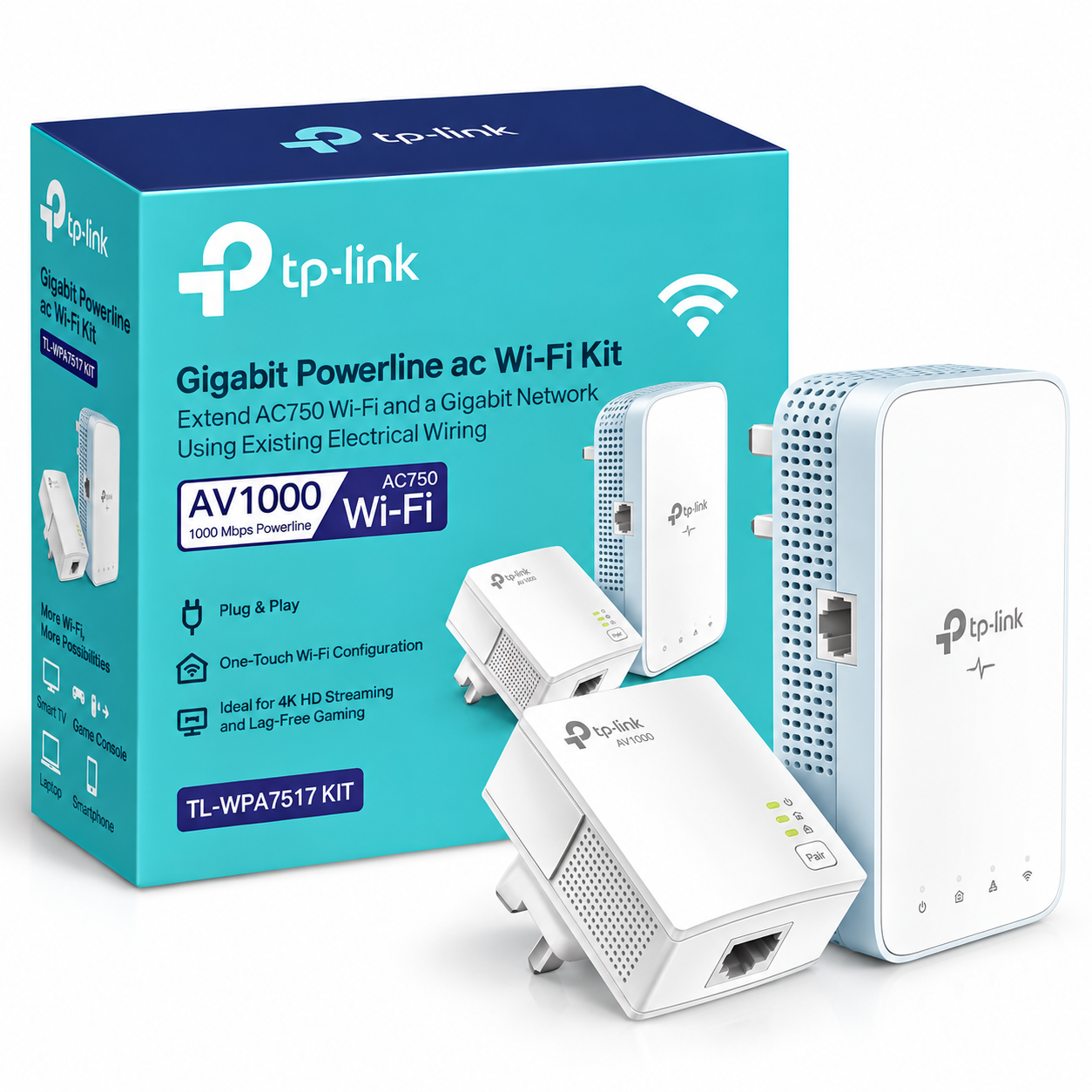
The TP-Link TL-WPA7517 KIT Powerline Wi-Fi Extender is designed to extend internet connectivity to rooms where the main router’s Wi-Fi signal is weak or unreliable. Instead of depending entirely on wireless signal travelling through walls and floors, it uses compatible electrical wiring to carry network data between two powerline adapters.
The kit combines a TL-PA7017 powerline adapter for connection near the router with a TL-WPA7517 Powerline Wi-Fi Extender for the room where additional wired and wireless connectivity is required. This makes it suitable for bedrooms, home offices, entertainment rooms and other areas where running a new Ethernet cable may be inconvenient.
Customers looking to buy TP-Link TL-WPA7517 KIT in Kenya should confirm the hardware version before ordering. TP-Link has released multiple revisions, and the verified wireless specification differs between V1 and V2.
Key Features of TP-Link TL-WPA7517 KIT
-
HomePlug AV2 powerline technology
-
Powerline transmission rate of up to 1000 Mbps
-
Powerline transmission distance rated up to 300 metres over electrical wiring
-
Dual-band Wi-Fi from the TL-WPA7517 extender
-
V1: AC750 — up to 300 Mbps on 2.4 GHz and 433 Mbps on 5 GHz
-
V2: AC1200 — up to 300 Mbps on 2.4 GHz and 867 Mbps on 5 GHz
-
One Gigabit Ethernet port on the TL-WPA7517
-
One Gigabit Ethernet port on the TL-PA7017
-
Wi-Fi Clone
-
Wi-Fi Auto-Sync
-
Pair button for powerline setup
-
Compatible with HomePlug AV and HomePlug AV2 powerline adapters
-
128-bit AES encryption for the powerline connection
-
tpPLC app and tpPLC Utility support
-
OneMesh support on V2
-
Two Ethernet cables listed in the official package contents
Extend Your Network Through Electrical Wiring
The major advantage of the TP-Link TL-WPA7517 KIT is its use of existing electrical wiring for the connection between rooms.
The TL-PA7017 is connected to your router using Ethernet and plugged into a suitable wall socket. The TL-WPA7517 is then installed in another room on the same compatible electrical circuit.
Network data can then travel between the two adapters through the electrical wiring. At the destination, the TL-WPA7517 provides both Wi-Fi and a Gigabit Ethernet connection.
This can be useful where thick walls, floors or distance make a conventional wireless extender less practical.
AV1000 HomePlug AV2 Powerline Technology
TP-Link rates the powerline side of the TL-WPA7517 KIT at up to 1000 Mbps using HomePlug AV2 technology.
It is important to understand what this number means. The 1000 Mbps specification is the maximum theoretical powerline transmission rate and is not a guarantee of 1000 Mbps internet throughput.
Actual performance can vary because powerline networking depends on conditions such as:
-
Electrical wiring quality
-
Distance between adapters
-
Electrical circuit layout
-
Interference from appliances
-
Power strips or surge protectors
-
Other electrical noise
-
Network and internet connection speeds
TP-Link specifies transmission over electrical wiring at distances of up to 300 metres under suitable conditions.
This 300-metre specification refers to the powerline connection over electrical wiring. It should not be described as 300 metres of Wi-Fi coverage.
Dual-Band Wi-Fi
The TL-WPA7517 provides simultaneous 2.4 GHz and 5 GHz wireless networking, but the advertised wireless speed depends on the hardware version.
TL-WPA7517 KIT V1
TP-Link identifies V1 as an AC750 model with:
-
2.4 GHz: up to 300 Mbps
-
5 GHz: up to 433 Mbps
TL-WPA7517 KIT V2
TP-Link identifies V2 as an AC1200 model with:
-
2.4 GHz: up to 300 Mbps
-
5 GHz: up to 867 Mbps
The newer V2 version therefore provides a higher stated 5 GHz wireless link rate.
Because both revisions use the same TL-WPA7517 KIT model family, buyers should confirm which hardware version is available before purchasing.
Tawa should also avoid describing all TL-WPA7517 KIT stock as AC1200 unless the supplied unit has been confirmed as the relevant V2 hardware version.
Gigabit Ethernet Ports
The TL-WPA7517 includes one Gigabit Ethernet port for connecting a wired device at the destination.
The TL-PA7017 adapter used near the router also includes one Gigabit Ethernet port.
The remote Ethernet connection can be useful for equipment such as:
-
Desktop computers
-
Smart TVs
-
Game consoles
-
Network media players
-
Set-top boxes
-
Network switches
-
NAS equipment
A switch can also be connected where more wired ports are required, provided the overall network design is suitable.
Wi-Fi Clone and Wi-Fi Auto-Sync
TP-Link provides Wi-Fi Clone functionality to make wireless setup easier.
Wi-Fi Clone can copy compatible wireless settings such as the Wi-Fi network name and password, helping reduce the need to create completely separate credentials for the powerline extender.
Wi-Fi Auto-Sync is designed to synchronise compatible wireless setting changes across supported TP-Link powerline devices.
Exact behaviour can depend on the hardware revision and other networking products being used, so compatibility should be checked when integrating the TL-WPA7517 KIT into an existing TP-Link network.
OneMesh Support on V2
TP-Link officially lists OneMesh support for the TL-WPA7517 KIT V2.
When used with a compatible TP-Link OneMesh router, the V2 extender can participate in a unified OneMesh network.
This feature should not automatically be advertised for V1 stock, because the official V1 product information does not list OneMesh as one of its core features.
If OneMesh functionality is an important reason for buying the device, confirm that the supplied unit is the appropriate V2 hardware version and that the router is compatible.
Simple Plug, Pair and Play Setup
The kit is designed for relatively straightforward installation.
A typical setup involves:
-
Connect the TL-PA7017 to the router using Ethernet.
-
Plug the TL-PA7017 into a wall socket.
-
Plug the TL-WPA7517 into a suitable wall socket in the destination room.
-
Pair the powerline adapters.
-
Connect devices using Wi-Fi or Ethernet.
TP-Link includes Pair controls for creating the powerline connection between compatible adapters.
Although setup is relatively simple, the electrical conditions of the building still determine whether powerline networking will perform effectively.
Powerline Security
TP-Link specifies 128-bit AES encryption for the powerline connection.
The Pair function allows compatible adapters to establish a secured powerline network.
Wireless security options vary somewhat by documentation and hardware revision, so the exact supported wireless security modes should be checked against the supplied unit’s official documentation before they are used as a purchasing requirement.
tpPLC App and Utility
TP-Link supports management of compatible powerline devices using its tpPLC app and tpPLC Utility.
Depending on the hardware version and software platform, available functions can include:
-
Viewing compatible powerline devices
-
Checking powerline connection information
-
Managing wireless settings
-
LED controls
-
Guest network configuration
-
Managing supported powerline network settings
This provides more control than simply installing the adapters with their default configuration.
Compatibility with Other Powerline Adapters
TP-Link lists the TL-WPA7517 KIT as compatible with HomePlug AV and HomePlug AV2 standard powerline adapters.
This allows compatible powerline networks to be expanded using additional supported adapters.
However, basic powerline compatibility does not mean every advanced feature will automatically work across every TP-Link model. Features such as OneMesh and Wi-Fi synchronisation can depend on the exact models and hardware versions used.
Always confirm compatibility when expanding an existing installation.
What Comes in the TP-Link TL-WPA7517 KIT?
For the V2 version, TP-Link officially lists:
-
1 × TL-WPA7517 Powerline Wi-Fi Extender
-
1 × TL-PA7017 Powerline Adapter
-
2 × Ethernet cables
-
1 × Quick Installation Guide
Package contents can vary by region or revision, so customers should confirm the contents of the specific stock offered by Tawa before ordering.
Best Uses for TP-Link TL-WPA7517 KIT
The TP-Link TL-WPA7517 KIT can be a practical choice for:
-
Extending internet access to another room
-
Home offices with weak router Wi-Fi
-
Smart TVs located far from the router
-
Gaming consoles requiring an Ethernet connection
-
Bedrooms and upstairs rooms
-
Apartments and multi-room homes
-
Small office extensions
-
Connecting wired devices without installing a long Ethernet cable
It is particularly useful where a suitable electrical circuit exists between the router location and the destination room.
Important Limitations to Understand
Powerline networking is strongly affected by the electrical installation.
TP-Link states that powerline adapters should be deployed on the same electrical circuit. Real-world performance can also be affected by wiring quality, interference and the electrical devices connected nearby.
For this reason, the TL-WPA7517 KIT should not be sold with a guaranteed real-world throughput figure.
The quoted AV1000 rating is not the same as a guaranteed 1000 Mbps internet connection, and the advertised AC750 or AC1200 wireless figures are theoretical wireless link rates rather than guaranteed internet speeds.
The product should also not be advertised with a specific Wi-Fi coverage area or maximum number of users unless TP-Link supplies a verified figure for the exact hardware version.
Who Should Buy TP-Link TL-WPA7517 KIT?
The TL-WPA7517 KIT is suitable for homeowners and small-office users who need to extend network access to another room through existing electrical wiring.
It is particularly useful for buyers who need both Wi-Fi and a Gigabit Ethernet connection in the destination room.
For larger commercial installations involving structured cabling, multiple business access points, managed switching or network design, professional network planning may be more appropriate. OrbitLink Solutions can assist with professional networking and business deployment requirements, while Tawa remains the main buying destination for the product itself.
What to Check Before Buying
Before buying the TP-Link TL-WPA7517 KIT, confirm:
-
Hardware version: V1 and V2 have different wireless specifications.
-
Wireless requirement: V1 is AC750; V2 is AC1200 according to TP-Link.
-
OneMesh requirement: OneMesh is officially listed for V2.
-
Plug type: Confirm the supplied regional plug format.
-
Electrical installation: Both adapters need a suitable electrical path between them.
-
Package contents: Confirm the adapters and accessories included.
-
Existing powerline equipment: Check compatibility before adding the kit to another powerline network.
These checks are especially important because TP-Link states that product and hardware-version availability can differ between regions.
TP-Link TL-WPA7517 KIT Price in Kenya
The TP-Link TL-WPA7517 KIT price in Kenya can change depending on stock availability, exchange rates, shipment costs, hardware version and the exact package being supplied.
There is no verified Kenya retail price in the manufacturer specifications, so a price should not be invented or presented as an official TP-Link figure.
Check Tawa for the latest TP-Link TL-WPA7517 KIT price in Kenya, current availability and confirmation of whether the unit being sold is V1, V2 or another regional hardware revision.
Tawa can also be used to shop for compatible Ethernet cables, routers, switches and other networking accessories required for the installation.
Buy TP-Link TL-WPA7517 KIT in Kenya
The TP-Link TL-WPA7517 KIT Powerline Wi-Fi Extender provides a convenient way to bring network connectivity into another room using existing electrical wiring. It combines AV1000 HomePlug AV2 powerline technology, dual-band Wi-Fi and Gigabit Ethernet connectivity in a kit intended for homes and smaller networks.
The most important detail to confirm before ordering is the hardware version. V1 is officially specified as AC750 with 300 Mbps on 2.4 GHz and 433 Mbps on 5 GHz, while V2 is marketed as AC1200 with 300 Mbps on 2.4 GHz and 867 Mbps on 5 GHz and includes OneMesh support. Actual throughput will depend on your electrical wiring, network conditions and connected equipment.
Buy the TP-Link TL-WPA7517 KIT in Kenya from Tawa and confirm the current price, stock availability, hardware version, plug type and package contents before ordering.